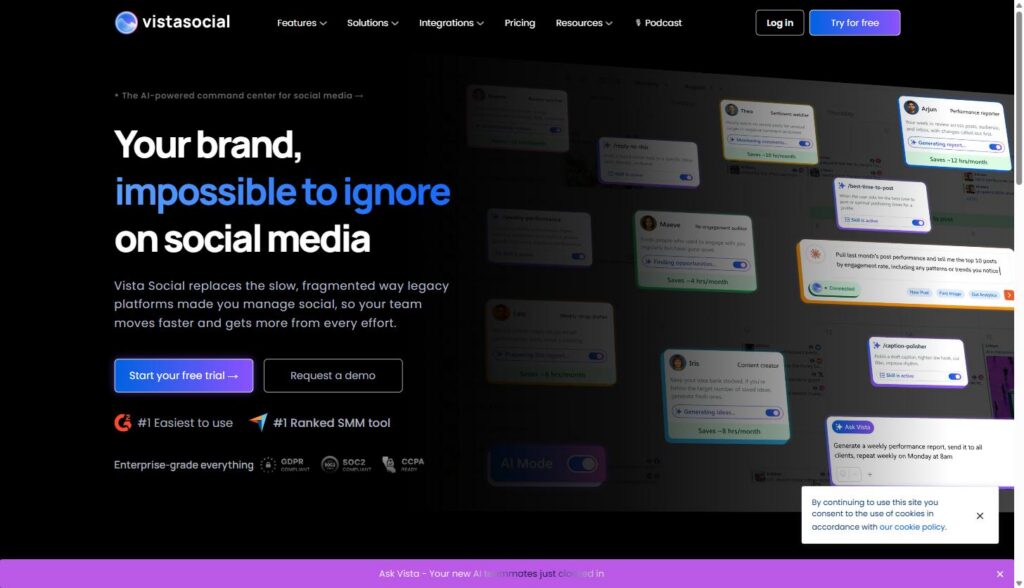
Vista Social is an all-in-one social media management platform for scheduling, analytics, listening, review management, and client reporting across Instagram, Facebook, X, TikTok, LinkedIn, Pinterest, Threads, Reddit, Snapchat, YouTube, and Google Business. It is aimed less at solo creators and more at marketing teams and agencies juggling multiple brands or client accounts who need one dashboard instead of ten browser tabs.
If you run social for more than one brand, you already know the real problem is not content ideas. It is the plumbing: logging into six different platforms, rebuilding the same report every Friday, chasing approvals over Slack, and hoping nobody forgets the client’s Tuesday campaign because it is buried in three different calendars. This guide is a review and a test plan. It explains what the platform does, then gives you a five-check way to test it in the 14-day free trial with scripts you can run, a scorecard you can download, and a worked example for picking a plan. Skill level: comfortable with a spreadsheet. Time: about two weeks of light use.
Disclosure: MV3 Marketing participates in affiliate and partner programs, including one with Vista Social. This post contains affiliate links, and if you sign up through one of them, MV3 may earn a commission at no additional cost to you. We only write about tools our team has actually researched and would consider recommending to a client. Everything below is based on Vista Social’s own public pages, read on 11 October 2026. We have not logged into a client account for this post, so we describe features as the vendor documents them and give you a way to verify them yourself.
What is Vista Social, and what do you need before testing it?
Vista Social describes itself as an “AI-powered command center for social media”. Structurally it is a social media management platform with a publishing engine, an analytics module, an engagement inbox, a listening module, review management, and an AI assistant called Ask Vista. Its homepage lists #1 easiest to use and #1 ranked SMM tool badges and G2 and Capterra review links; treat those as vendor claims and check the review sites yourself.
The publishing engine covers Instagram, Facebook, X, Pinterest, TikTok, LinkedIn, Reddit, Snapchat, Threads, Tumblr, and YouTube from one dashboard. Before you test, gather the items below.
| Item | What you need | Why |
|---|---|---|
| Roster | A list of clients with the number of social profiles for each | Plan limits are counted in profiles and users |
| Access | Admin access to two real client profiles for the trial | You need real accounts to test connection and approvals |
| Tools | A spreadsheet, Python 3, and Google Analytics access | For the bulk CSV check and for confirming UTM links |
| Time | About two weeks, a few hours in total | The trial is 14 days with no credit card, per the pricing page |
To start the trial and connect a couple of client profiles, you can start a free 14-day trial of Vista Social here.
What does each feature area cover?
| Area | What the vendor page says it covers | What to test |
|---|---|---|
| Publishing | Scheduling to 11 networks, drafts, approval, permissions, notifications, queues, media library, bulk upload | Bulk CSV, approval flow, calendar across clients |
| Analytics | Profile performance, sentiment, review, post performance, team performance, competitor reports; custom, white label, PDF export, scheduled delivery | One exported client report |
| Engagement | Smart inbox, conversation view, task assignment, tagging, internal notes, DM automations | Reply speed across profiles |
| Listening | Topic monitoring across social, news, reviews and the open web; Convergence Score of 0 to 100; real-time alerts | Two topics for a real client |
| Review management | Reviews from Facebook, Google Business, Yelp, TripAdvisor, OpenTable and TrustPilot in one stream | Alerts and replies for a location-based client |
| Ask Vista (AI) | Chat to schedule, publish, report and engage; agents; skills | A first-draft task, reviewed by a person |
Check 1: Can you connect profiles and keep them organized?
The first check is plumbing. Connect two real client profiles and confirm that you can group them per client, set who can publish and who can only draft, and avoid shared logins. The publishing page lists permission controls, labels, and organization of media by client, brand, or project. The client profile connect feature, which the pricing page lists from the Scale plan up, is meant to let a client authorize access to their own accounts without handing over a login.
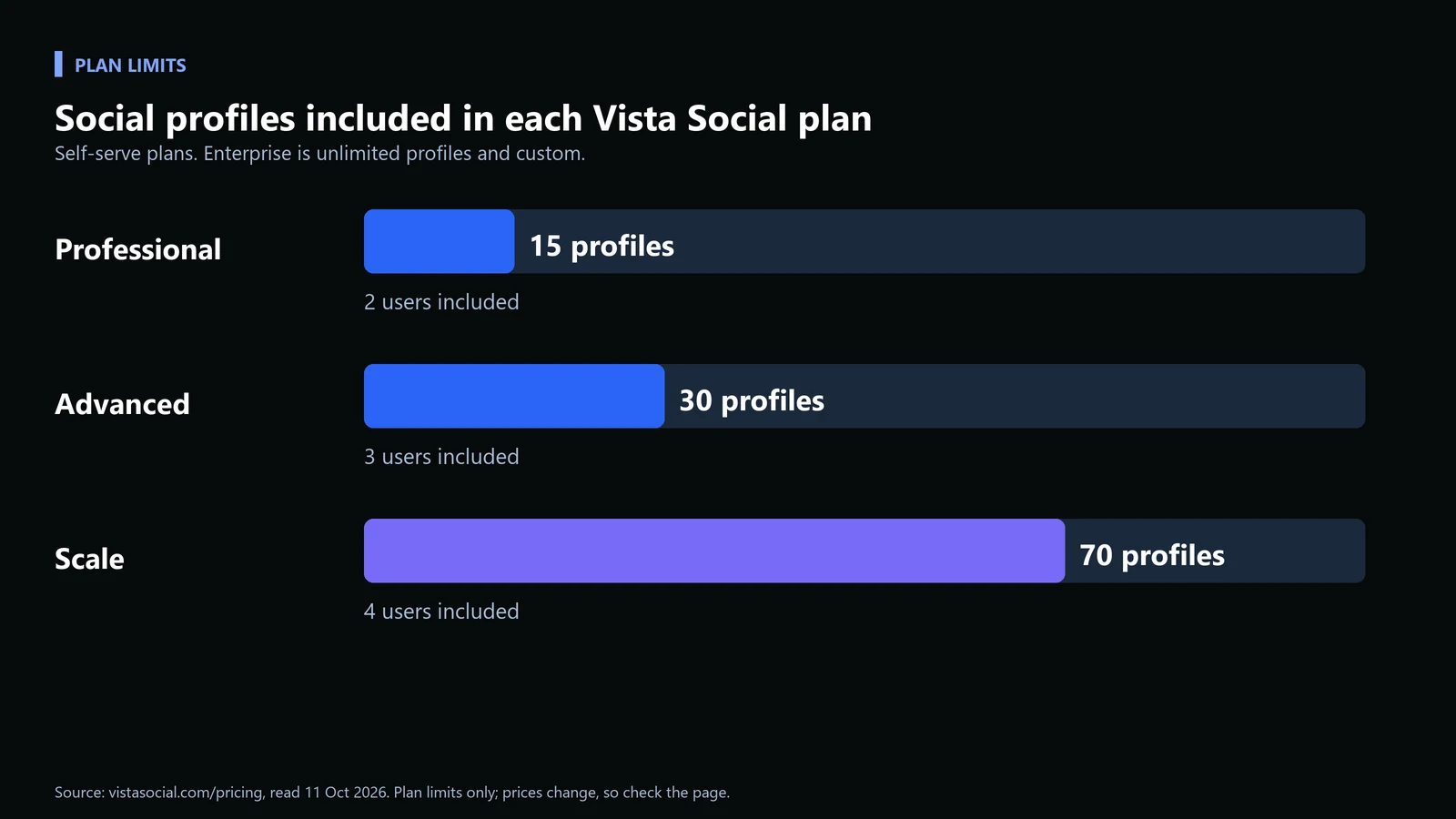
The plan you test on sets a ceiling. These are the profile and user limits shown on the pricing page.
Worked example: picking a plan for an illustrative 9-client agency
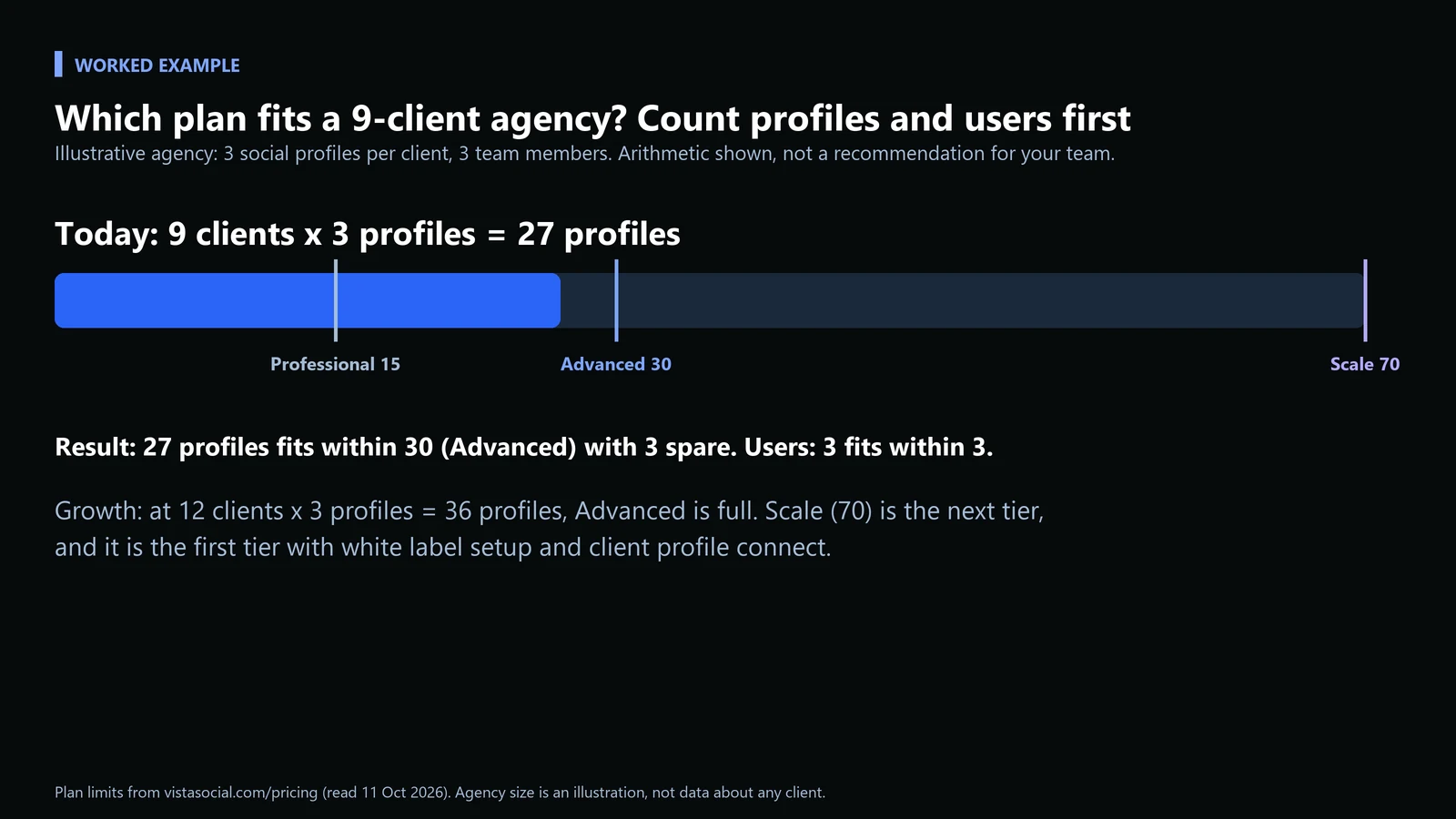
| Step | Calculation | Result |
|---|---|---|
| Count profiles today | 9 clients x 3 profiles | 27 profiles |
| Compare to limits | 27 against 15, 30, 70 | Over Professional (15), within Advanced (30) |
| Check users | 3 team members against 3 users on Advanced | Fits exactly, no room to add a fourth |
| Test growth | 12 clients x 3 profiles | 36 profiles, over Advanced, so Scale (70) |
| Check agency features | White label setup and client profile connect | Listed from Scale up on the pricing page |
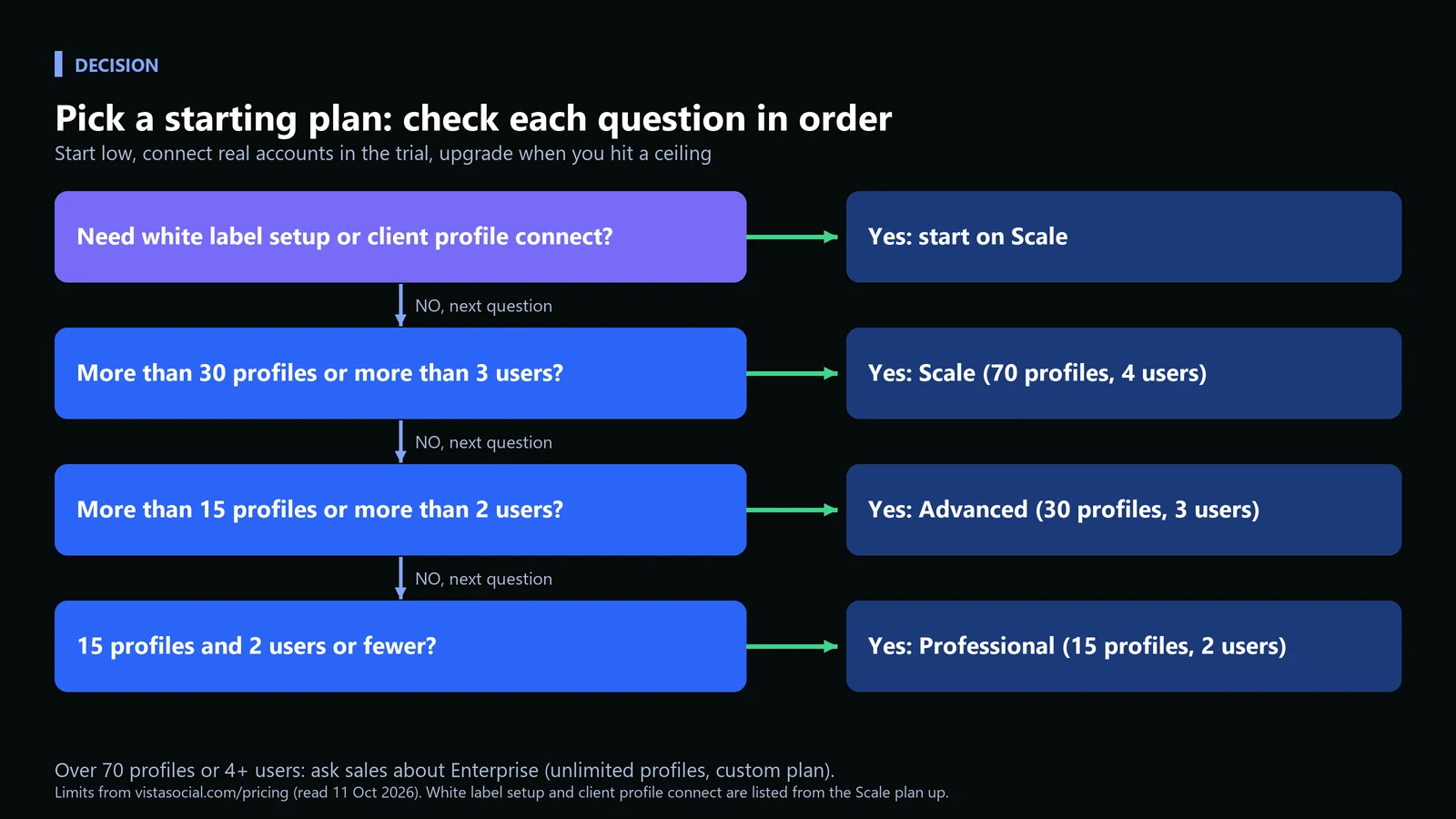
Common mistake: choosing a tier for the roster you hope to have. Count what you have, and let the trial tell you when you outgrow it.
Check 2: Does bulk scheduling work, and are links tagged?
Agencies live in bulk. Vista Social supports bulk scheduling from a CSV spreadsheet or an RSS feed, and its documentation sets out the CSV rules. The columns must be in this order, according to its bulk scheduling guide.
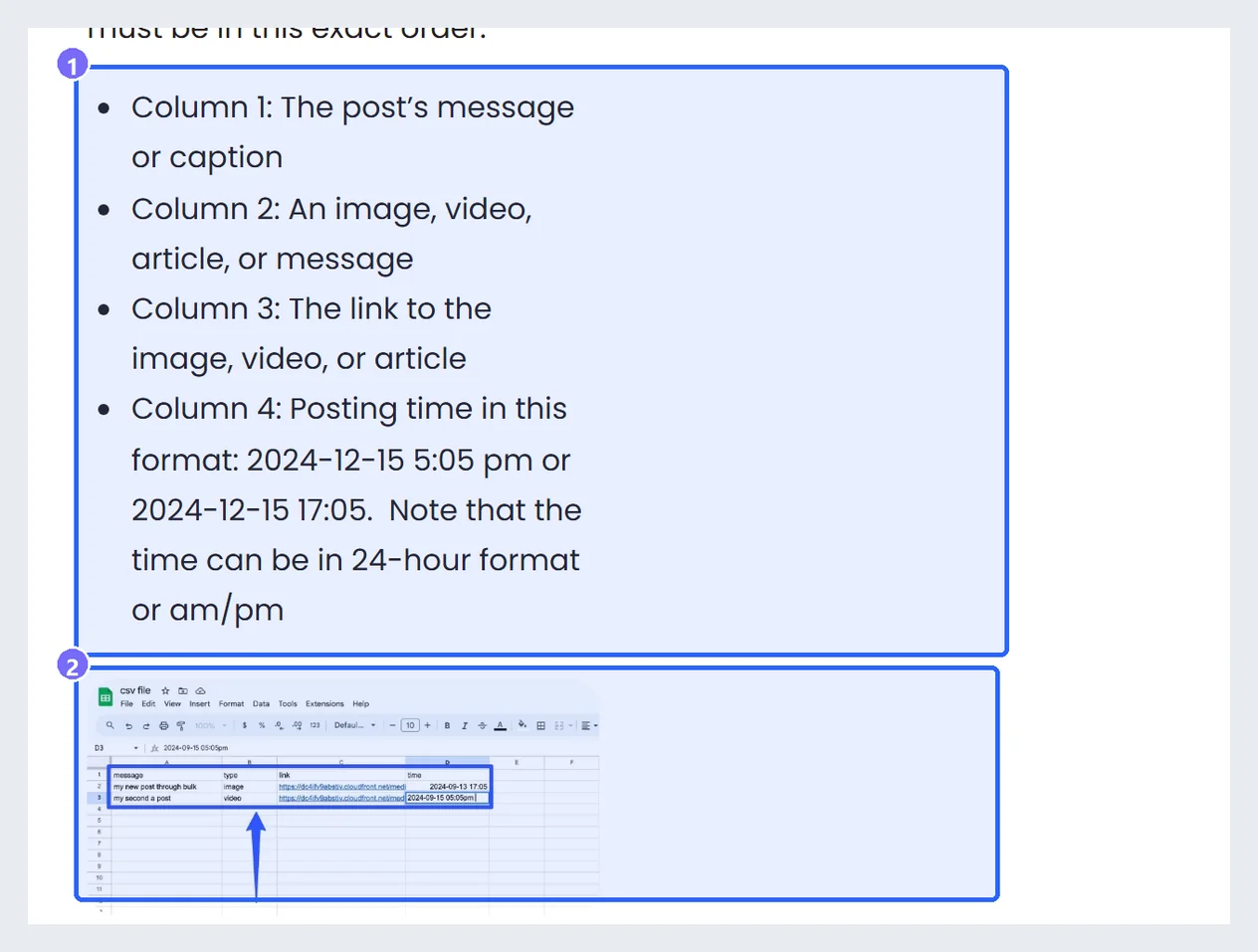
The guide also notes that media links must be publicly hosted, Google Drive links are not supported, Excel CSVs do not support emojis (use Google Sheets), and imports are limited to 200 rows, with up to 100 posts recommended. Rather than discover these at upload time, check the file first. The script below enforces those documented rules, and exits with code 1 when something will fail.
bulk_csv_check.py (run as python bulk_csv_check.py posts.csv)
import csv, re, sys
from datetime import datetime

MAX_ROWS = 200        # Vista Social documents a 200-row limit per CSV import
SOFT_ROWS = 100       # and recommends staying at or under 100 posts
TIME_FORMATS = ["%Y-%m-%d %I:%M %p", "%Y-%m-%d %H:%M"]   # e.g. 2024-12-15 5:05 pm or 2024-12-15 17:05

def parse_time(s):
    for f in TIME_FORMATS:
        try:
            return datetime.strptime(s.strip(), f)
        except ValueError:
            pass
    return None

rows = list(csv.reader(open(sys.argv[1], newline="", encoding="utf-8")))
header, data = rows[0], rows[1:]
problems = []

if len(data) > MAX_ROWS:
    problems.append(f"{len(data)} rows is over the {MAX_ROWS}-row import limit")
elif len(data) > SOFT_ROWS:
    problems.append(f"warning: {len(data)} rows is over the recommended {SOFT_ROWS}")

for n, r in enumerate(data, start=2):
    if len(r) < 4:
        problems.append(f"row {n}: expected 4 columns, found {len(r)}"); continue
    caption, kind, link, when = [c.strip() for c in r[:4]]
    if not caption:
        problems.append(f"row {n}: empty caption")
    if link and not re.match(r"https?://", link):
        problems.append(f"row {n}: link is not a public http(s) URL")
    if "drive.google.com" in link:
        problems.append(f"row {n}: Google Drive links are not supported, upload to the media library instead")
    if parse_time(when) is None:
        problems.append(f"row {n}: time '{when}' is not in a documented format")

print(f"rows checked: {len(data)}")
print("OK" if not problems else "PROBLEMS:")
for p in problems:
    print(" -", p)
sys.exit(1 if any(not p.startswith("warning") for p in problems) else 0)
Here is a good file and a bad one, illustrative, with the output for each.
posts_good.csv
message,type,link,time
Client A: Tuesday launch post,image,https://cdn.example.com/a-launch.jpg,2026-10-13 09:00
Client B: how-to article,article,https://blog.example.com/how-to,2026-10-13 5:05 pm
Client C: product video,video,https://cdn.example.com/c-demo.mp4,2026-10-14 17:05
posts_bad.csv (empty caption, Google Drive link, wrong time format)
message,type,link,time
Client A: Tuesday launch post,image,https://cdn.example.com/a-launch.jpg,2026-10-13 09:00
,article,https://blog.example.com/how-to,2026-10-13 5:05 pm
Client C: product video,video,https://drive.google.com/file/d/abc,13/10/2026 5pm
Output on the good file, then on the bad file:
rows checked: 3
OK

rows checked: 3
PROBLEMS:
 - row 3: empty caption
 - row 4: Google Drive links are not supported, upload to the media library instead
 - row 4: time '13/10/2026 5pm' is not in a documented format
Next, tag the links. Vista Social’s support article says to go to Settings, then Publishing Settings, click Add URL under URL Tracking, enter the URL, and define default parameters; those parameters are then attached automatically when you add the URL in the publisher. UTM parameters work with Google Analytics, so you can see traffic by network and campaign. The script below builds the same kind of tagged link by hand, which is useful for checking what the tool produced.
utm_link.py
from urllib.parse import urlencode, urlparse, parse_qsl, urlunparse

def tag(url, source, medium, campaign, content=None):
    p = urlparse(url)
    q = dict(parse_qsl(p.query))
    q.update({"utm_source": source, "utm_medium": medium, "utm_campaign": campaign})
    if content:
        q["utm_content"] = content
    return urlunparse(p._replace(query=urlencode(q)))

print(tag("https://example.com/pricing", "linkedin", "organic_social", "client-a-oct-launch"))
print(tag("https://example.com/blog?ref=nl", "instagram", "organic_social", "client-a-oct-launch", "carousel_1"))
Output:
https://example.com/pricing?utm_source=linkedin&utm_medium=organic_social&utm_campaign=client-a-oct-launch
https://example.com/blog?ref=nl&utm_source=instagram&utm_medium=organic_social&utm_campaign=client-a-oct-launch&utm_content=carousel_1
Expected result: the link published to the profile carries utm_source, utm_medium and utm_campaign. Common mistake: tagging only some clients. Add one rule per client domain, and confirm one live link in Google Analytics during the trial.
Check 3: Does approval work for client sign-off?
For agencies the bottleneck is rarely writing posts. It is getting sign-off without forty emails. The publishing page lists draft posts with team feedback, approval assignment, permissions that control who can publish versus draft, and notifications on phone or desktop. Run one real post from draft to approval with a client contact.
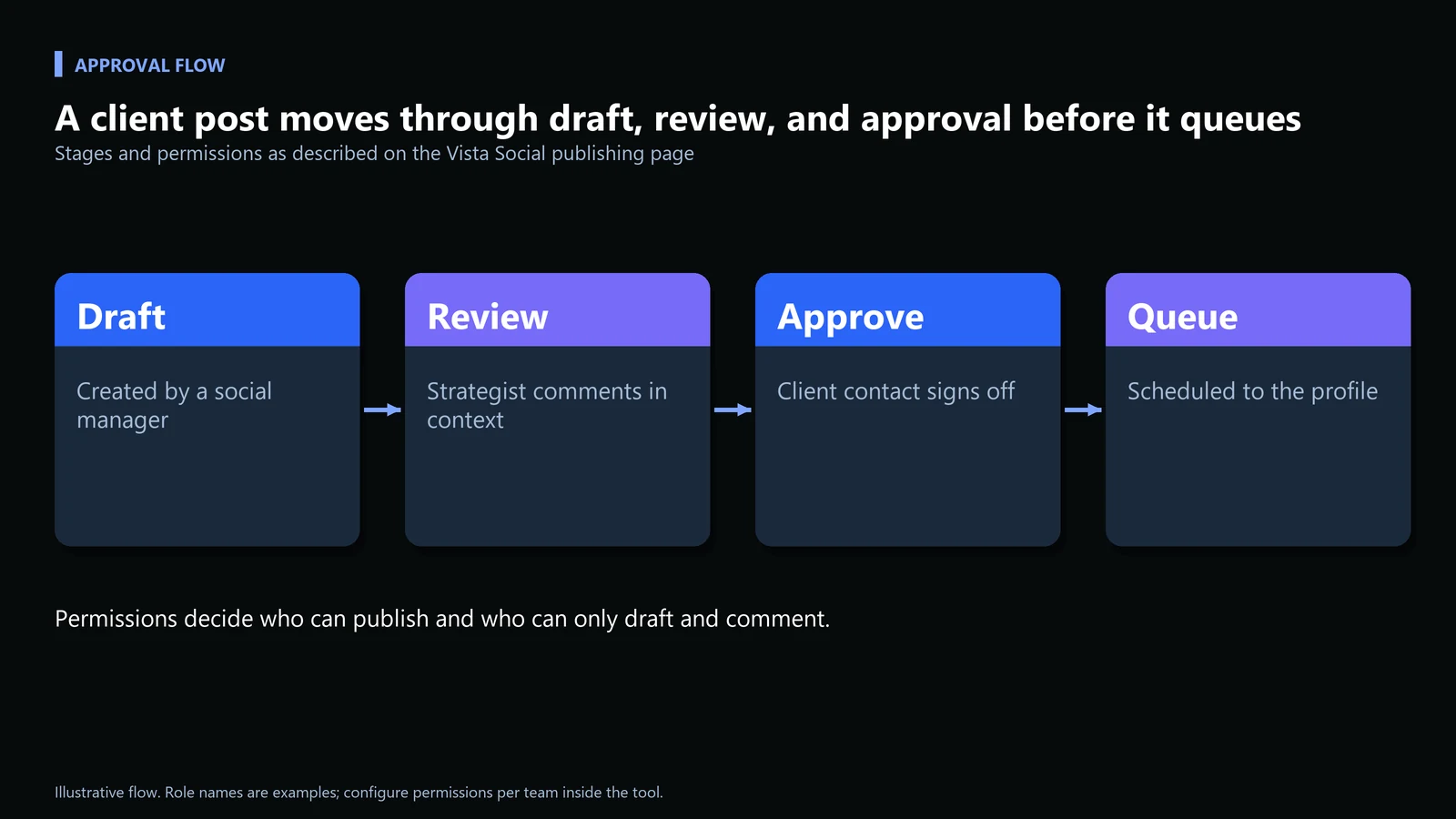
Pass condition: the client approves inside the tool, you can see who approved it, and no side email was needed. Common mistake: giving the client full admin rights to make approval easy. Use a role that can approve but not publish.
Check 4: Can you build and export a client report?
Reporting eats the most unpaid hours in agency social, because a report built once has to be rebuilt every month. The analytics page lists six report types, plus per-network breakdowns and a cross-network view.
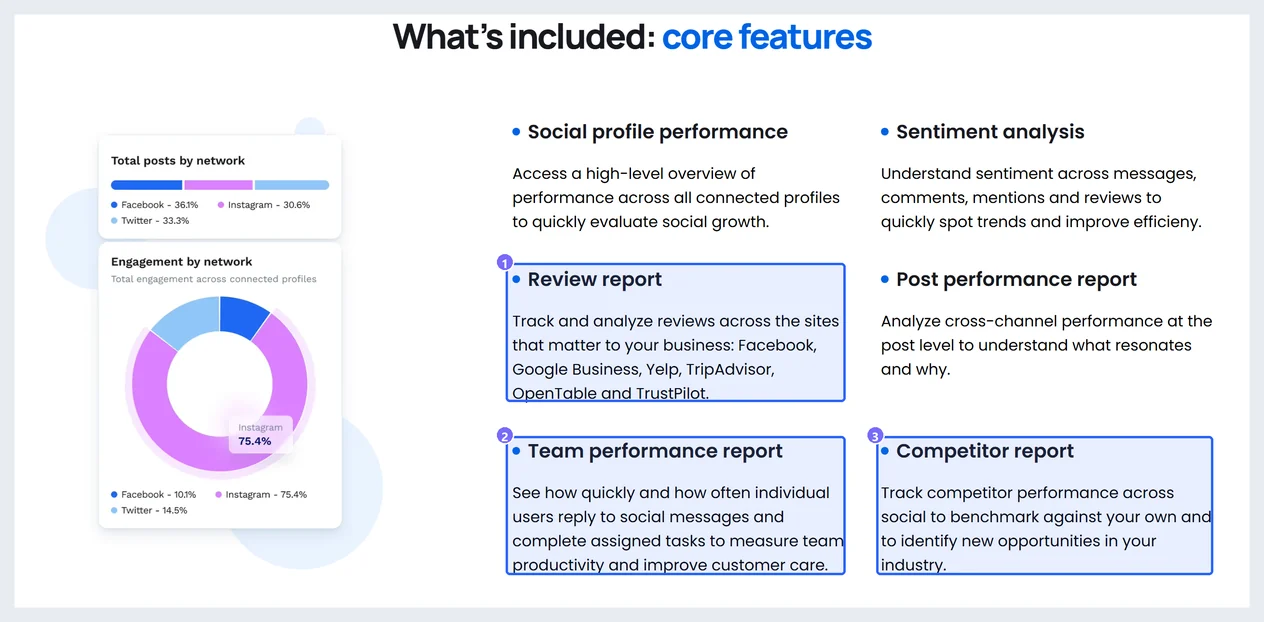
The same page lists custom reports, white label (your own logo, title and description on each report), export to PDF, and scheduled delivery to teams and clients. The white label page adds custom report colors, branded notifications, and a custom domain. Pass condition: one exported client report that you would send, with your branding and nothing you have to fix by hand.
| Report | Question it answers for a client | Who reads it |
|---|---|---|
| Social profile performance | Is growth moving across connected profiles? | Client marketing lead |
| Post performance | Which posts resonated and why? | Strategist |
| Sentiment | How do people feel in comments, mentions and reviews? | Client and account manager |
| Review report | What is the review picture across the sites that matter? | Multi-location clients |
| Team performance | How fast and how often does each user reply and complete tasks? | Agency manager |
| Competitor report | How do we benchmark against others in the industry? | Client leadership |
What about listening, reviews, and the AI layer?
These are the modules agencies add after the basics work. Vista Social’s listening page describes topic monitoring across social, search, news, reviews and the open web, with a Convergence Score of 0 to 100 that separates a validated multi-source trend from a single noisy spike. It lists six alert types, shown below.

The review management page says reviews from Facebook, Google Business, Yelp, TripAdvisor, OpenTable and TrustPilot arrive in one stream, with email, text and in-app notifications, and that you can respond to Facebook and Google Business reviews from the dashboard. For other sites you respond on the site itself, which makes it a fit for clients with several physical locations. Listening is sold as an add-on; check the pricing page for current options.
Ask Vista is described as a chat interface to “schedule, publish, report, and engage”, with agents that work in the background and saved “skills” for multi-step workflows. Whether to rely on it for anything client-facing is a team decision. Treat it like any AI drafting tool: useful for a first pass, not a substitute for someone reading the output before it reaches a client’s audience.
Check 5: Score the trial and decide
Put the trial on a calendar so it does not drift. This schedule fits the 14 days the pricing page states, with no credit card required.
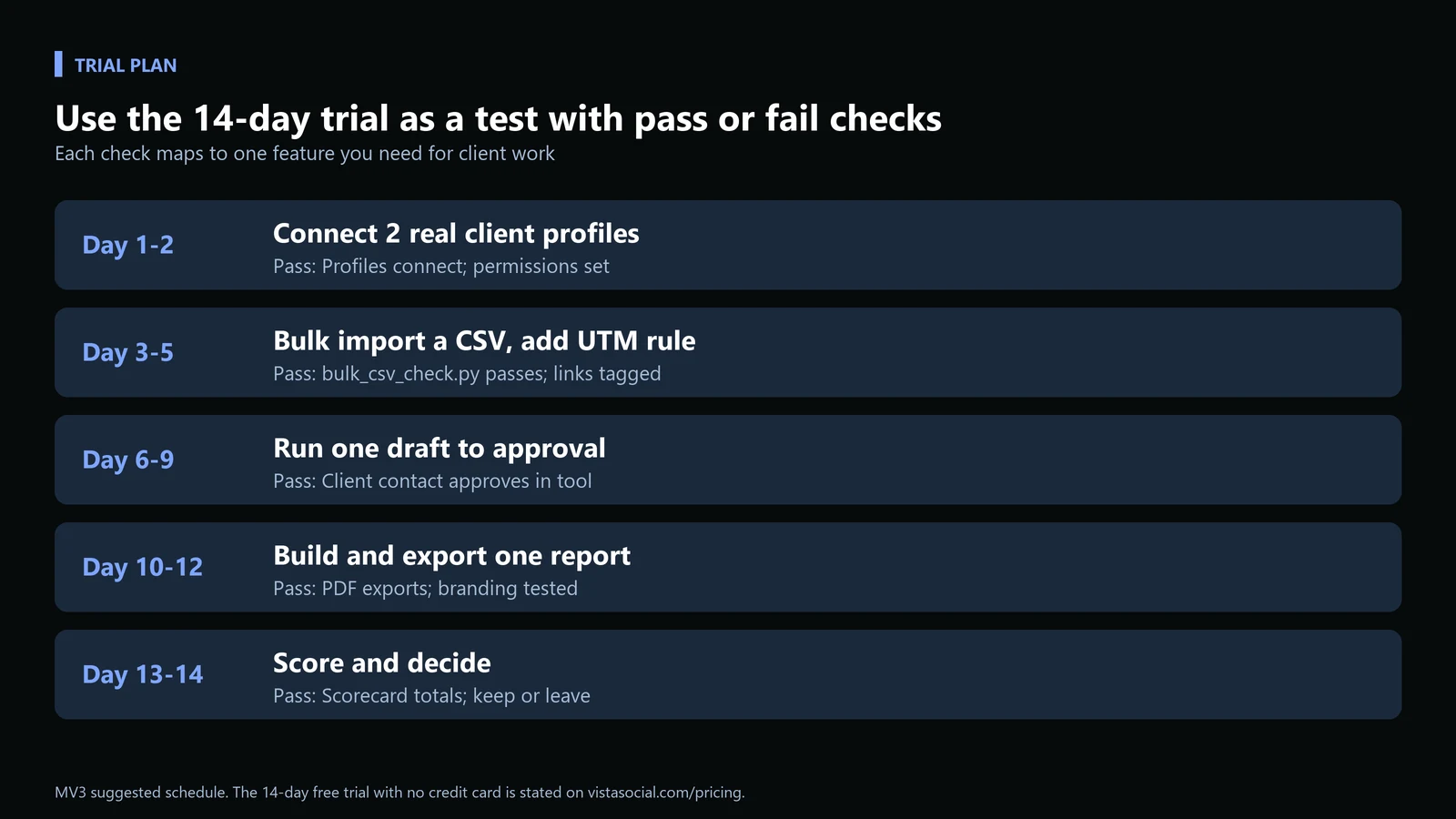
| Check | Pass condition | Result (fill in) |
|---|---|---|
| 1. Connect | Two profiles connected, no shared login, permissions set | Pass / fail |
| 2. Bulk and UTM | CSV imports as written, live link carries all three UTM parameters | Pass / fail |
| 3. Approval | A client approves in the tool, with no side email | Pass / fail |
| 4. Report | One exported PDF you would send as is | Pass / fail |
| 5. Hours | Weekly hours on scheduling, approvals, reporting against last week | Hours saved |
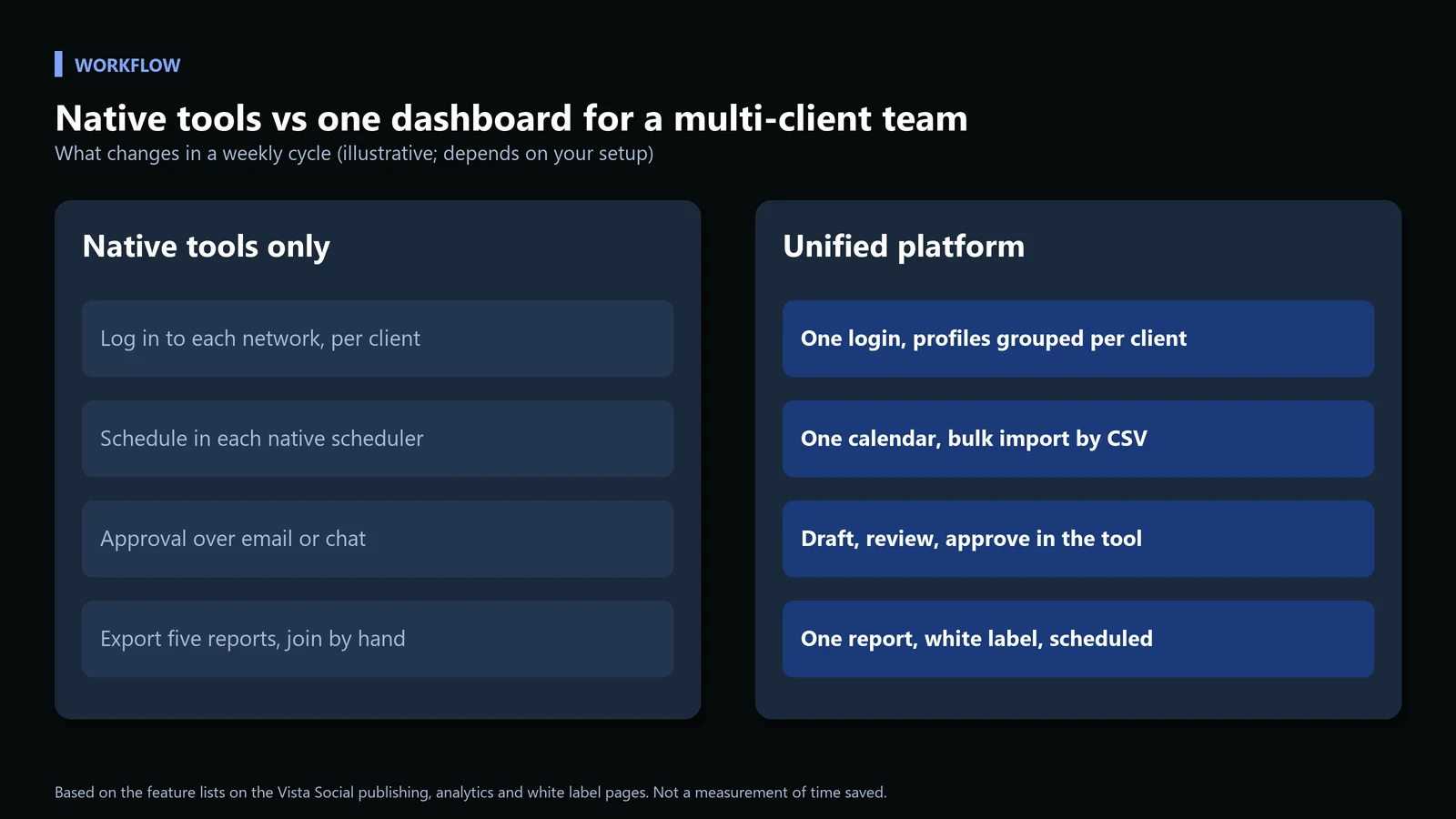
If you are still stitching together native schedulers and a shared spreadsheet, that gap is usually the first sign it is worth testing a dedicated platform. You can try Vista Social free for 14 days and run the checks alongside your current process. For how content planning and distribution fit together for SaaS teams, our B2B content marketing framework covers the editorial calendar side.
How do you fix common problems?
| Symptom | Likely cause | Fix |
|---|---|---|
| CSV import rejects a row | Wrong time format, empty caption, or a Drive link | Run bulk_csv_check.py and fix what it names |
| Emojis break in the import | The CSV was saved from Excel | Edit in Google Sheets and export from there |
| Link clicks show up as generic social traffic | No UTM rule for that domain | Add the URL under URL Tracking in Publishing Settings |
| Clients cannot be added without sharing a login | Client profile connect is not on your plan | Check the pricing page; it is listed from Scale up |
| You hit the profile limit mid-trial | Roster larger than the plan | Recount profiles, then use the decision flow |
Who is Vista Social a good fit for, and who is it not?
It makes the most sense for marketing teams and agencies managing three or more social profiles across multiple brands or clients, where reporting overhead and approval friction are real time costs. White label setup and client profile connect are listed from the Scale plan up, and the review and multi-location reporting suit service businesses with several physical locations.
It is probably more than you need for a single brand posting to two or three platforms with no client reporting, where a free native scheduler would cover the need without paying for approval workflows or competitor benchmarking you would not use. Match the tool to the number of accounts, people, and clients involved, not the feature list alone.
Checklist
- Roster counted in profiles and users, today and at your next client count
- Two real profiles connected during the trial
- Bulk CSV validated, imported, and UTM links confirmed in Google Analytics
- One post approved by a client inside the tool
- One branded report exported
- Hours compared against last week before you decide
Downloads: Trial scorecard (CSV) and Trial scorecard checklist (PDF).
For related terms like content operations and organic pipeline that come up constantly in these conversations, see our marketing glossary.
Frequently asked questions
Does Vista Social have a free trial?
Yes. Its pricing page states a 14-day free trial with no credit card required on every plan. Use it to connect two real client profiles and run the five checks in this guide.
Which Vista Social plan includes white label and client profile connect?
The pricing page lists white label setup and client profile connect from the Scale plan up, which also includes 70 social profiles. Re-check the page before you buy, since plans change.
How many posts can you bulk schedule from a CSV?
Vista Social documents a limit of 200 rows per CSV import and recommends uploading up to 100 posts. The columns must be in a set order: caption, media type, link, and posting time.
Can Vista Social add UTM parameters to links automatically?
Yes. Its support article says to go to Settings, then Publishing Settings, add a URL under URL Tracking, and define default parameters, which are then attached automatically when that URL is added to a post.
Where does this information come from?
| Topic | Source (read 11 Oct 2026) |
|---|---|
| Plan limits, 14-day trial, white label and client profile connect | Vista Social pricing |
| Report types, white label, PDF export, scheduled delivery | Vista Social analytics |
| Approval, permissions, drafts, media library, networks | Vista Social publishing |
| CSV columns, 200-row limit, RSS import | Vista Social bulk scheduling guide |
| URL tracking steps | Vista Social support: URL tracking with UTM codes |
| Listening, Convergence Score, alert types | Vista Social listening |
| Review sites and response options | Vista Social review management |
| White label reports, notifications, custom domain | Vista Social white label |
If multi-client social management is eating your team’s time right now, the fastest way to find out is to connect a couple of real client accounts and run the five checks. You can start the free 14-day trial here, no credit card required, and see whether the reporting and approval workflow save the hours it claims to. If you would rather have us build the process around your accounts, book a call.
Share this article

Vance Moore is Chief Growth Officer at MV3 Marketing and leads its team of SEO professionals, engineers and auditors.
Ready to audit your organic growth opportunity?
$2,500 flat. 5 business days. Six deliverables tied to pipeline , not rankings. No retainer required.
Get the Organic Growth Audit →