
By MV3 Marketing Team | Published April 8, 2026
TL;DR, Key Takeaways
• 78% of B2B companies have at least one critical GA4 configuration error affecting conversion counts.
• The single most-missed setting: data retention left at the 2-month default (affects 62% of properties).
• A proper audit covers 7 areas: configuration, event tracking, conversions, data quality, attribution, audiences, and CRM alignment.
• GA4 does not fix historical data, every week of bad collection is permanent.
• MV3’s GA4 analytics audit is $2,500 flat, delivered in 5 business days.
Why Most B2B Companies Are Operating on Broken GA4 Data
Most B2B companies are making budget decisions based on GA4 data they have never properly validated.
The default GA4 configuration retains data for only two months. Internal traffic contaminates session counts. Form submission events fire twice, inflating conversion rates. And when a VP asks whether organic search is generating pipeline, the answer the dashboard returns is structurally wrong, not because GA4 is bad, but because nobody audited the implementation.
The problem is not visibility. It is validity.
“If your GA4 shows 3,000 sessions but only 2 form submissions last month, the problem isn’t your traffic. It’s your configuration.”
, MV3 Marketing, MBA, Founder, MV3 Marketing
What a GA4 Analytics Audit Is
A GA4 analytics audit is a systematic review of a Google Analytics 4 property that verifies whether the configuration, event tracking, conversion setup, data quality controls, attribution model, audience definitions, and CRM alignment are all functioning correctly.
For B2B companies specifically, an audit is not optional maintenance, it is a prerequisite for any reliable attribution, pipeline analysis, or budget allocation decision. A single misconfigured filter can suppress 20-40% of actual conversion data.
An audit differs from a GA4 setup in that it assesses an existing property against a defined standard and produces a documented remediation plan. If your property has never been properly configured, our full GA4 implementation service builds it correctly from the start.
Key Findings: 40+ B2B GA4 Audits
The following data is drawn from MV3 Marketing’s audits of B2B GA4 properties across SaaS, professional services, and manufacturing sectors.
| Issue | Frequency | Business Impact |
|---|---|---|
| Data retention at 2-month default | 62% | Historical trend analysis unavailable after 60 days |
| Missing internal traffic exclusion | 58% | Inflated session counts, distorted conversion rates |
| Duplicate conversion counting | 41% | Overstated lead volume, incorrect cost-per-lead |
| Missing UTM parameters on paid campaigns | 47% | Paid traffic attributed to Direct, masking channel ROI |
| No CRM-to-GA4 alignment verification | 71% | “Conversions” in GA4 ≠ qualified leads in CRM |
| Enhanced measurement double-firing | 33% | Scroll and file download events counted twice |
| At least one critical configuration error | 78% | Conversion counts structurally unreliable |
Source: MV3 B2B GA4 Audit Index (2024-2026). N=40+ properties. Methodology: full-property audit across configuration, event tracking, conversions, data quality, attribution, audiences, and CRM alignment.
The 7-Point B2B GA4 Audit Framework
1. GA4 Configuration & Account Settings
What to verify: The foundational settings that govern what GA4 collects, how long it stores data, and what it excludes.
Why it matters: Configuration errors are silent. There is no alert when data retention truncates your trend window or when your own team’s sessions inflate conversion rates.
Audit checklist:
- [ ] Data retention set to 14 months (Admin > Data Settings > Data Retention)
- [ ] Internal IP addresses added to Data Filters as Developer Traffic or Internal Traffic
- [ ] Google Signals enabled for cross-device reporting (if GDPR-compliant in your region)
- [ ] Cross-domain tracking configured if traffic spans multiple domains (e.g., app subdomain + main site)
- [ ] Enhanced measurement settings reviewed, confirm file downloads, outbound clicks, and scroll depth are intentionally on or off
- [ ] Data stream confirmed as Web (not App) with correct URL
Most common failure: Data retention at the 2-month default. This means any analysis requiring more than 60 days of session-level data, cohort analysis, year-over-year conversion comparison, LTV modeling, returns incomplete results. Fix: Admin > Data Settings > Data Retention > Set to 14 months.
Screenshot needed: GA4 Admin panel showing Data Retention dropdown set to 14 months.
2. Event Tracking Accuracy
What to verify: That the events you depend on for conversion tracking are firing correctly, consistently, and without duplication.
Why it matters: In GA4, everything is an event. If your form submission event fires twice per submission, your conversion rate is mathematically false.
Audit checklist:
- [ ] All form submissions fire exactly once per submission (verify via GTM Preview + GA4 DebugView)
- [ ] Phone click events tracked via GTM click trigger (not enhanced measurement auto-track)
- [ ] File download events tracked without duplication (enhanced measurement + GTM trigger conflict is common)
- [ ] Video engagement events firing correctly for embedded YouTube/Vimeo
- [ ] Event names follow a consistent naming convention (snake_case, descriptive, not GA3 legacy names)
- [ ] No
page_viewduplication from GTM tag + GA4 stream config both firing
How to test: Enable GTM Preview mode. Submit a form. Open GA4 DebugView. Count the number of times your conversion event appears. It should appear exactly once.
Screenshot needed: GTM Preview pane showing a form_submit event with one instance. GA4 DebugView showing the same event firing once, not twice.
3. Conversion Setup & Attribution
3a: Key Event (Conversion) Setup
What to verify: That the right events are marked as Key Events (conversions), and that conversion values are assigned where appropriate.
Why it matters: GA4 no longer automatically marks events as conversions. Any event that represents a business outcome, form submission, demo request, phone call, must be manually toggled as a Key Event. If it is not toggled, it will not appear in conversion reports.
Audit checklist:
- [ ] All primary lead events marked as Key Events (Admin > Events > toggle on)
- [ ] Micro-conversions (scroll depth, content downloads) marked separately from macro-conversions (form submissions)
- [ ] Conversion values assigned to Key Events where revenue attribution is needed
- [ ] Conversion counts cross-referenced against back-end CRM lead intake for same period
- [ ] GA4 conversion counts not significantly higher than CRM lead counts (if so, duplication suspected)
CTA, Mid-Article:
Is your GA4 conversion count matching your CRM?
Most B2B companies find a 30-50% discrepancy on first audit. Get MV3’s GA4 Analytics Audit →, $2,500 flat, 5 business days, six deliverables.Screenshot needed: GA4 Events list with Key Event toggles visible. One toggle ON, one OFF, to illustrate the difference.
4. Data Quality & Spam Filtering
What to verify: That your GA4 data represents actual human visitors and excludes internal, bot, and staging traffic.
Why it matters: Unfiltered GA4 data is not just noisy, it is misleading. Internal employee sessions inflate session counts and depress conversion rates. Staging/dev traffic creates phantom events that corrupt audience definitions.
Audit checklist:
- [ ] Internal IP ranges added to Data Filters (activated, not in testing mode)
- [ ] Staging/development environment traffic excluded (via hostname filter or separate GA4 property)
- [ ] Referral exclusion list includes your own domain (prevents self-referral sessions)
- [ ] Bot filtering enabled (GA4 enables this by default, but confirm it has not been disabled)
- [ ] Session engagement rate benchmarked (below 35% for most B2B sites suggests bot or internal contamination)
- [ ] Direct traffic share benchmarked (above 40% is a UTM/attribution problem, not actual direct intent)
Warning block: If you activated a Data Filter but left it in “Testing” mode rather than “Active,” it is not filtering anything. This is one of the most common implementation errors, the UI appears configured but the filter does nothing.
5. Attribution Model & Channel Grouping
What to verify: That GA4’s attribution model accurately represents the B2B buyer journey, and that channel groupings correctly classify your traffic sources.
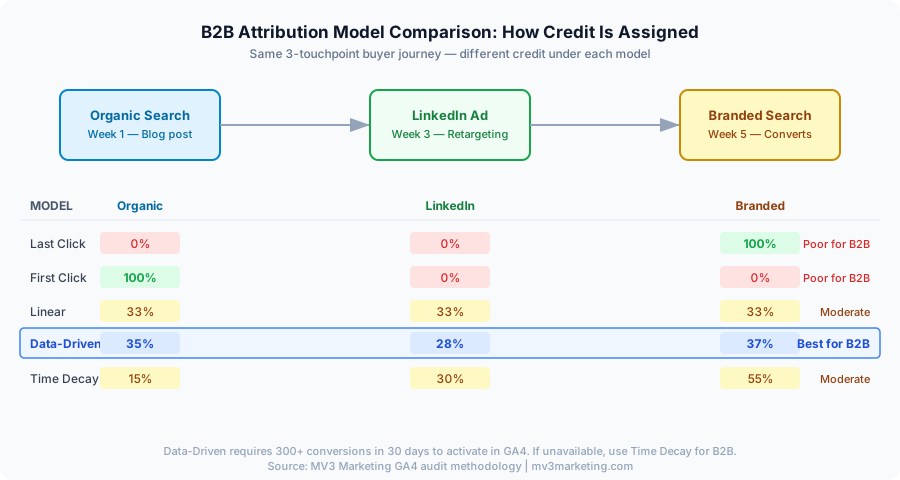
Why it matters: B2B purchase cycles span weeks to months with 5-15 touchpoints. Last-click attribution, which GA4 does not use by default, but which many teams replicate by looking only at “last source” reports, systematically undervalues top-of-funnel channels like organic search and content.
3b: Attribution Model Verification
Attribution model comparison:
| Model | What It Credits | B2B Fit |
|---|---|---|
| Last click | Final touchpoint before conversion | Poor, punishes awareness channels |
| First click | First touchpoint in the path | Poor, punishes nurture channels |
| Linear | Equal credit across all touchpoints | Moderate, ignores touchpoint weight |
| Time decay | More credit to recent touchpoints | Moderate, reasonable for short cycles |
| Data-driven | ML model based on actual conversion paths | Best for B2B with sufficient data volume |
| Position-based | 40% first, 40% last, 20% middle | Moderate, reasonable for lead gen |
Audit checklist:
- [ ] Confirm GA4 is set to Data-Driven attribution (requires 300+ conversions/30 days for the model to activate)
- [ ] If data-driven is not available, use Time Decay for B2B (not Last Click)
- [ ] Review Conversion Paths report to identify which channels are first-touch vs. assist vs. last-touch
- [ ] Confirm channel groupings are correctly classifying: Organic Search, Paid Search, Paid Social, Email, Direct, Referral
- [ ] Custom channel groups created if you run channels GA4 classifies incorrectly (e.g., LinkedIn organic)
Diagram needed: Visual of a B2B conversion path, Organic (awareness) → Retargeting Ad (nurture) → Branded Search (conversion), with attribution credit shown under each model.
6. Audience & Segment Validation
What to verify: That your GA4 audience definitions correctly capture the high-intent visitor segments you need for remarketing and reporting.
Why it matters: An audience that includes all visitors is not an audience, it is a list. High-intent B2B audiences should reflect demonstrated buyer behavior: viewed pricing, visited multiple service pages, spent 3+ minutes on-site, or engaged with a case study.
Audit checklist:
- [ ] Remarketing audiences defined by behavioral signals, not just “visited site”
- [ ] Pricing page visitor audience created and active
- [ ] High-engagement audience created (session duration > 3 min OR 4+ pages viewed)
- [ ] Audiences synced to Google Ads for remarketing
- [ ] Audience sizes verified, audiences under 100 users cannot be used in Google Ads
- [ ] Predictive audiences reviewed if data volume supports (requires 1,000+ purchases or conversions in 28 days)
Screenshot needed: GA4 Audience Builder showing a high-intent segment, e.g., “Viewed /pricing/ AND session duration > 180 seconds.”
7. GA4-CRM Data Alignment
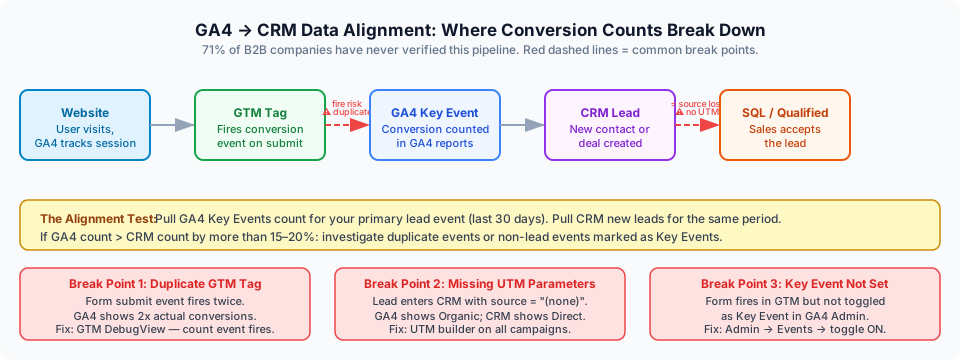
What to verify: That what GA4 calls a “conversion” matches what your sales team calls a “qualified lead.”
Why it matters: This is the most critical alignment check in B2B analytics, and the one most consistently skipped. GA4 can report 200 conversions in a month while your CRM shows 14 SQLs. The gap is not a mystery, it is configuration. Either GA4 is counting unqualified micro-events as conversions, or your CRM intake is not capturing all digital lead sources.
The alignment test:
- Pull GA4 Key Events count for your primary lead event, last 30 days.
- Pull CRM new lead intake for the same 30 days, same lead source.
- If GA4 count > CRM count by more than 15-20%, investigate: duplicate events, non-lead events marked as Key Events, or form submissions that are not actually completing.
- If CRM count > GA4 count, investigate: form submissions firing without a GA4 event, leads entering via phone or offline channel, or GA4 data retention truncating older conversions.
Audit checklist:
- [ ] GA4 conversion count compared to CRM lead count, documented discrepancy percentage
- [ ] UTM parameters on all email and paid campaigns confirmed (so CRM source matches GA4 channel)
- [ ] Offline conversions uploaded to GA4 if relevant (phone leads, in-person events)
- [ ] GA4 conversion data importable to CRM for closed-loop attribution
- [ ] Pipeline value reportable by originating GA4 channel (even if done manually in a spreadsheet)
Flow diagram needed: GA4 → Google Tag Manager → Form Submit Event → CRM New Lead field → SQL flag → Closed Won. Each step labeled with where alignment breaks down.
CTA, Mid-Article:
71% of B2B companies have never verified their GA4-to-CRM alignment.
If your analytics don’t connect to pipeline, your budget decisions are guesses.
Book a GA4-CRM Alignment Review →, included in MV3’s $2,500 GA4 audit.
GA4 Audit Checklist: Common Problems Summary
The following table compiles the most frequent GA4 configuration failures across 40+ B2B properties audited by MV3 Marketing, along with their measured frequency, business impact, and the specific fix for each.
| Problem | % of B2B Properties Affected | Business Impact | Fix |
|---|---|---|---|
| Data retention at 2-month default | 62% | No trend data beyond 60 days | Admin > Data Retention > 14 months |
| Missing internal traffic filter | 58% | Inflated sessions, depressed CVR | Add IP range to Data Filters |
| Duplicate conversion counting | 41% | Overstated lead volume | GTM DebugView audit; remove redundant tags |
| Missing UTMs on paid campaigns | 47% | Paid traffic shows as Direct | UTM builder + GA4 URL validation |
| No CRM-GA4 alignment check | 71% | Budget allocated to wrong channels | Monthly lead reconciliation process |
| Enhanced measurement double-firing | 33% | Inflated event counts | Disable conflicting GTM tags |
| Key Events not set | 19% | Conversions not tracked at all | Admin > Events > toggle Key Event |
| Staging environment contamination | 27% | False sessions and events | Hostname filter or separate property |
Source: MV3 Marketing. N=40+ B2B GA4 properties audited 2024-2026.
What To Do After Your GA4 Audit
An audit produces a findings list. What comes next determines whether the findings create value.
Immediate Actions (Within 48 Hours)
- Fix data retention, Admin > Data Settings > Data Retention > 14 months.
- Activate internal traffic filters (if in Testing mode, switch to Active).
- Correct any duplicate conversion tags in GTM.
Short-Term Actions (Within 2 Weeks)
- Rebuild UTM tracking standards and enforce on all paid campaigns.
- Define and build high-intent audiences in GA4 and sync to Google Ads.
- Reconcile GA4 conversion count vs. CRM lead count for the trailing 30 days.
Strategic Actions (Within 30 Days)
- Establish a monthly GA4-CRM alignment check, a single spreadsheet with four columns is sufficient.
- Review attribution model and switch to Data-Driven if conversion volume supports it.
- Build a Looker Studio report connecting GA4 channel data to CRM pipeline stages.
- Schedule your next audit trigger: annual review, or after any CRM migration, GTM container change, or site redesign.
- If GA4 audit reveals unexplained organic traffic drops, a Technical SEO audit identifies the on-site factors driving them.
For companies whose analytics gaps require a full rebuild rather than a repair, MV3’s Analytics Setup & GA4 service covers implementation from scratch with the same validation standard as the audit.
For companies ready to connect analytics to organic growth, our Technical SEO Audit and B2B SEO service identify channel gaps that a clean GA4 property will then accurately measure.
FAQ: GA4 Analytics Audits for B2B
What is a GA4 analytics audit?
A GA4 analytics audit is a systematic review of a Google Analytics 4 property that verifies configuration, event tracking, conversion setup, data quality, attribution model, audience definitions, and CRM alignment are all functioning correctly. For B2B companies, audit findings typically include at least one configuration error affecting conversion counts.
How long does a GA4 analytics audit take?
A professional GA4 analytics audit typically takes 3-5 business days. MV3 Marketing delivers its GA4 audit in 5 business days with six written deliverables and a 30-minute findings review call.
What does a GA4 analytics audit cost?
MV3 Marketing’s GA4 analytics audit is $2,500 flat, no retainer, no hourly billing. It includes configuration review, event audit, conversion validation, data quality check, attribution analysis, and CRM alignment assessment. Deliverables are documented and actionable.
How often should a B2B company audit its GA4 property?
A full GA4 audit is recommended annually. Spot-checks are recommended quarterly for high-traffic properties. Audits should also be triggered by: website redesigns, CRM migrations, GTM container changes, or any sudden unexplained change in reported conversions.
Can a GA4 audit fix historical data?
No. GA4 does not reprocess historical data. Fixes apply forward from the implementation date. This is why identifying configuration errors quickly matters, every day of bad data collection produces a permanent gap in your historical record. If you discover today that data retention was set to 2 months for the past year, that 10-month gap in session-level data cannot be recovered. Run your audit as early as possible after launching or migrating a GA4 property.
What is the most common GA4 configuration error in B2B companies?
Based on 40+ B2B GA4 audits, the most common error is data retention set to the 2-month default instead of 14 months, found in 62% of properties. The second most common is missing internal traffic exclusion (58%), which inflates session counts and depresses conversion rates.
About the Author
MV3 Marketing, MBA is the Founder and Chief Growth Strategist at MV3 Marketing. He has spent 10+ years building B2B SEO, AI content infrastructure, and performance marketing programs for companies that want to own their growth channels rather than rent them. MV3 has conducted 40+ GA4 analytics audits across B2B SaaS, professional services, and manufacturing.
Your GA4 data is only as reliable as its configuration.
If your conversion counts have never been validated against your CRM, your budget decisions are based on unverified numbers.
Related Reading
MV3’s GA4 Analytics Audit is $2,500 flat. Delivered in 5 business days. Six deliverables: written findings report, prioritized remediation plan, event audit results, attribution model assessment, CRM alignment check, and a 30-minute findings review call.
No retainer. No hourly billing. One audit, documented and actionable.
Share this article

Alex Carter leads SEO and content strategy at MV3 Marketing, specializing in generative engine optimization, technical SEO, and AI-driven content systems for B2B companies.
Ready to audit your organic growth opportunity?
$2,500 flat. 5 business days. Six deliverables tied to pipeline , not rankings. No retainer required.
Get the Organic Growth Audit →