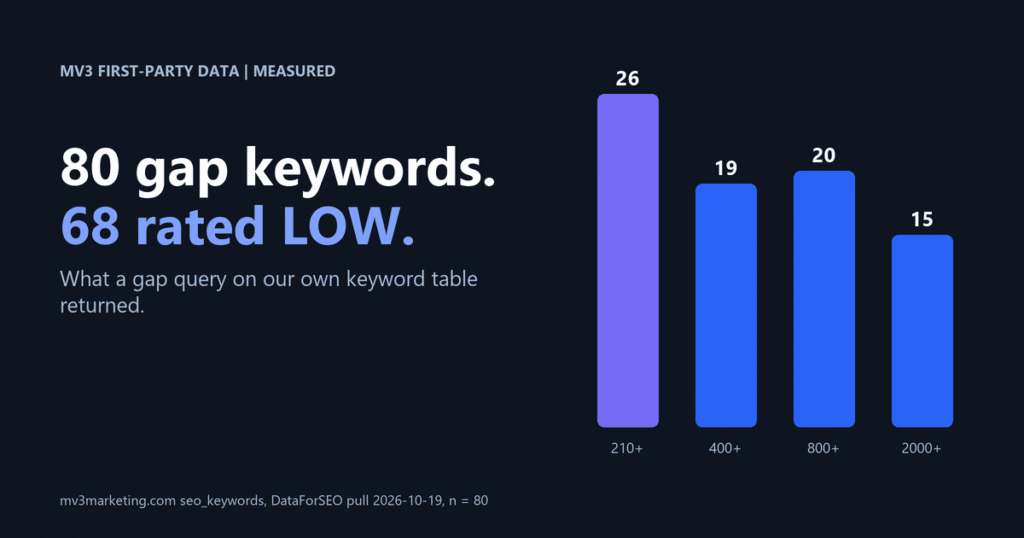
What does keyword research for B2B SaaS show on our own site?
We ran this method on our own data first. The table behind this post holds 274 keywords pulled from DataForSEO on 2026-10-19. Of those, 259 clear a floor of 30 searches a month. None of the 274 rows has a page or a ranking position recorded against it.
That last number is a tracking gap, not proof that we rank for nothing. It is the reason the method starts with a table you can query, and the reason Step 4 below checks the live site before anything gets written.
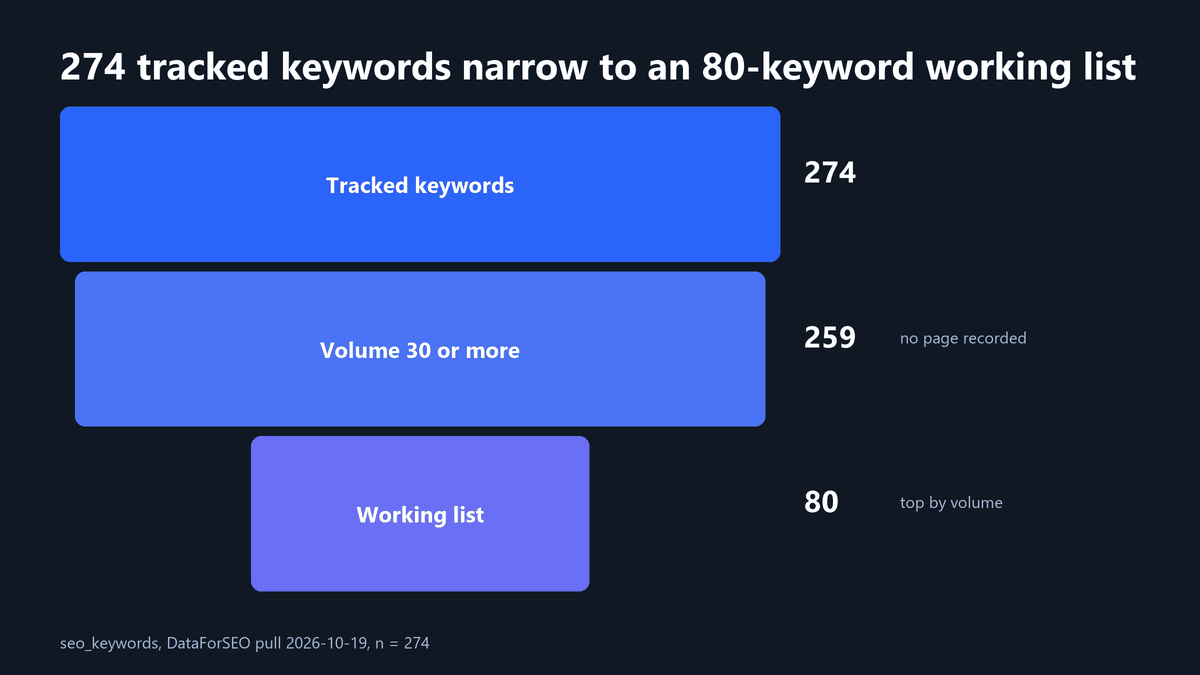
The working list is the 80 highest-volume keywords from those 259. Here is what it looks like.
| Measure | Result |
|---|---|
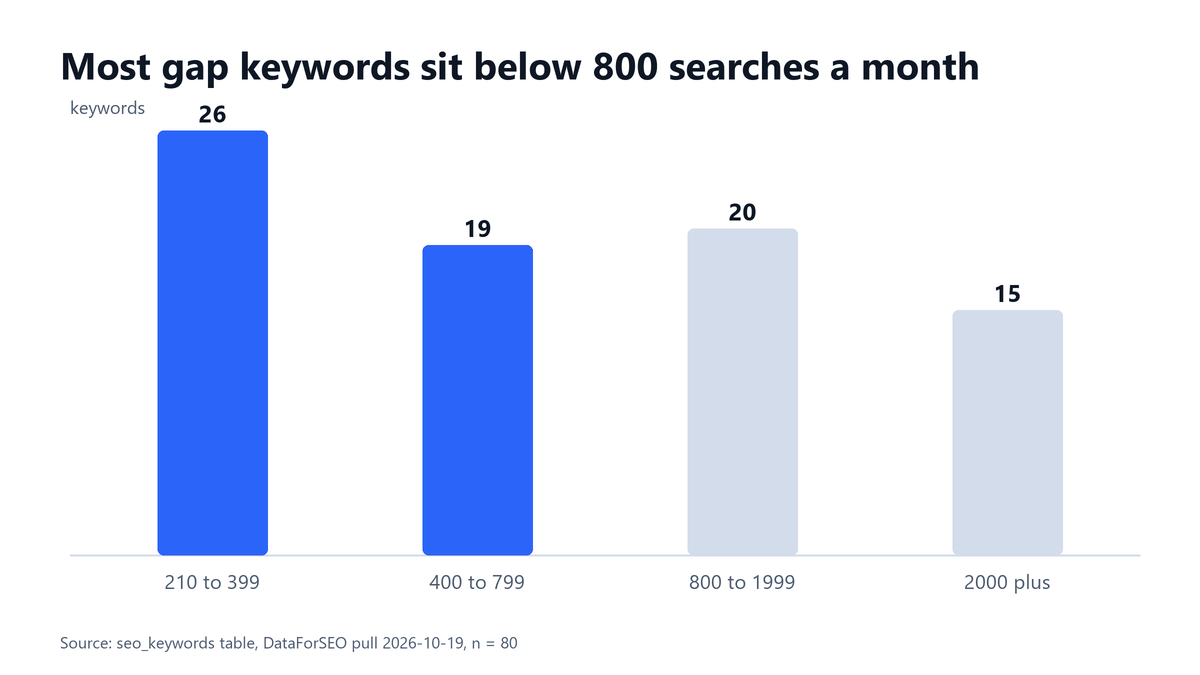
| Median monthly searches | 720 |
| Largest keyword | 9,900 searches a month |
| Smallest keyword | 210 searches a month |
| Competition rated LOW | 68 of 80 (85%) |
| Competition rated MEDIUM | 12 of 80 |
Read the numbers carefully. Competition here is a paid-search signal. Google defines it as “the number of advertisers that showed on each keyword relative to all keywords across Google” (Google Ads Help, Keyword Planner). Treat it as a rough filter for organic difficulty, never as a promise.
Before you start
You need a keyword data source that returns monthly volume and a competition rating, a place to store rows (a spreadsheet works, a database is better) and a list of your published URLs. Skill level is beginner to intermediate. Plan on about an hour for the first pass. You will end with a ranked gap list and one brief.
MV3 sells SEO and content services, so we have a commercial interest in this method. We use it on our own site first, which is why the numbers in this guide come from our own table.
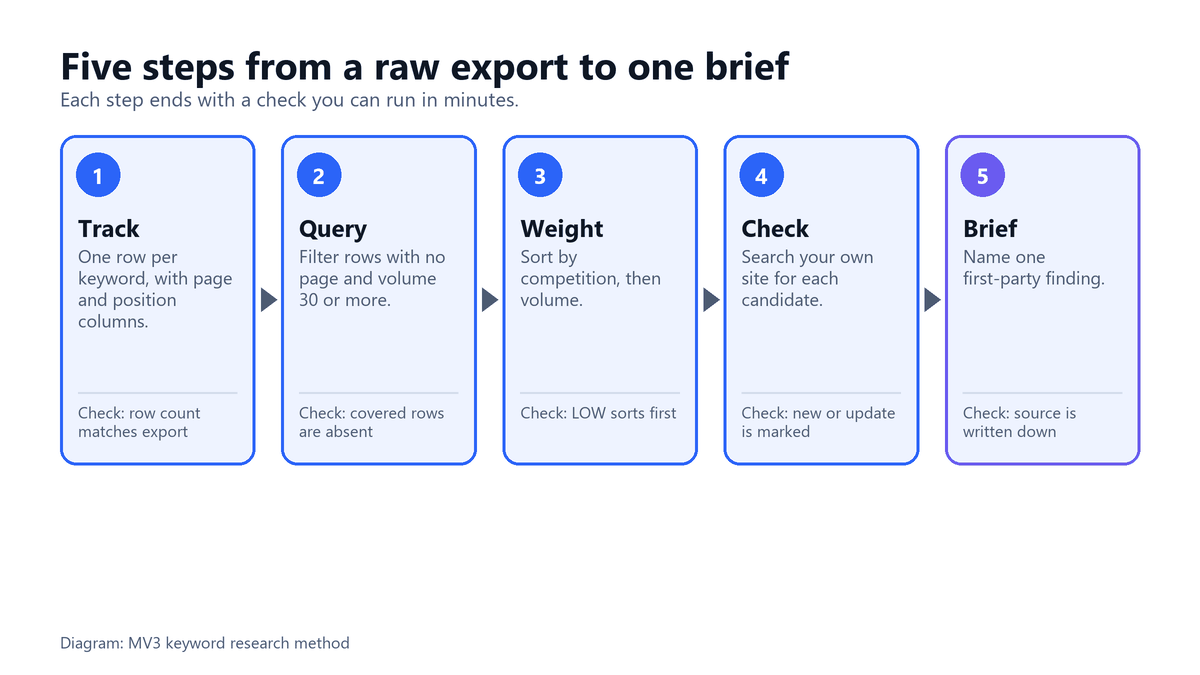
Step 1: Build a tracked keyword table
Create one row per keyword. Store the keyword, monthly volume, competition rating, the page you have assigned to it and your current position. The last two columns turn a static export into something you can query for gaps.
CREATE TABLE keywords (
  keyword      TEXT,
  volume       INTEGER,
  competition  TEXT,     -- LOW, MEDIUM or HIGH
  our_position INTEGER,  -- NULL when we have no recorded ranking
  our_url      TEXT      -- NULL when no page is assigned
);
What this does: it holds the five facts every later step needs. We ran it on a scratch SQLite database to confirm it creates cleanly. Volume figures from Keyword Planner are “averaged over a 12-month period” by default, per Google Ads Help, so a seasonal term can look smaller or larger than it does this month.
Expected result: a table with a row count that matches your export. Common mistake: leaving the page column out. Without it you cannot tell a real gap from a keyword you already cover.
Step 2: Query for the gap, not the whole list
Filter for rows where no page and no position are recorded, and where volume clears a floor. We use 30 searches a month. A lower floor adds noise. A much higher floor hides long-tail terms that often convert well in B2B.
SELECT keyword, volume, competition
FROM keywords
WHERE our_position IS NULL
  AND our_url IS NULL
  AND volume >= 30
ORDER BY CASE competition WHEN 'LOW' THEN 0 WHEN 'MEDIUM' THEN 1 ELSE 2 END,
         volume DESC
LIMIT 5;
We tested this query on a scratch SQLite table seeded with six of our real gap keywords plus three decoys (a covered keyword, a MEDIUM one and a 20-search one). Output of the test run:
('funnel marketing', 9900, 'LOW')
('tam sam som', 9900, 'LOW')
('content marketing strategy', 5400, 'LOW')
('customer acquisition cost', 4400, 'LOW')
('b2b marketing', 4400, 'LOW')
Expected result: the covered keyword and the 20-search keyword are absent, and LOW competition sorts first. Common mistake: sorting by volume alone. The biggest number is often the most crowded.
Step 3: Weight by competition and volume together
A 9,900-search keyword with a LOW rating is a different bet from a 210-search keyword with a MEDIUM rating. Plot every candidate on two axes and work the high-volume, low-competition corner first. In our list that corner holds 25 keywords. A further 43 are lower volume but still rated LOW.
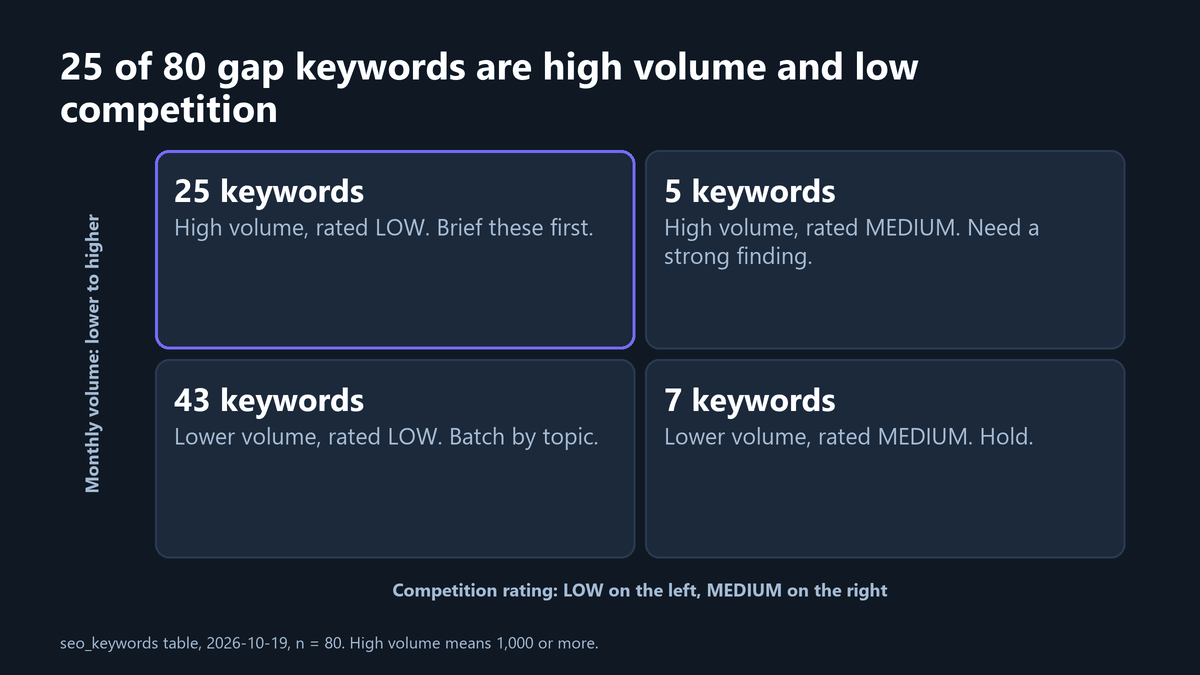
| Quadrant | Keywords in our list | What we do |
|---|---|---|
| High volume, LOW | 25 | Brief first, one post each |
| Lower volume, LOW | 43 | Group by topic, write in batches |
| High volume, MEDIUM | 5 | Write only with a strong first-party finding |
| Lower volume, MEDIUM | 7 | Hold |
Expected result: a short, ordered shortlist rather than a spreadsheet of 80 rows. Common mistake: chasing round numbers. Volume figures are modeled estimates, so 1,000 searches is not meaningfully better than 880.
Step 4: Check your own site before you write
Search your published posts for the keyword and its close variants. Publishing a second page for a topic you already cover splits links and clicks between two URLs that should be one.
Our own table shows why this step is not optional. It lists “answer engine optimization” as a gap keyword, yet the live site already has a page on the topic at answer engine optimization services. The table was missing the assignment, not the page. We also already publish a guide on using AI for keyword research, so this post focuses on the gap query and the triage instead of the tooling.
Rule we follow. If a live page already answers the query, update that page instead of drafting a new one, and record its URL in the table.
Expected result: each shortlisted keyword is marked “new page” or “update existing”, with a URL. Common mistake: trusting the table alone. Tables drift and sites change.
Step 5: Turn the keyword into a brief with one real finding
A keyword tells you what demand exists. It does not tell you what angle will earn the click. Before you commit, name one number or observation only you can supply: your own analytics, your CRM counts or your own test. A post that only rephrases the pages already ranking adds nothing for a reader.
Search Console is the best first-party source for this. Google says impressions matter “because someone needs to see a link to your property in order to click to visit it” (Search Console Help, performance report). Queries where you already earn impressions show which neighbouring topics Google associates with you. Our walkthrough of the Search Console API workflow covers pulling that data, and our competitor content gap method shows how to add what rivals cover.
Google’s own starter guide adds a reminder about audience. It notes that “users who know a lot about the topic might use different keywords in their search queries than someone who is new to the topic”. Write the brief in the searcher’s vocabulary, not your product vocabulary.
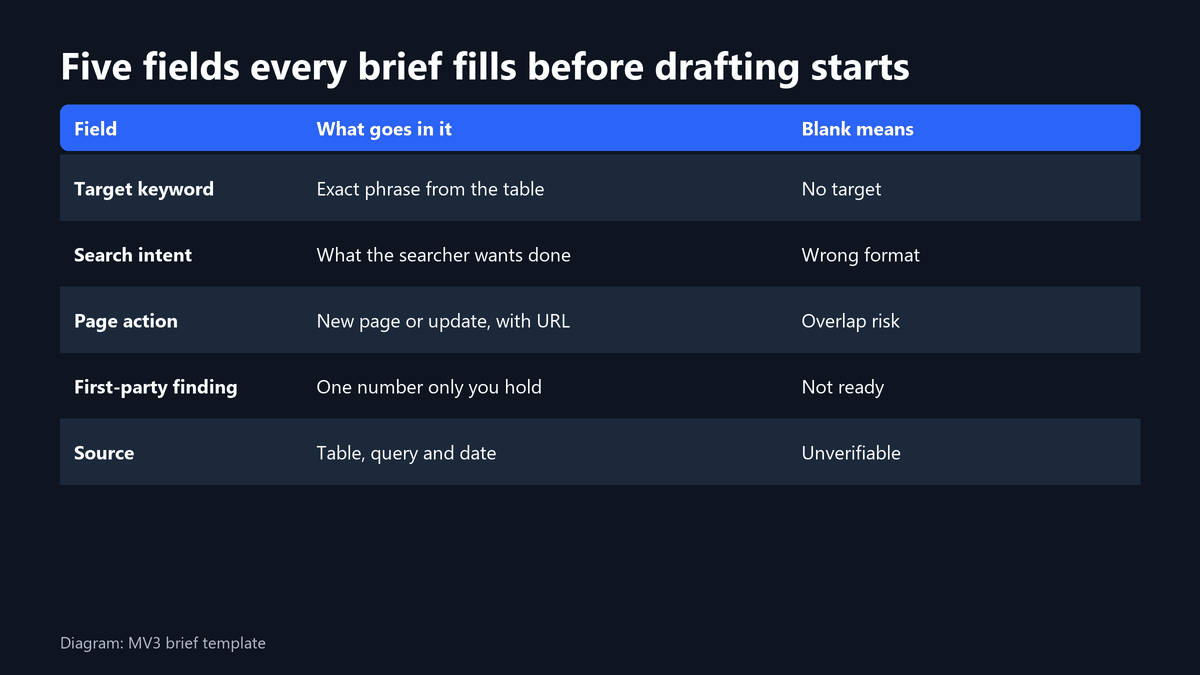
Test for a finding. If you cannot write the source of the number in one line (table, query, date), you do not have a finding yet.
Expected result: a one-paragraph brief with a named data source. Common mistake: treating the keyword table as the brief.
What goes wrong, and how to fix it
| Symptom | Likely cause | Fix |
|---|---|---|
| The gap list is nearly the whole table | The page column was never filled in | Map each live URL to its target keyword, then rerun |
| Every keyword shows LOW | The rating is a paid-search signal and is coarse | Use it as a filter only, then read the live results page |
| A shortlisted topic already has a post | Step 4 was skipped | Update the old page and record its URL |
| Volume looks wrong for a seasonal term | Volume is averaged over 12 months | Check the monthly breakdown before judging |
Worked example from our own list
Take the five keywords from the test run in Step 2. All five are rated LOW, and all five sit in the high-volume corner at 4,400 searches a month or more. Before drafting any of them we would run Step 4 on the live site, and write a brief only where we can name a first-party data source. The rest of the list stays in the table until we have a finding to support it.
This is a labelled illustration of the process, not a forecast. We make no claim about the traffic any post will earn.
Why we publish the messy part. A table with no pages assigned is common. Showing it here is more useful than a clean story, because it is the first thing you will meet in your own data.
Checklist recap
- Every keyword has volume, a competition rating, an assigned page and a position column.
- The gap query uses a volume floor and excludes covered rows.
- Candidates are sorted by competition first, then volume.
- Each shortlisted keyword is checked against the live site and marked new or update.
- Each brief names one first-party finding and its source.
If you want a second set of eyes on your own keyword table, book a call with MV3. Our AI SEO service runs this process for B2B SaaS teams.
FAQ
What do you need to do keyword research for B2B SaaS?
You need a source of monthly volume and a competition signal, plus a place to store rows so you can query them again. The vendor matters less than whether the data lands in a table you can filter and rerun.
How many keywords should a B2B SaaS content plan start with?
There is no fixed number. Our list returned 259 qualifying keywords, and we brief only a handful at a time. Start with as many as you can support with a real finding, then expand.
Is search volume the only thing that matters?
No. Competition, whether you already cover the topic and whether you can add a first-party finding all matter as much. A high-volume keyword you cannot say anything original about is a weaker pick than a smaller one you can.
How often should you refresh the keyword table?
Refresh it when you publish, and whenever you pull new volume data. The gap changes each time you ship a page or a competitor does.
Share this article

Vance Moore is Chief Growth Officer at MV3 Marketing and leads its team of SEO professionals, engineers and auditors.
Ready to audit your organic growth opportunity?
$2,500 flat. 5 business days. Six deliverables tied to pipeline , not rankings. No retainer required.
Get the Organic Growth Audit →