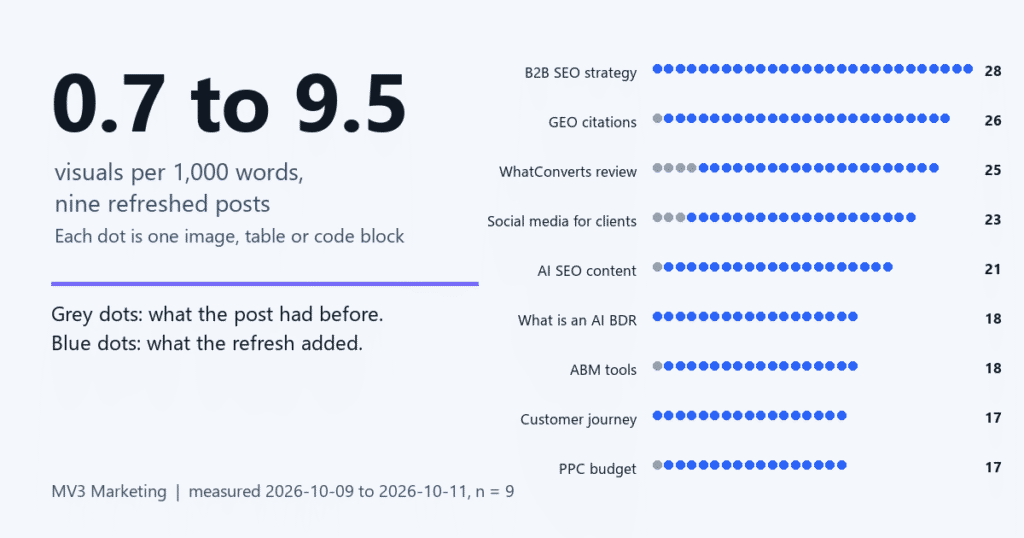
To refresh old blog posts well, start by admitting how they usually fail: a wall of text that nobody scans and no passage a search engine can lift cleanly. A post that was fine when you published it can read as dense and dated a year later, even when every fact still holds. This week we refreshed nine of our own posts, including our GEO citations post and our PPC budget framework, and measured the change. Disclosure: MV3 Marketing sells content services, so we gain if you hire help with this. The method below works without us.
Before you start
- Time: about 30 minutes to measure and plan, plus writing time per post.
- Tools: Search Console access, Python 3 with the requests package, an image or chart tool.
- Level: beginner to intermediate.
- You will end with: a measured before and after for each post and a dated baseline to judge results later.
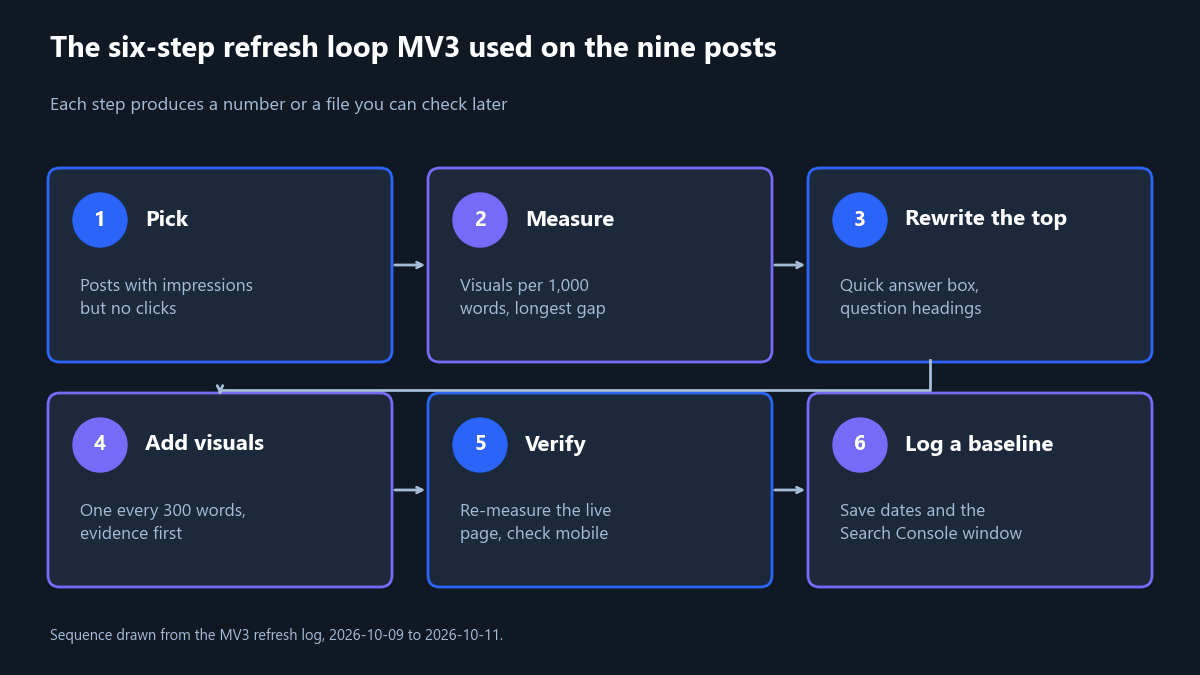
Step 1: Pick posts with impressions but no clicks
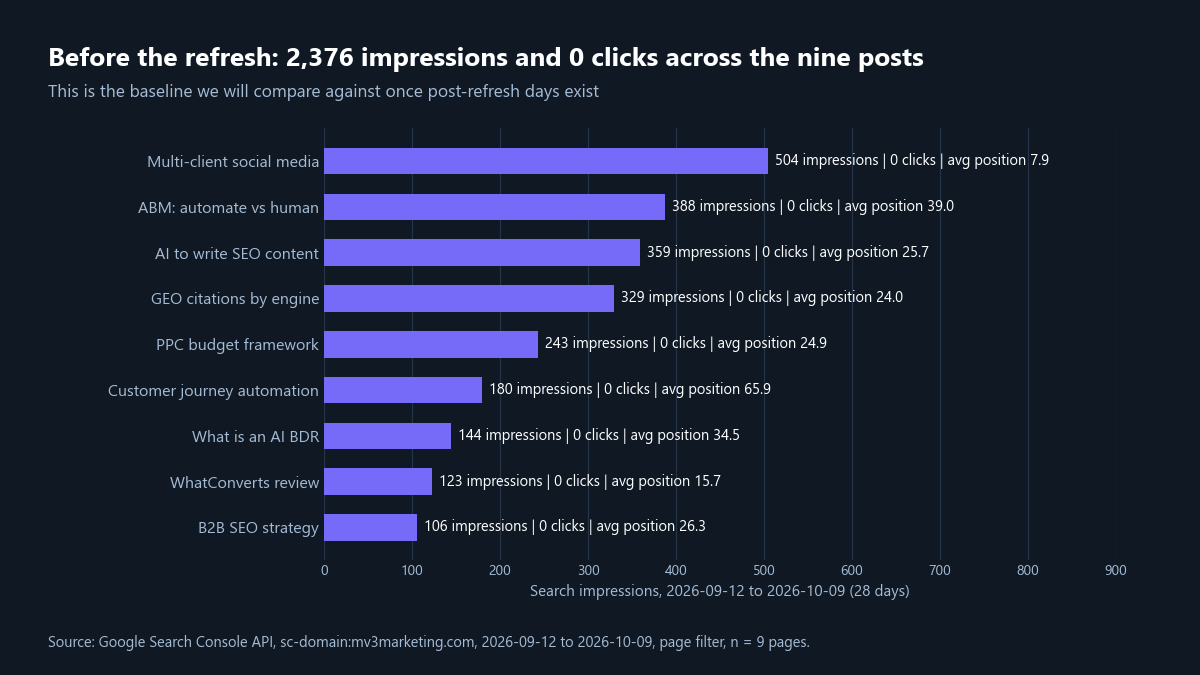
Open Search Console, filter by page, and set the last 28 days. Sort by impressions. Posts that show up in results but earn no clicks are your first candidates, because people already see them and skip them. Save the export, since it is your baseline.
Expected result: a list of pages with impressions, clicks and average position. Common mistake: choosing posts by age alone. Age tells you nothing about whether a post is seen.
Step 2: Measure visual density
Count images, tables, code blocks and video per 1,000 words, plus the longest run of words with none of them. The script below does this for any URL. We ran it on 2026-10-11 against one refreshed post and one post we have not refreshed.
import re, sys, requests
from html.parser import HTMLParser

SKIP = {"script", "style", "nav", "footer", "aside", "form", "noscript"}

class Counter(HTMLParser):
    def __init__(self):
        super().__init__()
        self.words, self.marks, self.skip, self.art = 0, [], 0, 0
    def handle_starttag(self, tag, a):
        a = dict(a)
        if tag in SKIP: self.skip += 1
        if tag == "article": self.art += 1
        if not (self.art and not self.skip): return
        junk = re.search(r"logo|avatar|icon|emoji", (a.get("src") or "") + (a.get("class") or ""), re.I)
        small = (a.get("width") or "999").isdigit() and int(a.get("width") or 999) < 200
        if tag in ("img", "table", "pre", "video") and not junk and not small:
            self.marks.append(self.words)
    def handle_endtag(self, tag):
        if tag in SKIP and self.skip: self.skip -= 1
        if tag == "article" and self.art: self.art -= 1
    def handle_data(self, text):
        if self.art and not self.skip: self.words += len(text.split())

def visuals_per_1000(url):
    html = requests.get(url, headers={"User-Agent": "Mozilla/5.0 Chrome/124.0"}, timeout=60).text
    c = Counter(); c.feed(html)
    edges = [0] + sorted(c.marks) + [c.words]
    gap = max(b - a for a, b in zip(edges, edges[1:]))
    return c.words, len(c.marks), round(len(c.marks) / max(c.words, 1) * 1000, 2), gap

if __name__ == "__main__":
    for u in sys.argv[1:]:
        w, v, d, g = visuals_per_1000(u)
        print(f"{u.rstrip('/').split('/')[-1][:38]:<38} words={w} visuals={v} per_1k={d} longest_gap={g}")
Run it with python vpk.py URL1 URL2. Output:
ppc-budget-management-framework        words=2952 visuals=17 per_1k=5.76 longest_gap=430
seo-migration-checklist-b2b-saas       words=2359 visuals=2 per_1k=0.85 longest_gap=1072
b2b-seo-strategy-organic-pipeline      words=4261 visuals=28 per_1k=6.57 longest_gap=371
Expected result: the refreshed PPC post scores 5.76 with a longest gap of 430 words; the untouched migration checklist scores 0.85 with a gap of 1,072. Common mistake: counting logos and icons. The script skips small and icon-like images.
Step 3: Rewrite the top of the post
Put a 40 to 60 word answer first, in a labelled box. State the outcome, the time and the tools. Then make each H2 a plain question or a numbered step. A reader, and a machine, should be able to quote that opening without any other context.
On our PPC post the opening was a long paragraph. After the rewrite it starts with a quick answer box, then a short list of what you need.
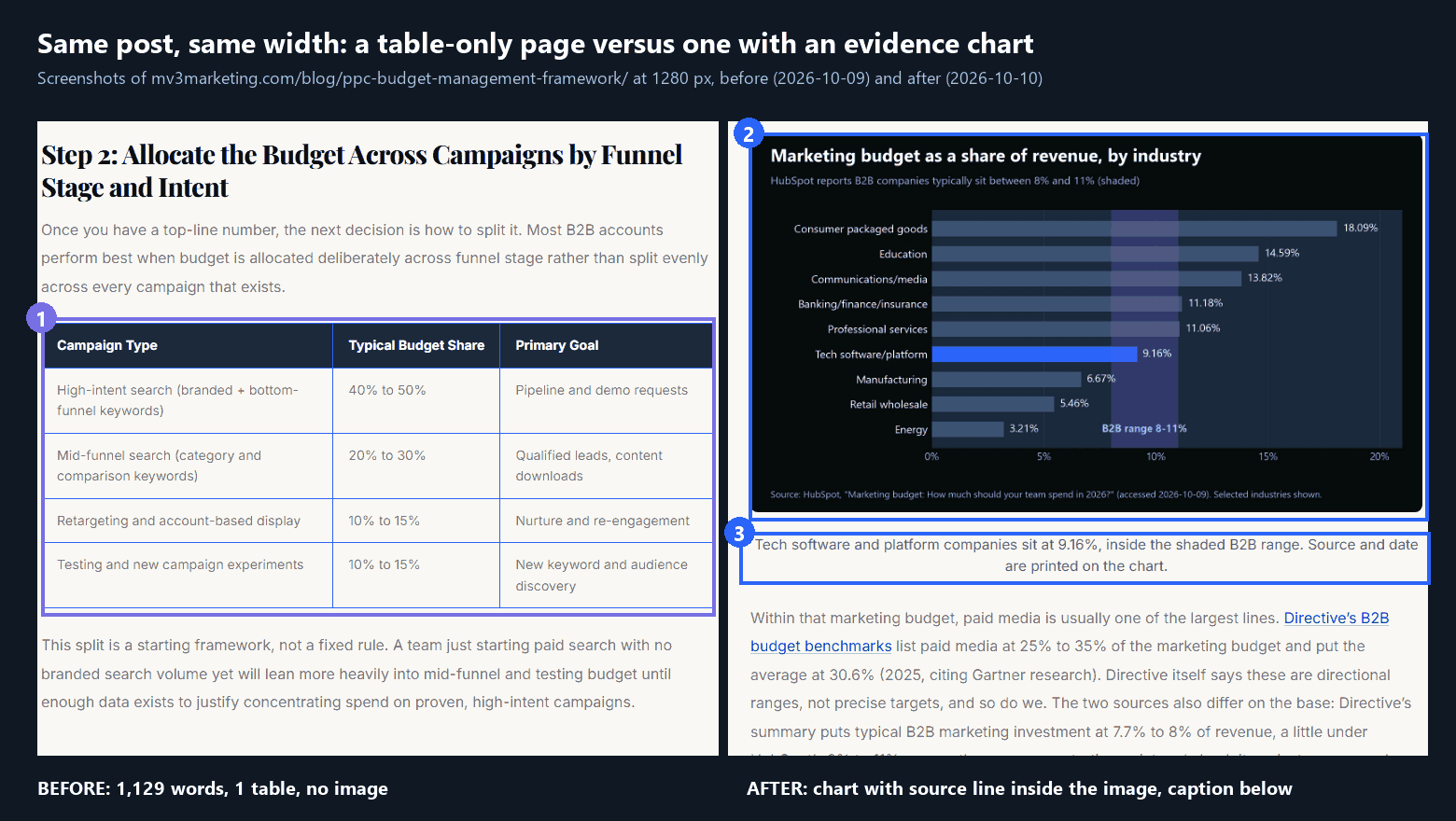
Expected result: the first screen answers the question. Common mistake: burying the answer under a story. Lead with it and tell the story later.
Step 4: Add a visual every 300 words, evidence first
Add a visual wherever a claim could be shown. Prefer evidence: a chart drawn from data you hold, with the source and date printed in the image, or an annotated screenshot of something real. Use diagrams for sequences. Give each a one-sentence caption and a descriptive alt text. Keep images wide enough to read on mobile, at least 1,200 pixels.
Keep every existing fact, source and URL while you do this. The refresh changes how the page is built, not what it claims. If a number cannot be traced to a source and a date, remove it or label it as an estimate. A new chart built on a shaky figure makes the page worse, not better.
Three of our posts show the effect. The GEO post had one visual in 2,804 words, a 2,692 word stretch with none. After the refresh its longest gap was 238 words.
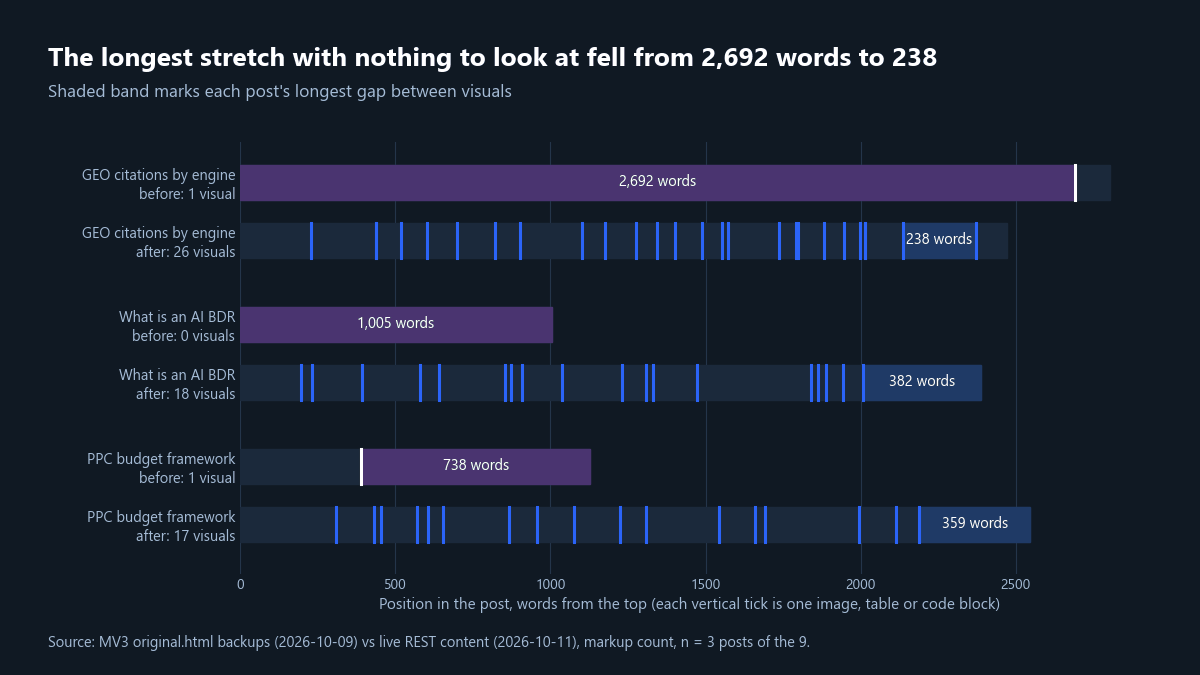
Expected result: no gap longer than 450 words. Common mistake: decoration. A stock photo is not evidence and does not count.
Step 5: Re-measure the live page
Publish, clear the cache, and run the script again on the public URL. Check the page on a phone width as well. We report two counts because they answer different questions. The markup count leaves table and code text out of the word total. The rendered count uses all visible article text, so its ratio is lower.
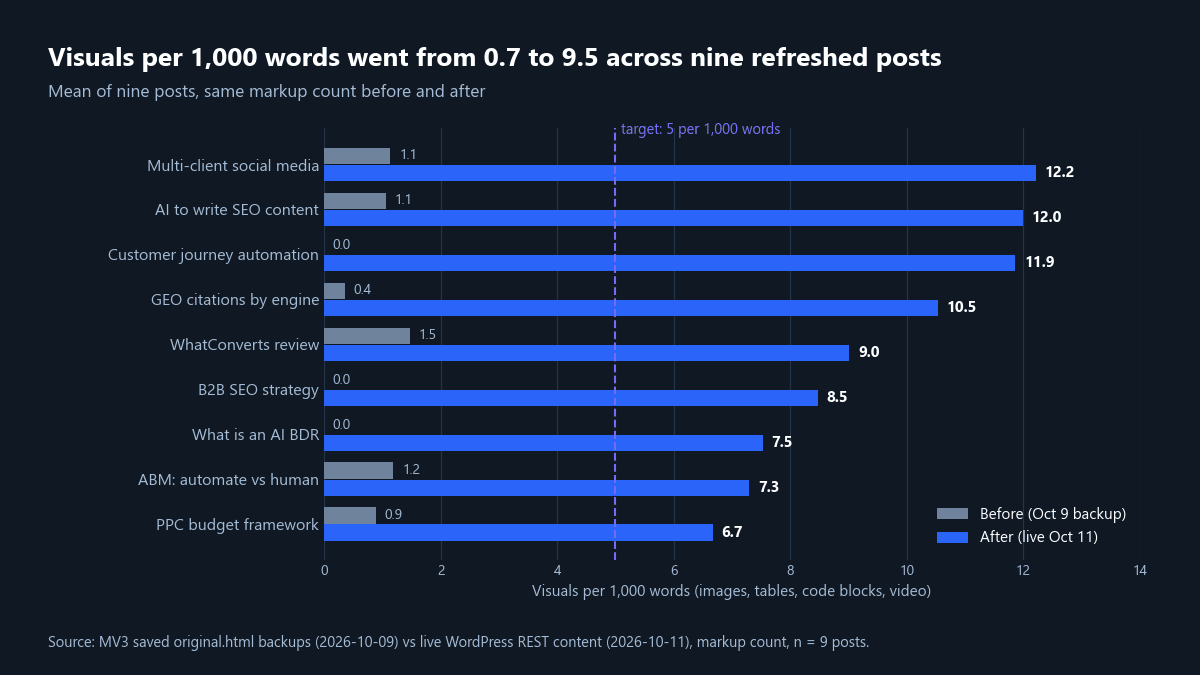
| Post | Before (markup) | After (markup) | After (rendered page) |
|---|---|---|---|
| Multi-client social media | 1.1 | 12.2 | 7.9 |
| AI to write SEO content | 1.1 | 12.0 | 6.5 |
| Customer journey automation | 0.0 | 11.9 | 6.4 |
| GEO citations by engine | 0.4 | 10.5 | 7.1 |
| WhatConverts review | 1.5 | 9.0 | 7.0 |
| B2B SEO strategy | 0.0 | 8.5 | 6.2 |
| What is an AI BDR | 0.0 | 7.5 | 5.7 |
| ABM: automate vs human | 1.2 | 7.3 | 5.6 |
| PPC budget framework | 0.9 | 6.7 | 5.2 |
| Mean of nine | 0.7 | 9.5 | 6.4 |
Source: MV3 original.html backups (2026-10-09), live REST content and rendered pages (2026-10-11), n = 9 posts. Expected result: at least 5 on the rendered count. Common mistake: comparing a before measured one way with an after measured another way.
Step 6: Log a baseline, then wait
Record the date each refresh went live and keep the Search Console export from Step 1. Our refreshes went live on 2026-10-10 and 2026-10-11, but Search Console data ended on 2026-10-09 when we checked. That leaves no post-refresh days, so we cannot say anything about rankings or clicks yet.
Search Console data ran two days behind when we checked, and a short window proves little. Write down what you expect, pick a review date, and compare like with like: the same pages, the same 28 day length, the same query filters.
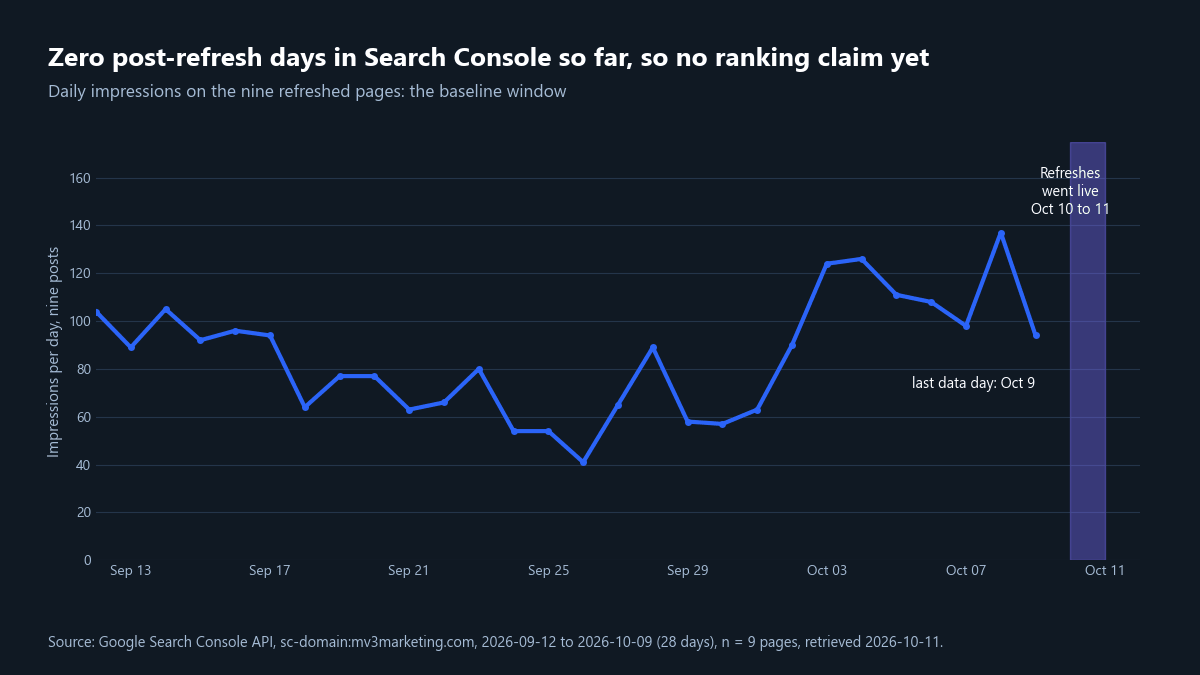
Expected result: a dated baseline file. Common mistake: judging a refresh after two days. We will compare at least 28 days after launch.
Troubleshooting
| Symptom | Likely cause | Fix |
|---|---|---|
| Words = 0 | The theme has no article tag | Change the selector in the script to your content wrapper |
| Score looks too high | Icons or tracking images counted | Skip small images and icon class names |
| Browser count is lower than the script | Images load by JavaScript | Measure the rendered page with a headless browser |
| Charts unreadable on a phone | Image narrower than 1,200 pixels | Re-render wider and enlarge the labels |
Checklist recap
- Export Search Console pages and save the baseline.
- Run the script and record words, visuals, per 1,000 and longest gap.
- Put a 40 to 60 word answer first.
- Add a visual at least every 450 words, with half as evidence.
- Re-measure the live page and check mobile.
- Log the go-live date and wait 28 days.
FAQ
Does refreshing a post get it cited by AI search?
We cannot show that yet. We have no post-refresh Search Console days and did not track AI citations. We wrote short self-contained answers and sourced charts, but whether engines cite them is untested. Our GEO citation gap framework covers how to check.
How many visuals should an old post have?
Our working target is 5 per 1,000 words, with no gap over 450 words. That is our own standard, not a Google rule. The nine posts reached a mean of 6.4 on the rendered count.
Should I change the URL when I refresh?
We kept every URL. A stable address keeps its history, and the refresh changes the content, not the location. For citation basics see how to get cited by ChatGPT and Perplexity.
Want this done across your whole archive? Book a call with MV3 Marketing.
Share this article

Vance Moore is Chief Growth Officer at MV3 Marketing and leads its team of SEO professionals, engineers and auditors.
Ready to audit your organic growth opportunity?
$2,500 flat. 5 business days. Six deliverables tied to pipeline , not rankings. No retainer required.
Get the Organic Growth Audit →