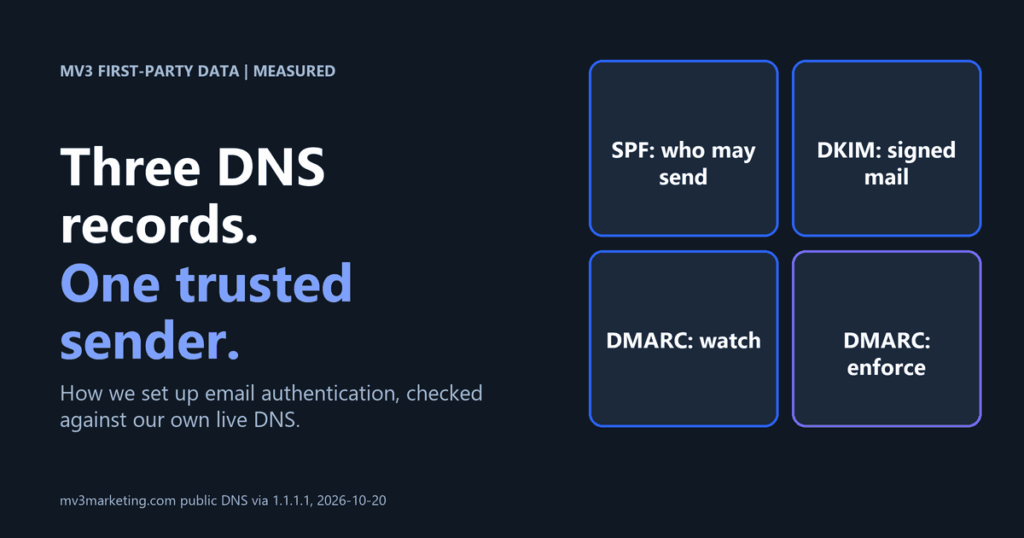
What does our own DNS look like for email authentication?
Before writing a how-to on email deliverability, we checked our own domain. On 2026-10-20 we queried public DNS for mv3marketing.com through the 1.1.1.1 resolver. The results are public records, so anyone can repeat the check with the commands shown in Step 5.
We found an SPF record that authorizes Google Workspace only and ends in a hard fail. We found a DMARC policy of quarantine at 100 percent. We found a DKIM key published under the selector named google and a second selector named resend. We also found that the sending subdomain called send publishes its own SPF record, which authorizes Amazon SES.
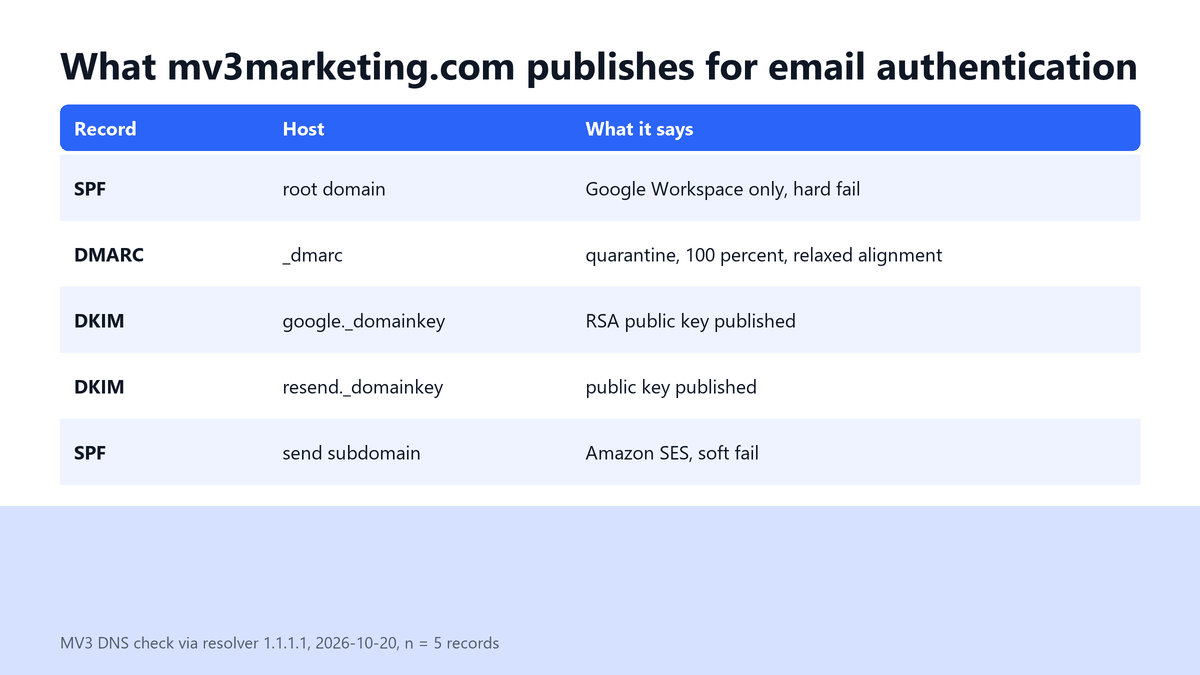
Two things stand out. First, the root domain and the sending subdomain carry separate SPF records, which keeps each record short and each sender easy to audit. Second, the DMARC policy is enforced, not just monitored. We did not check whether every message we send passes alignment, so we are not claiming a pass rate. We are showing what is published.
Disclosure. MV3 Marketing sells outbound and email infrastructure setup for B2B SaaS teams (see our outbound marketing service). The steps below work without us, and we show our own records so you can compare.
Why does email deliverability depend on authentication now?
Mailbox providers stopped treating authentication as optional. Google states the date and the rule plainly. Its sender guidelines say that starting February 1, 2024, all senders to Gmail accounts must meet a baseline, and senders above 5,000 messages a day must meet a stricter one.
| Requirement | All senders | More than 5,000 messages a day |
|---|---|---|
| SPF and DKIM | SPF or DKIM | SPF and DKIM |
| DMARC | Not required | Required, policy can be none |
| Spam rate in Postmaster Tools | Below 0.30% | Below 0.30% |
| One-click unsubscribe | Marketing and subscribed messages | Marketing and subscribed messages |
Most B2B SaaS teams send far fewer than 5,000 messages a day to Gmail from one domain. That does not make DMARC optional in practice. A published DMARC record is how you receive reports about who is sending as you, and Google tells the larger senders to set it up.
Before you start
You need access to your DNS host, a list of every tool that sends email, and an inbox where you can read raw message headers. Skill level is intermediate. Time is about two hours for the records and two to four weeks of report reading before you enforce anything.

Step 1: List every system that sends mail as your domain
Authentication fails most often for a boring reason: someone forgot a sender. Open a sheet and write one row per system. Include your mailbox provider, your marketing automation tool, your product’s transactional email, your CRM sequences, your support desk and any outbound platform.
| System | Sends what | From domain | Can sign DKIM? |
|---|---|---|---|
| Mailbox provider | Staff email | Root domain | Yes |
| Marketing automation | Newsletters | Subdomain | Yes |
| Product email service | Receipts, alerts | Subdomain | Yes |
| Support desk | Ticket replies | Root domain | Check vendor docs |
Expected result: a complete list with the From domain for each system. Common mistake: forgetting tools that send on behalf of a person, such as sales sequencing, because they feel like a mailbox rather than a system.
Step 2: Publish one SPF record
SPF is a DNS text record that lists which servers may send for a domain. A domain must publish exactly one. RFC 7208 says that if the resulting record set includes more than one record, evaluation returns a permanent error, so merge senders into one record instead of adding a second.
Here is the record we publish on the root domain. It authorizes one provider and rejects everything else.
v=spf1 include:_spf.google.com -allEach include, a, mx, ptr, exists and redirect term costs a DNS lookup. RFC 7208 says implementations must limit those terms to 10 during evaluation and return a permanent error above that. The small script below counts the top-level terms. It does not follow nested includes, so treat its number as a floor.
import re

def spf_terms(record):
    parts = record.split()
    if parts[0].lower() != "v=spf1":
        raise ValueError("not an SPF record")
    n = 0
    for p in parts[1:]:
        p = p.lstrip("+-~?")
        if re.match(r"(include:|a|mx|ptr|exists:|redirect=)", p, re.I):
            n += 1
    return n

print(spf_terms("v=spf1 include:_spf.google.com -all"))
print(spf_terms("v=spf1 include:_spf.google.com include:amazonses.com include:mailgun.org mx a -all"))
We ran it on 2026-10-20. Output:
1
5
Expected result: one SPF TXT record at the root of each sending domain, under the limit. Common mistake: ending in a soft fail while you believe you enforce. A tilde all means soft fail and a minus all means hard fail, so choose on purpose. We use a hard fail on the root and a soft fail on the sending subdomain.
Step 3: Turn on DKIM signing for each sender
DKIM adds a cryptographic signature to each message. The receiver finds your public key in DNS under a name built from a selector. RFC 6376 explains that selectors let a domain keep multiple public keys at once, which is why each sender gets its own.
In every sending tool, find the domain authentication or DKIM page. The tool shows you a host name and a value to publish. Copy them exactly, then wait for the tool to confirm that it sees the record. Our root domain publishes a key at the host google._domainkey and the sending service publishes one at resend._domainkey.
nslookup -type=TXT google._domainkey.mv3marketing.com. 1.1.1.1The answer begins with the version tag and the key type, then the public key. The key itself is long, so we do not paste it here. Both selectors answered on 2026-10-20.
Expected result: each sender shows DKIM as verified in its own dashboard. Common mistake: publishing the key at the wrong host. DNS hosts often append your domain for you, so entering the full name can produce a doubled domain. Check the result with the command above.
Step 4: Publish DMARC at p=none, then tighten
DMARC tells receivers what to do when a message fails authentication and where to send reports. RFC 7489 defines three policies: none asks for no specific action, quarantine asks that failures be treated as suspicious, and reject asks receivers to reject failures. The percentage tag is optional and defaults to 100.
Start with monitoring. Publish this TXT record at the host _dmarc, replacing the address with a mailbox you read.
v=DMARC1; p=none; rua=mailto:[email protected]; pct=100This is our own published record, shown for comparison. It is enforced rather than monitored.
v=DMARC1; p=quarantine; rua=mailto:[email protected],mailto:[email protected]; pct=100; adkim=r; aspf=r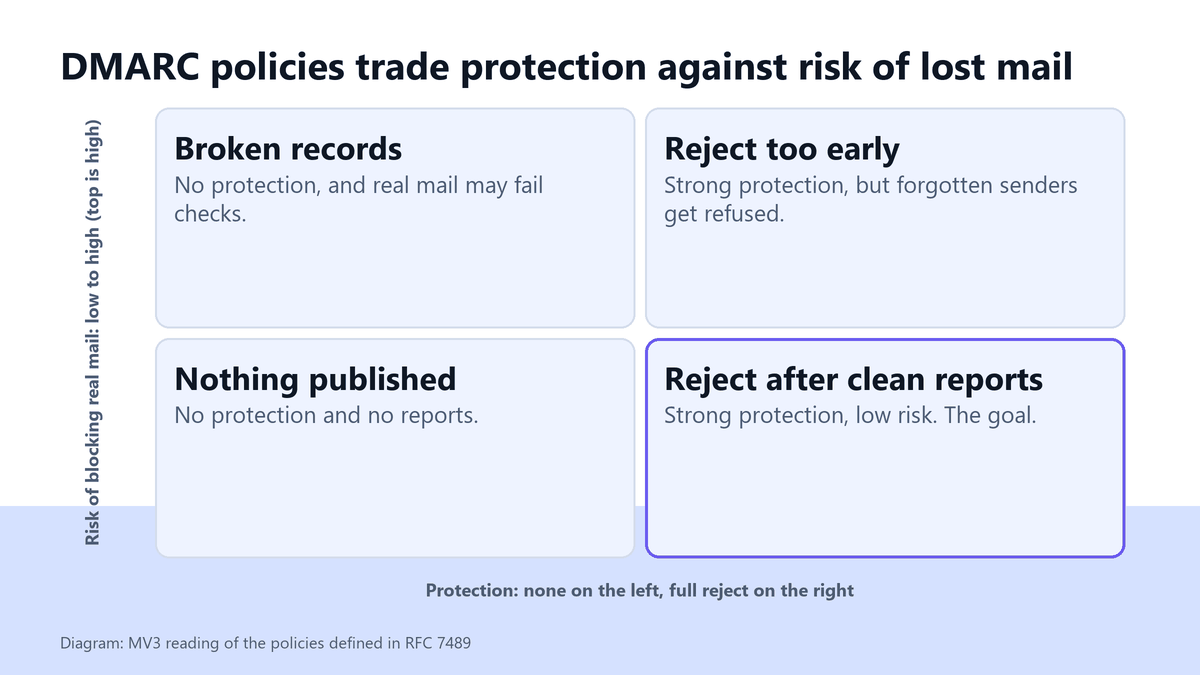
The parser below reads a record into tags and fails loudly on a missing policy. We ran it on a sample record and on a broken one.
def dmarc_parse(record):
    tags = dict(t.strip().split("=", 1) for t in record.split(";") if "=" in t)
    tags.setdefault("pct", "100")
    if tags.get("v") != "DMARC1" or "p" not in tags:
        raise ValueError("invalid DMARC record")
    if tags["p"] not in ("none", "quarantine", "reject"):
        raise ValueError("bad policy")
    return tags

d = dmarc_parse("v=DMARC1; p=quarantine; rua=mailto:[email protected]; pct=100; adkim=r; aspf=r")
print("DMARC:", d["p"], "pct=" + d["pct"], "adkim=" + d["adkim"], "aspf=" + d["aspf"])
try:
    dmarc_parse("v=DMARC1; rua=mailto:[email protected]")
except ValueError as e:
    print("Missing p tag ->", e)
DMARC: quarantine pct=100 adkim=r aspf=r
Missing p tag -> invalid DMARC recordExpected result: a DMARC TXT record that parses, with a reporting address that receives mail. Common mistake: jumping to reject on day one. A forgotten sender then gets refused silently. Read reports for two to four weeks first. That window is our working practice, not a rule from the RFC.
Step 5: Test with real messages and read the reports
Send a message from each system to a Gmail inbox you control. Open the message, choose the option to show the original, and read the authentication summary. You want SPF, DKIM and DMARC all reported as pass. Google also requires that the domain in the From header align with either the SPF domain or the DKIM domain to pass DMARC alignment.
Then confirm the published records from outside your network:
nslookup -type=TXT mv3marketing.com. 1.1.1.1
nslookup -type=TXT _dmarc.mv3marketing.com. 1.1.1.1
nslookup -type=MX send.mv3marketing.com. 1.1.1.1
The trailing dot and the explicit resolver matter. On our own machine, a lookup without them was answered with the wrong zone because of a local search suffix. Naming the resolver gave a clean answer, and that is the output behind the table at the top of this post.
Expected result: three passes in the original message and matching records from an outside resolver. Common mistake: testing only the mailbox provider. Marketing and product senders sign differently, so test each one.
How do you fix the common failures?
| Symptom | Likely cause | Fix |
|---|---|---|
| SPF permanent error | Two SPF records, or too many lookups | Merge into one record and count lookup terms |
| DKIM fail | Key published at the wrong host or copied with a line break | Republish exactly as shown and re-query |
| DMARC fail with SPF and DKIM pass | From domain does not align with either authenticated domain | Send from the authenticated domain or sign with your own domain |
| No DMARC reports arrive | Wrong reporting address or no mail sent yet | Check the rua tag and wait a day after sending |
What should the finished checklist look like?
Checklist. One SPF record per sending domain, under 10 lookups. DKIM verified in every sender. DMARC published with a reporting address. A sender inventory that someone owns. Reports read on a schedule. Policy raised only after clean reports.
If you want a second pair of eyes on your records, read how we think about choosing an email platform, how teams apply AI to email marketing, and how this fits an outbound program. To have us check your domain, book a call.
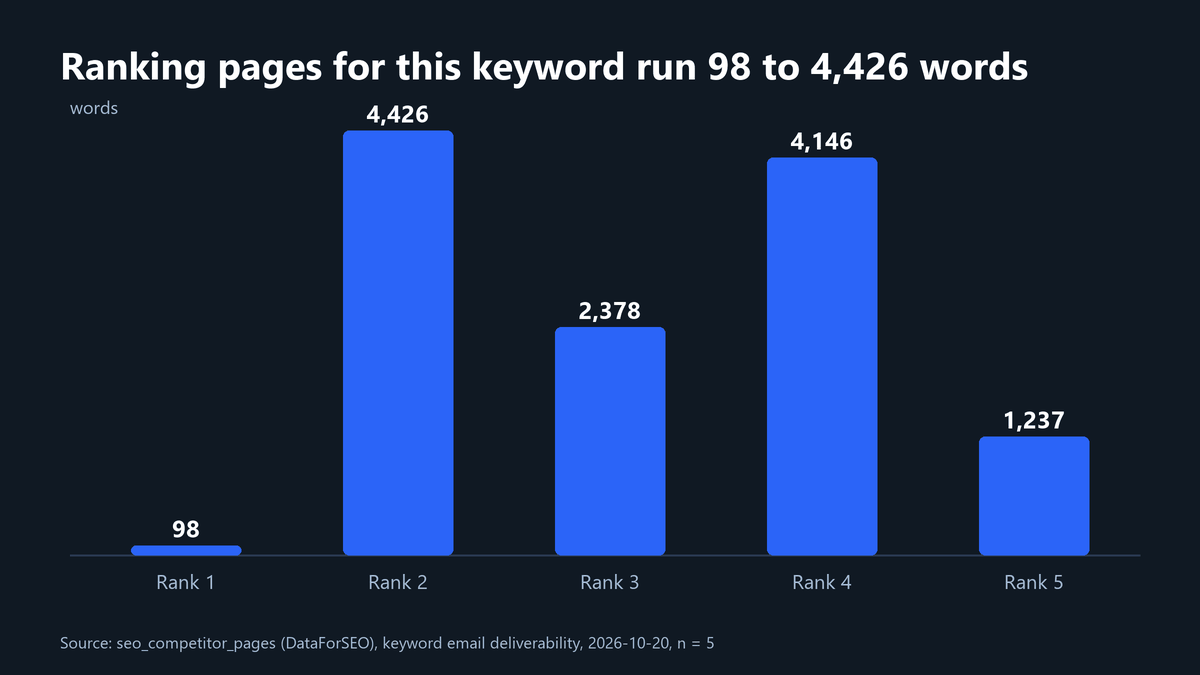
How long are the pages that rank for this topic?
We pulled the five pages tracked for the keyword email deliverability from our competitor table. Length varies a lot, and none of the five includes a data table. Three of the five carry FAQ markup.
What are the Gmail spam-rate limits?
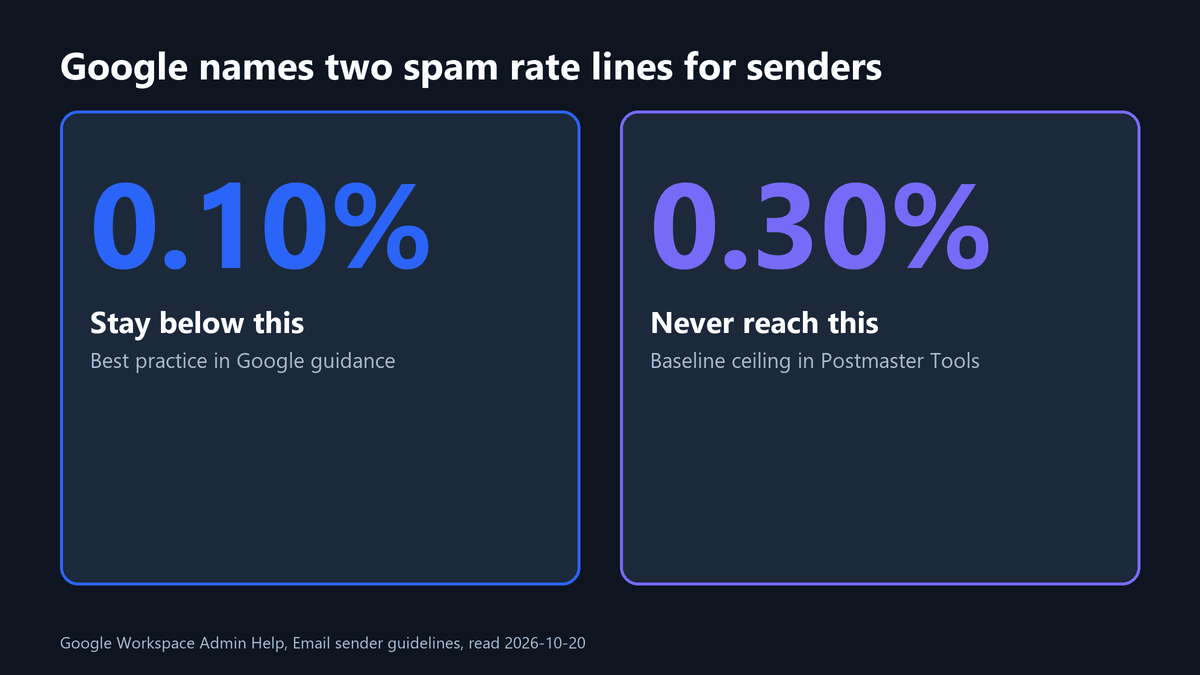
Authentication gets you into consideration. Reputation then decides placement. Google tells senders to keep the spam rate reported in Postmaster Tools below 0.30 percent in the baseline requirements, and its best-practice guidance goes further, saying to keep it below 0.10 percent and avoid ever reaching 0.30 percent.
FAQ
Do I need DMARC if I send fewer than 5,000 emails a day?
Google requires DMARC for senders above that volume and not for the baseline group. Publish it anyway at p=none. The reports show who sends as your domain, which is useful at any volume.
What is the difference between SPF and DKIM?
SPF authorizes sending servers by listing them in DNS. DKIM signs each message with a key you publish in DNS. DMARC then checks that at least one of them aligns with the visible From domain.
How many SPF records can a domain have?
One. RFC 7208 says that more than one SPF record produces a permanent error. Merge senders into a single record.
Should I use a subdomain for marketing email?
Many teams do, because it separates reputation and keeps each SPF record short. We publish a separate SPF record on our sending subdomain. Treat it as a design choice, not a requirement.
When should I move DMARC from none to reject?
After reports show every legitimate sender passing. Move to quarantine first, watch for lost mail, then consider reject.
Share this article

Vance Moore is Chief Growth Officer at MV3 Marketing and leads its team of SEO professionals, engineers and auditors.
Ready to audit your organic growth opportunity?
$2,500 flat. 5 business days. Six deliverables tied to pipeline , not rankings. No retainer required.
Get the Organic Growth Audit →