Most robots.txt advice for AI crawlers ends at “paste these lines”. This guide adds the missing part, a repeatable test. We wrote the rules, ran them through the parser in Python’s standard library, and found two traps, one of them in our own file. MV3 Marketing sells SEO and GEO services, so we have a stake in you getting this right, but the method below needs only Python and a text editor. For common mistakes see our robots.txt guide for B2B SaaS. For evidence of who actually visits, see our AI crawler log file analysis.
Before you start
- Tools: Python 3 (we used 3.14.3, standard library only), your current robots.txt, and five sample URLs: home page, a blog post, pricing, an admin path and a staging path.
- Time and level: about 30 minutes, comfortable running a short script.
- You will end with: a tested policy file and a script you can rerun after every change.
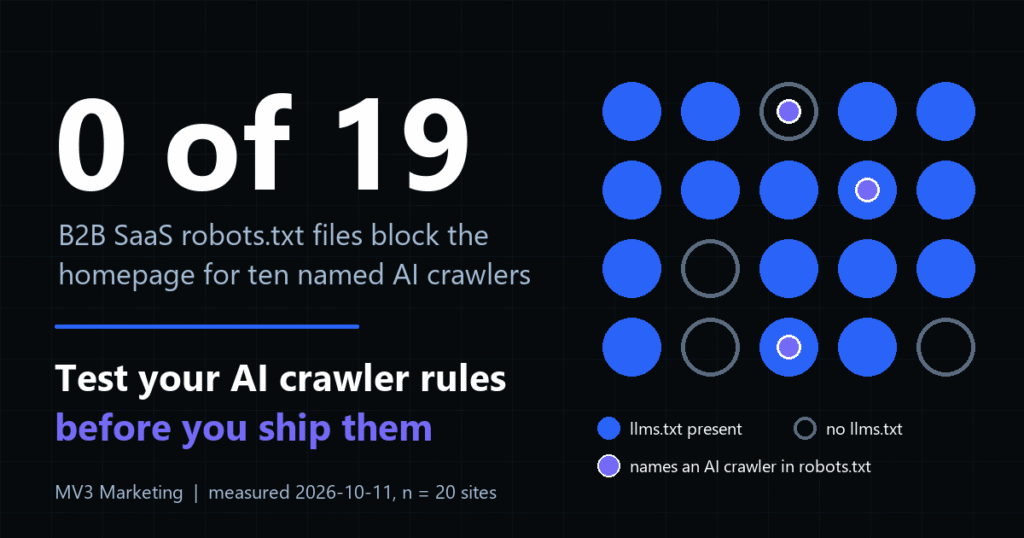
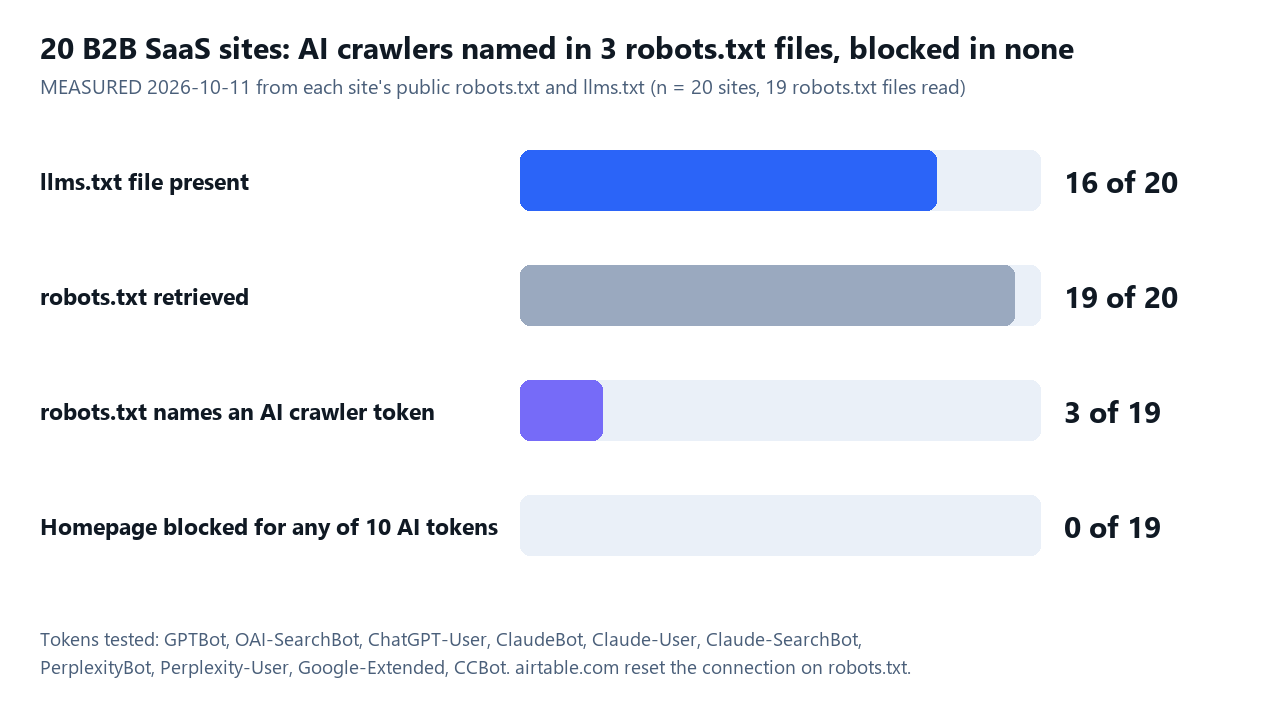
To see what peers do, we fetched robots.txt and llms.txt from 20 public B2B SaaS marketing sites on 2026-10-11 (MEASURED: Chrome user agent, one request per file, 1.5 seconds apart). Nineteen robots.txt files loaded; one site reset the connection. Three files name at least one AI crawler token, none block the homepage for any of ten tokens, and 16 of 20 sites serve an llms.txt file. The block test used Python’s parser and checked the homepage only.
Step 1: List each bot and its job
Each vendor publishes separate tokens for training, search and user-initiated fetches. Write down which you want before you write a rule. We read each vendor page on 2026-10-11: OpenAI, Anthropic, Perplexity, Google and Common Crawl.
| Token | Vendor | Purpose in the vendor’s words |
|---|---|---|
GPTBot |
OpenAI | Crawls content that may be used to train generative AI foundation models. |
OAI-SearchBot |
OpenAI | Surfaces sites in ChatGPT search; opted-out sites are not shown in search answers. |
ChatGPT-User |
OpenAI | Visits pages for user actions; OpenAI says robots.txt rules may not apply. |
ClaudeBot |
Anthropic | Collects web content that could contribute to model training. |
Claude-User |
Anthropic | Fetches pages when a person asks Claude a question. |
Claude-SearchBot |
Anthropic | Indexes content to improve search result quality. |
PerplexityBot |
Perplexity | Surfaces and links sites in Perplexity search; not used for foundation model training. |
Perplexity-User |
Perplexity | Supports user actions; not used for crawling or training. |
Google-Extended |
Controls use for Gemini training and grounding; no separate user agent string; does not affect Google Search inclusion. | |
CCBot |
Common Crawl | Open web crawl; opt out with Disallow: /. |
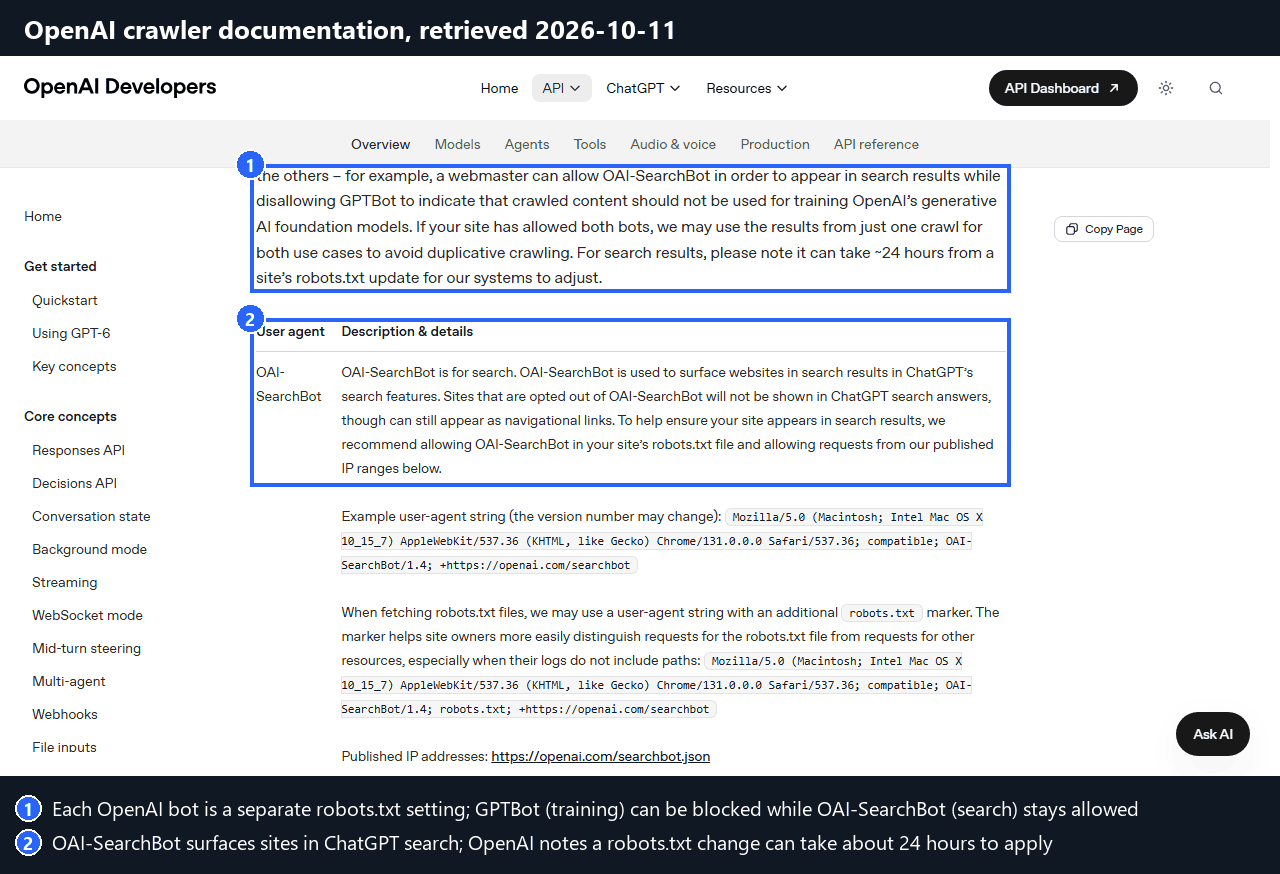
Expected result: one line of policy per token. Our default for a B2B SaaS publisher that wants AI citations is to block training tokens and allow search tokens. That is a choice, not a rule: Anthropic notes that disabling Claude-SearchBot may reduce visibility in search results. Common mistake: blocking GPTBot and assuming ChatGPT search is blocked too. OpenAI states the settings are independent.
Step 2: Write one group per purpose
Stack several User-agent lines above one rule when the bots share a policy. The first draft below blocks the four training tokens and allows three search tokens. Anthropic’s page lists three bots and says its bots honor robots.txt directives.
User-agent: GPTBot
User-agent: ClaudeBot
User-agent: Google-Extended
User-agent: CCBot
Disallow: /

User-agent: OAI-SearchBot
User-agent: Claude-SearchBot
User-agent: PerplexityBot
Allow: /

User-agent: *
Disallow: /admin/
Expected result: a robots.txt file that reads cleanly. Common mistake: using a made-up token such as “AI-bots”. Only the exact tokens in the table are honored.
Step 3: Simulate every rule with urllib.robotparser
Python’s urllib.robotparser answers one question: may this user agent fetch this URL? Feed it the draft text, then ask about all five sample URL types for every token. Never test only the home page.
from urllib.robotparser import RobotFileParser

def check(txt, agents, paths, host="https://example.com"):
    rp = RobotFileParser()
    rp.parse(txt.splitlines())
    for ua in agents:
        row = " ".join(
            f"{p}={'ALLOW' if rp.can_fetch(ua, host + p) else 'BLOCK'}" for p in paths)
        print(f"{ua:<16} {row}")

check(POLICY,
      ["GPTBot", "ClaudeBot", "Google-Extended", "CCBot",
       "OAI-SearchBot", "Claude-SearchBot", "PerplexityBot", "Googlebot"],
      ["/", "/blog/post", "/admin/login"])
Output of that script (Python 3.14.3, 2026-10-11):
GPTBot           /=BLOCK /blog/post=BLOCK /admin/login=BLOCK
ClaudeBot        /=BLOCK /blog/post=BLOCK /admin/login=BLOCK
Google-Extended  /=BLOCK /blog/post=BLOCK /admin/login=BLOCK
CCBot            /=BLOCK /blog/post=BLOCK /admin/login=BLOCK
OAI-SearchBot    /=ALLOW /blog/post=ALLOW /admin/login=ALLOW
Claude-SearchBot /=ALLOW /blog/post=ALLOW /admin/login=ALLOW
PerplexityBot    /=ALLOW /blog/post=ALLOW /admin/login=ALLOW
Googlebot        /=ALLOW /blog/post=ALLOW /admin/login=BLOCK
Expected result: every training token blocked, every search token allowed. The test also shows a defect. The three search bots can fetch /admin/login, and the Disallow: /admin/ line under * never reaches them. Common mistake: reading the file by eye and trusting it.
Step 4: Repeat shared rules inside named groups
Google’s robots.txt documentation says only one group is valid for a given crawler and that user-agent specific groups and global groups (*) are not combined. A named group replaces the * group instead of adding to it. Our run matches: GPTBot was allowed on a path only the * group blocked.
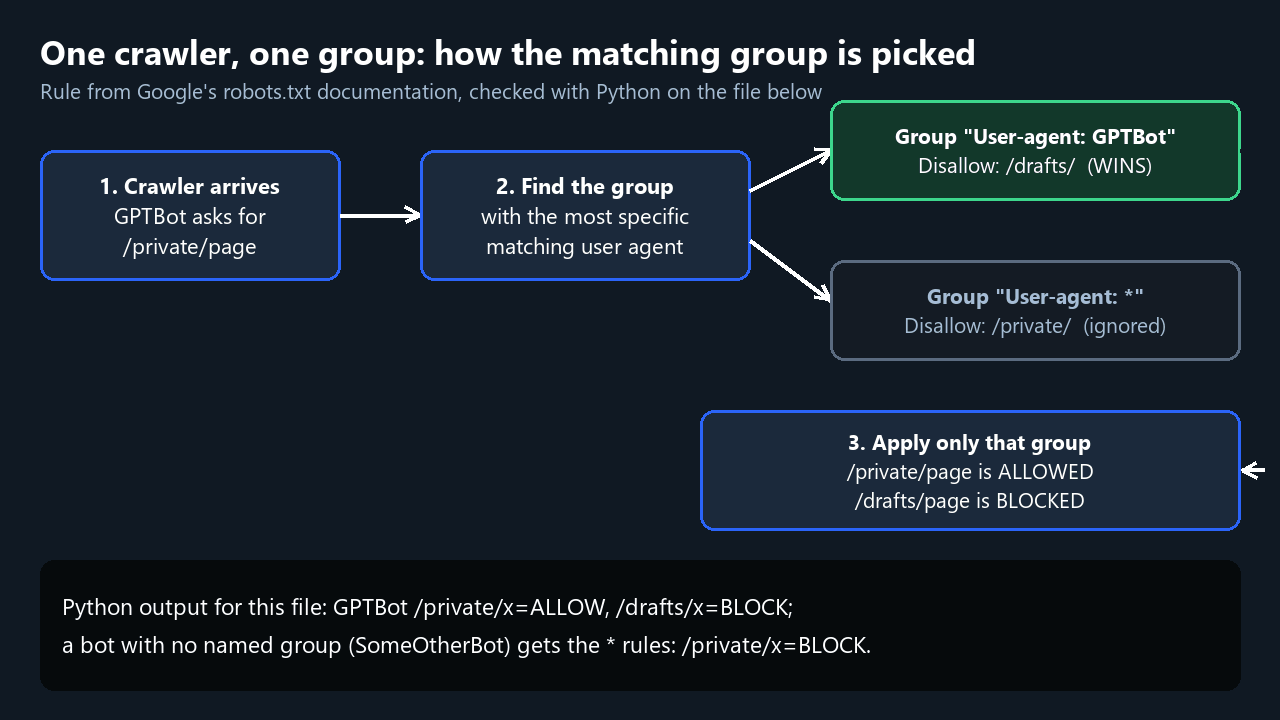
The fix is to copy each shared Disallow line into every named group that should honor it:
User-agent: GPTBot
User-agent: ClaudeBot
User-agent: Google-Extended
User-agent: CCBot
Disallow: /

User-agent: OAI-SearchBot
User-agent: Claude-SearchBot
User-agent: PerplexityBot
Disallow: /admin/

User-agent: *
Disallow: /admin/
Re-run the script. Expected result: OAI-SearchBot, Claude-SearchBot and PerplexityBot now return BLOCK for /admin/login and ALLOW for /blog/post, as in the right-hand panel above. Common mistake: fixing the first bot and forgetting the others in the stack.
Step 5: Put Allow lines before Disallow lines
Say you want GPTBot kept out of everything except the blog. Google’s documentation says the most specific rule, by path length, wins, so Allow: /blog/ beats Disallow: / in any order. Python’s parser did not agree in our run: with Disallow: / listed first it returned BLOCK for /blog/post. Listing Allow first returned ALLOW.
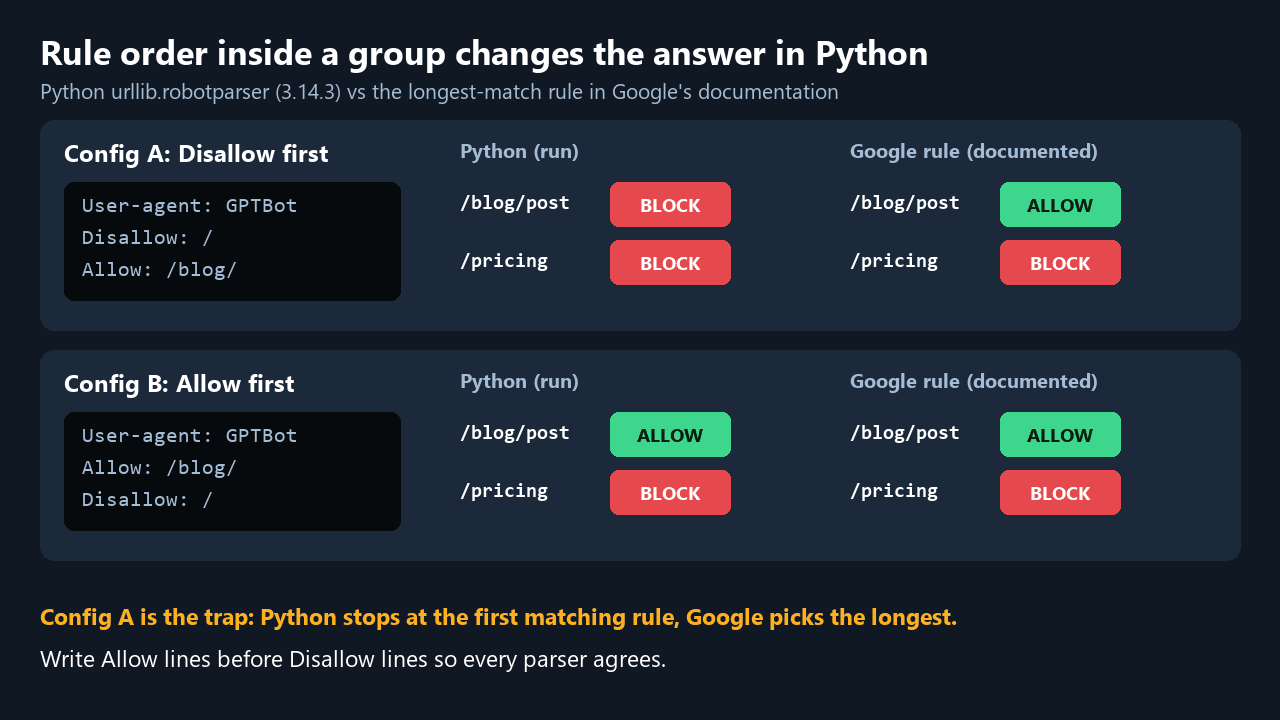
User-agent: GPTBot
Allow: /blog/
Disallow: /
Expected result: /blog/post=ALLOW and /pricing=BLOCK in Python. Common mistake: trusting one parser. Write the file so both agree.
Step 6: Verify the live file and set llms.txt expectations
Download the production file with curl -sSL https://www.example.com/robots.txt -o robots.txt, then run the same checks on it. Rules apply per host, protocol and port, so repeat for every subdomain.
from urllib.robotparser import RobotFileParser

rp = RobotFileParser()
with open("robots.txt", encoding="utf-8") as f:
    rp.parse(f.read().splitlines())

tests = [("GPTBot", "/blog/"), ("GPTBot", "/wp-login.php"),
         ("Googlebot", "/wp-login.php"), ("SomeBot", "/wp-login.php")]
for ua, path in tests:
    ok = rp.can_fetch(ua, "https://www.mv3marketing.com" + path)
    print(f"{ua:<10} {path:<14} {'ALLOW' if ok else 'BLOCK'}")
Our own file, run on 2026-10-11:
GPTBot     /blog/         ALLOW
GPTBot     /wp-login.php  ALLOW
Googlebot  /wp-login.php  BLOCK
SomeBot    /wp-login.php  BLOCK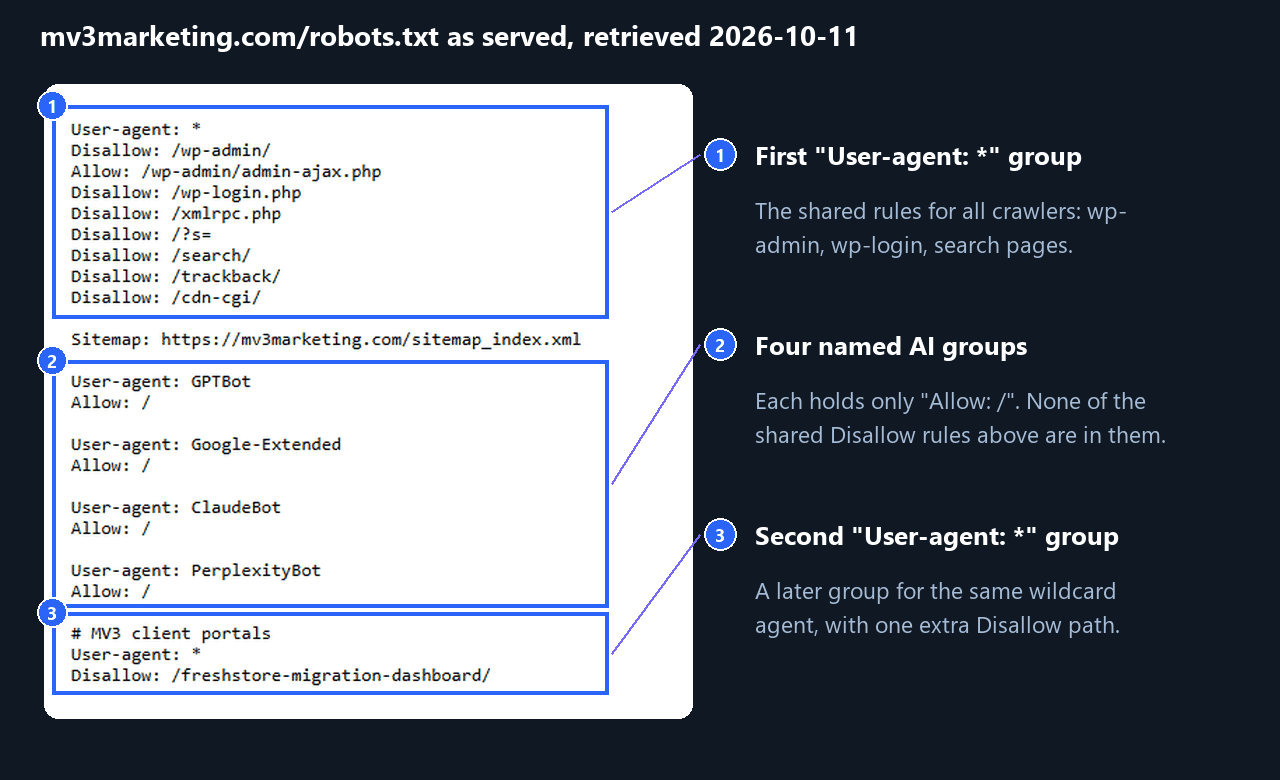
Our file shows the Step 4 trap: GPTBot is allowed on /wp-login.php while Googlebot is blocked. It also has a second wildcard group. Google’s documentation says rules for the same user agent are combined, but Python kept only the first wildcard group in our run, so the two tools can read one file differently. We are reporting this as found, not as fixed.
llms.txt: it is not an access-control file. The crawler-control sections of the five vendor pages above specify robots.txt tokens, and llms.txt appears only as a site’s own documentation index. Sixteen of the 20 sites we measured serve one. Whether it affects citations is a separate question, covered in our llms.txt implementation guide. OpenAI and Perplexity both say a robots.txt change can take about 24 hours to take effect, so recheck then.
Troubleshooting
| Symptom | Likely cause | Fix |
|---|---|---|
| A search bot fetches a path you disallowed | A named group replaced the * group | Repeat the Disallow lines inside the named group (Step 4) |
| Allow rule ignored in Python, honored by Google | Disallow listed before Allow | Put Allow lines first (Step 5) |
| A blocked bot still shows in logs | User-initiated bots may not follow robots.txt, or the user agent is spoofed | Check vendor IP lists; see the log analysis guide |
| Edit has no visible effect | Vendors say changes can take about 24 hours | Wait, then recheck logs |
| Test passes but crawlers differ | You tested the wrong host or protocol | Fetch the production file for each host |
Checklist recap
- One policy line per token, from vendor pages
- One group per purpose
- Every shared Disallow repeated in each named group
- Allow lines before Disallow lines
- Script run on five URL types per token
- Production file for each host tested
Want this run across your sites and server logs? Book a call with MV3.
FAQ
Does blocking GPTBot remove my site from ChatGPT search?
Not by itself. OpenAI says GPTBot and OAI-SearchBot are independent settings, and OAI-SearchBot controls search results.
Does llms.txt block AI crawlers?
No. The vendor pages we read document robots.txt tokens for opt-outs. llms.txt is a content index, not a permission file.
Is urllib.robotparser the same as Google’s parser?
No. In our run it applied the first matching rule, while Google documents longest-path matching. Write rules so both give the same answer.
Share this article

Vance Moore is Chief Growth Officer at MV3 Marketing and leads its team of SEO professionals, engineers and auditors.
Ready to audit your organic growth opportunity?
$2,500 flat. 5 business days. Six deliverables tied to pipeline , not rankings. No retainer required.
Get the Organic Growth Audit →