Why most CRO advice skips the first step
Conversion rate optimization, or CRO, is the practice of increasing the percentage of site visitors who complete a wanted action, such as booking a demo or starting a trial. Searches for the term run about 2,400 a month in the United States, with a related phrase, how to improve conversion rate, adding another 480. Both are rated low competition in our keyword tracking.
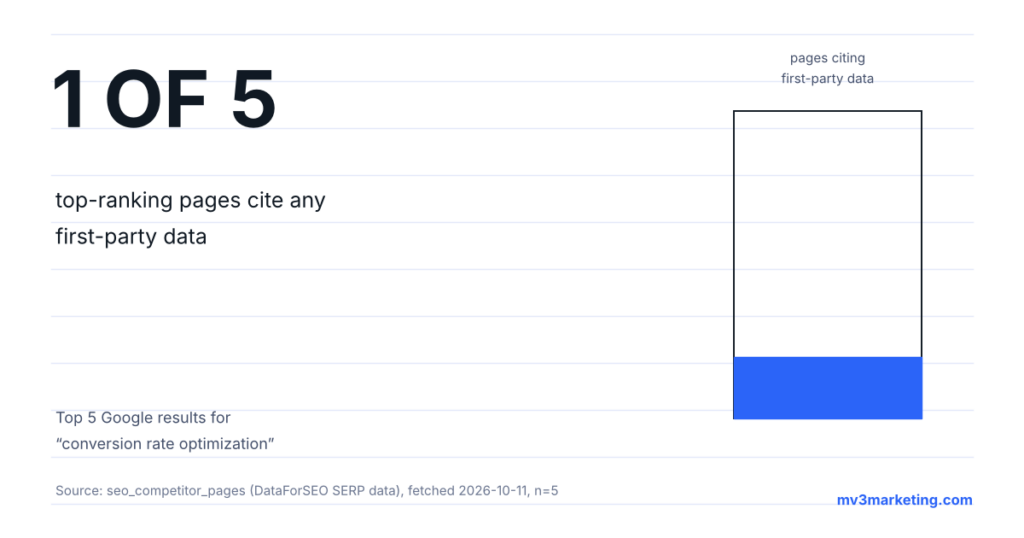
We pulled the five pages currently ranking for conversion rate optimization and read them the way a visitor would. Four of the five open with a definition and a list of tactics. Only one shows a real, first-party number anywhere in the page. None of the five walk a reader through pulling their own baseline before changing anything. That is the gap this guide fills.
Tip. If you only take one idea from this guide, take this one: rank pages by traffic times leak size before you touch any copy or layout.
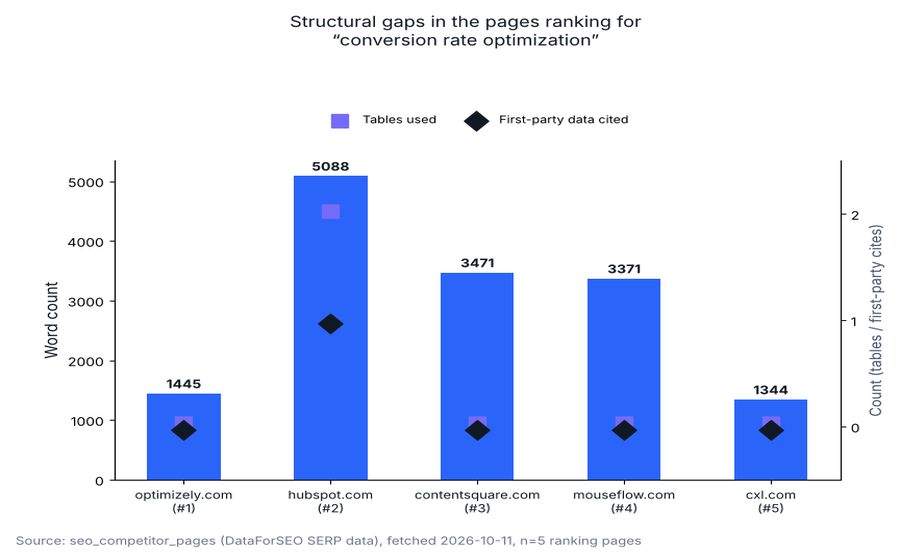
Source: seo_competitor_pages table (DataForSEO SERP data), fetched 2026-10-11, n=5 ranking pages.
What we found in the top five results
Word counts across the five ranking pages run from 1,344 to 5,088, with a median of 3,371. Only one of the five pages, the HubSpot guide, uses a data table anywhere in the body. Only one of the five, the HubSpot guide at rank two, cites a first-party figure of its own, and it does so once. The other four pages are built entirely from general advice with no attached evidence. Two of the five pages carry no visible last-modified date. The rank-five page, from CXL, was last updated in October 2022, more than three years before we pulled this data.
That combination, long pages with almost no first-party evidence, is common in CRO content. CRO findings are usually specific to one company’s traffic, so a blog writer outside that company’s analytics account cannot repeat them. This guide takes the opposite approach. It shows the audit process itself, with the actual steps run, rather than claiming results we did not generate.
Before you start
| Item | Why it matters |
|---|---|
| Access to analytics with page-level traffic and goal completions | You cannot rank pages by leak size without a traffic number and a conversion number for each one |
| A session-recording or heatmap tool, even a free tier | Step 3 depends on watching real visitor behavior, not guessing at it |
| At least 2 to 4 weeks before you need a verdict on any single change | Low-traffic B2B pages take time to accumulate enough sessions to trust a before and after comparison |
| One page or template you are allowed to edit this week | The audit is only useful if a change can actually ship at the end of it |
Time: budget half a day for steps 1 and 2 on a typical SaaS site with under 50 pages. Expect step 3 to run over several days, since you want sessions from more than one visit pattern.
Step 1: Pull the funnel baseline before touching anything
Pull three numbers for every page you plan to audit: sessions over the last 28 days, the number of goal completions attributed to that page, and the resulting conversion rate. Do this before forming any opinion about what is wrong with a page. We checked our own CRM pipeline tables for a usable acquisition-cost-per-channel baseline to pair with this step. Every tracked channel showed zero recorded contacts, replies, or paid customers in the current data, so no attribution-by-channel figure is cited in this guide. Expect this step to produce a short, boring spreadsheet; that is the correct output.
Expected result: a page-by-page table of sessions, completions, and conversion rate, sorted from highest to lowest traffic.
Common mistake: starting with the page that feels most broken instead of the page losing the most absolute conversions. A high-traffic page converting at 2 percent usually costs more than a low-traffic page converting at 0 percent.
| Page | Sessions (28d) | Completions | Conversion rate |
|---|---|---|---|
| Page A, pricing | 1,900 | 23 | 1.2% |
| Page B, demo request | 640 | 14 | 2.2% |
| Page C, blog CTA | 2,400 | 9 | 0.4% |
Tip. Build this sheet in a spreadsheet you can resort instantly. You will re-sort it again in step 2, and a static screenshot will not let you do that.
Step 2: Rank pages by traffic multiplied by leak size
Multiply each page’s sessions by its gap from your site-wide average conversion rate. A page with 2,000 monthly sessions converting one point below average is a bigger opportunity than a page with 80 sessions converting five points below average. Work down this ranked list, not down the list of pages that look the worst to you personally.
Expected result: a short, ordered list of 3 to 5 pages worth the time investment in steps 3 and 4.
Common mistake: auditing the homepage first because it is the most visited page on the site. Homepages usually have the smallest single-page leak because they serve many different visitor intents at once, which makes any one fix have a smaller effect.
Step 3: Watch real sessions on the top two or three pages
Review actual recorded sessions or a heatmap for the pages at the top of your ranked list. Look for the point where a visitor’s cursor or scroll stops matching a reader who is still interested. Common signals include repeated scrolling past the same section, a rage click on something that is not a button, and an exit right after the pricing or form section loads.
Expected result: a one-sentence hypothesis per page, written in plain language, such as “visitors stop scrolling before reaching the comparison table.”
Common mistake: watching five minutes of sessions and generalizing from one visitor. Watch enough sessions that the same friction point shows up more than twice before you call it a pattern.
Tip. Filter recordings to sessions longer than 20 seconds before you start watching. Very short sessions are usually a mismatched click from search, not a CRO signal.
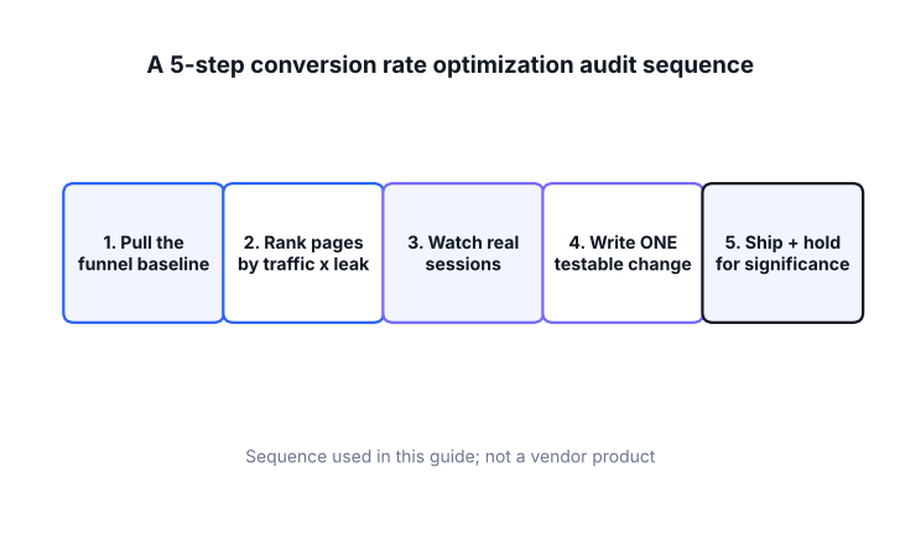
This is the sequence used in this guide, built from the audit steps above, not a vendor product or named tool.
Step 4: Write exactly one testable change per page
Turn the hypothesis from step 3 into a single change: move the comparison table earlier, shorten the form, change the call-to-action copy, or remove a distraction near the conversion point. One change per page per test cycle. Stacking several changes into one release means you will not know which one moved the number, if any did.
Expected result: a written, specific change request your designer or developer could implement without asking a follow-up question.
Common mistake: redesigning the whole page at once because you are already in the file. A full redesign feels productive and makes the result impossible to attribute.
Step 5: Ship the change and hold for a real sample
Publish the change, then wait. For a B2B SaaS page pulling a few hundred sessions a month, that can mean three to six weeks before the before-and-after comparison is based on enough visitors to trust. Resist judging the result after three days of data, in either direction.
Expected result: a conversion-rate comparison for the page, pre- and post-change, with a visible sample size attached to each side.
Common mistake: killing a change after a bad week, or declaring victory after a good one, before the sample size is large enough to tell the difference from normal week-to-week noise.
Tip. Write your minimum sample size down before you ship the change, not after you see the first result. Deciding the threshold in advance keeps you honest about what counts as a real signal.
Troubleshooting
| Symptom | Likely cause | What to do |
|---|---|---|
| Traffic on the target page is too low to reach a usable sample | The page was never meant to carry audit-grade statistical confidence on its own | Group similar low-traffic pages into one test, or judge the change by qualitative session review instead of a rate comparison |
| Session recordings show nothing unusual | The friction is happening earlier in the funnel, on a page before the one you are watching | Move step 1’s ranked list one page earlier in the typical visitor path and repeat step 3 there |
| The change shipped but the rate did not move either way | The hypothesis targeted a symptom, not the actual drop-off point | Re-run step 3 on fresh sessions recorded after the change shipped |
| Stakeholders want a result read out after one week | Sample size pressure from the business side, not a data problem | Report the sample size alongside the early rate so the number is read in context, not as a verdict |
Checklist recap
| Step | Done |
|---|---|
| Pulled sessions, completions, and conversion rate per page | □ |
| Ranked pages by traffic multiplied by leak size | □ |
| Watched real sessions on the top 2 to 3 pages | □ |
| Wrote one specific, testable change per page | □ |
| Shipped and set a minimum sample size before judging the result | □ |
Where this fits with the rest of your funnel
A CRO audit works best on a page you already know is attracting the right visitors. If the leak is actually earlier, find which funnel stage is losing people first. Start with a funnel-stage breakdown before auditing individual pages. If the page in question is your pricing page specifically, pair this process with a dedicated pricing page audit, since pricing pages have their own failure patterns around hidden costs and unclear plan tiers. Session recordings showing visitors leave before the page finishes loading point to a technical problem, not a copy or layout issue. See our Core Web Vitals guide for how load speed affects what a visitor sees before they decide to act.
MV3 Marketing runs this audit process directly for clients who want it handled end to end, from the baseline pull through the shipped test. If you would rather we run step 1 through 5 for you, book a call and bring your current analytics access.
FAQ
How long should a CRO audit take before I see a result?
Budget half a day to pull the baseline and rank pages, then plan on three to six weeks of live data per tested change on a typical B2B SaaS traffic volume before the result is trustworthy.
Do I need a paid tool to run this process?
No. Most analytics platforms report sessions and goal completions natively, and several session-recording tools offer a usable free tier for a single site.
What is the difference between conversion rate optimization and A/B testing?
A/B testing is one method for validating a change inside a CRO process. CRO is the broader practice of finding what to change and why; A/B testing, or a simpler before-and-after comparison on low-traffic pages, is how you check whether the change worked.
Share this article

Vance Moore is Chief Growth Officer at MV3 Marketing and leads its team of SEO professionals, engineers and auditors.
Ready to audit your organic growth opportunity?
$2,500 flat. 5 business days. Six deliverables tied to pipeline , not rankings. No retainer required.
Get the Organic Growth Audit →