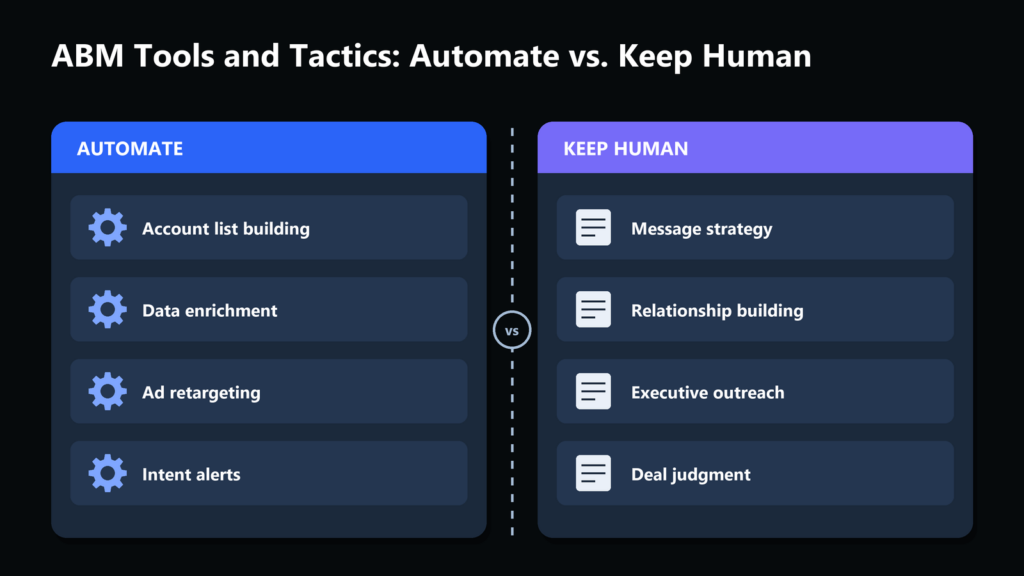
Quick answer: ABM tools automate account identification, intent signal collection, and personalized outreach at scale, but the highest-leverage parts of account-based marketing (which accounts actually matter, what message resonates with a specific buying committee, when to escalate to a rep) still need a human decision. The teams that get the best return treat ABM software as a targeting and timing engine, not a replacement for account strategy.
This guide gives you the split, then five steps to build it: tier your accounts, map the committee, pull intent into one view, route signals with rules you can write down, and approve escalations by hand. It includes a tested script, a worked example, a troubleshooting table and a downloadable checklist.
How big is the ABM tooling conversation?
Small and specific. Across the eight ABM tool and tactic phrases we checked, US search volume runs from 30 to 390 searches a month (Google Ads Keyword Planner data pulled through DataForSEO on 2026-10-09). That is a decision-stage audience: people comparing tools or tightening a program they already run, not casual browsers.
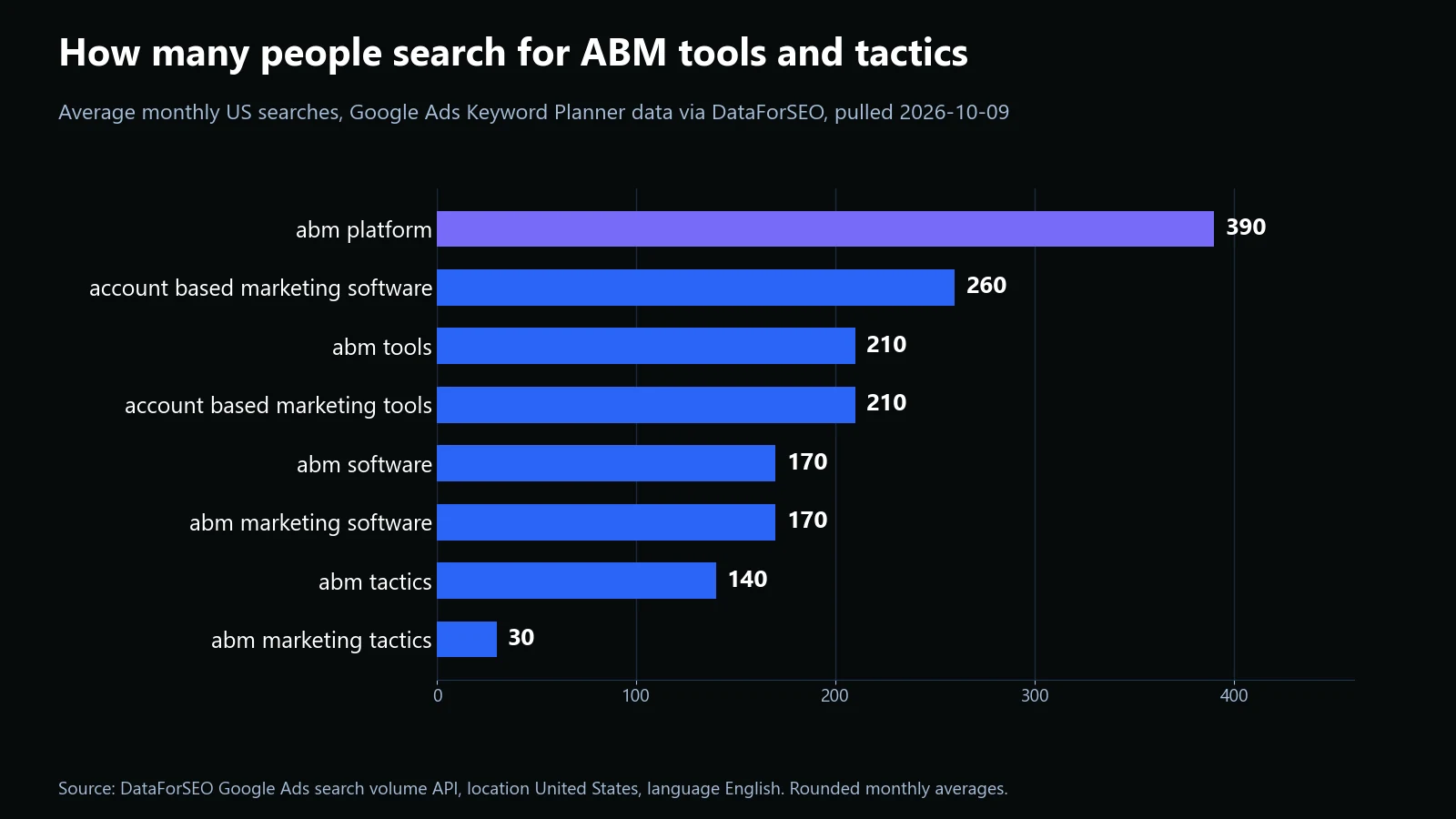
Our own Search Console data points the same way. This page has been shown for 44 different queries since June, and the biggest by impressions is “abm tools”, ahead of “abm software” and “abm tactics”. Readers lead with the tool and only later ask what to do with it, which is why the split below comes first.

The results page for the head term tells the same story. When we pulled the organic results for “abm tools” on 2026-10-10, five of the nine were “best tools” roundups, one was a vendor product page, and the rest were a forum thread, a directory and an analyst review site. A reader who lands here after those roundups already has a shortlist; what they lack is a way to decide what the software should and should not own.

What to actually automate
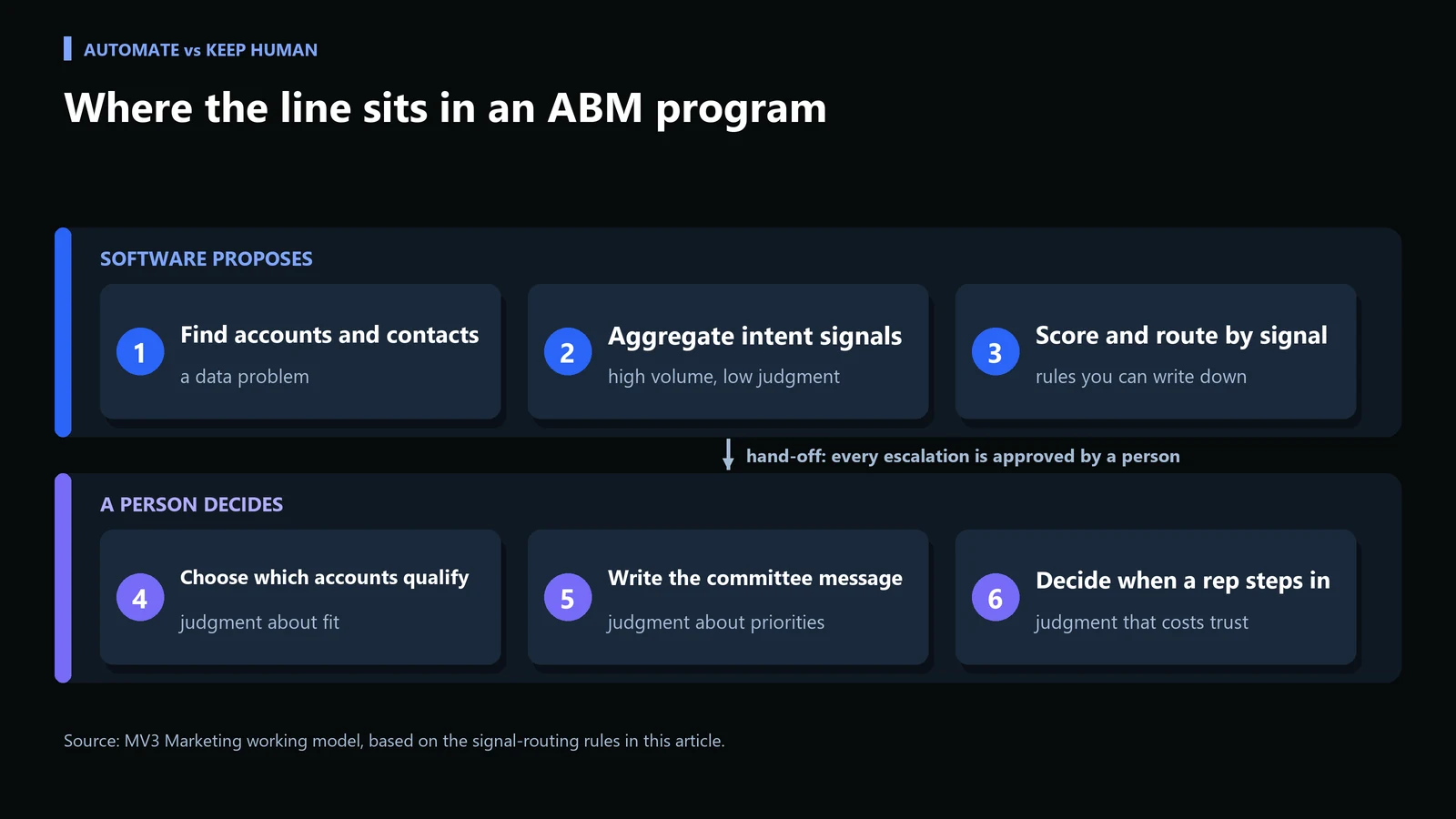
How do you decide what to automate in ABM? Five steps
Step 1: Write the ICP gate and tier every account
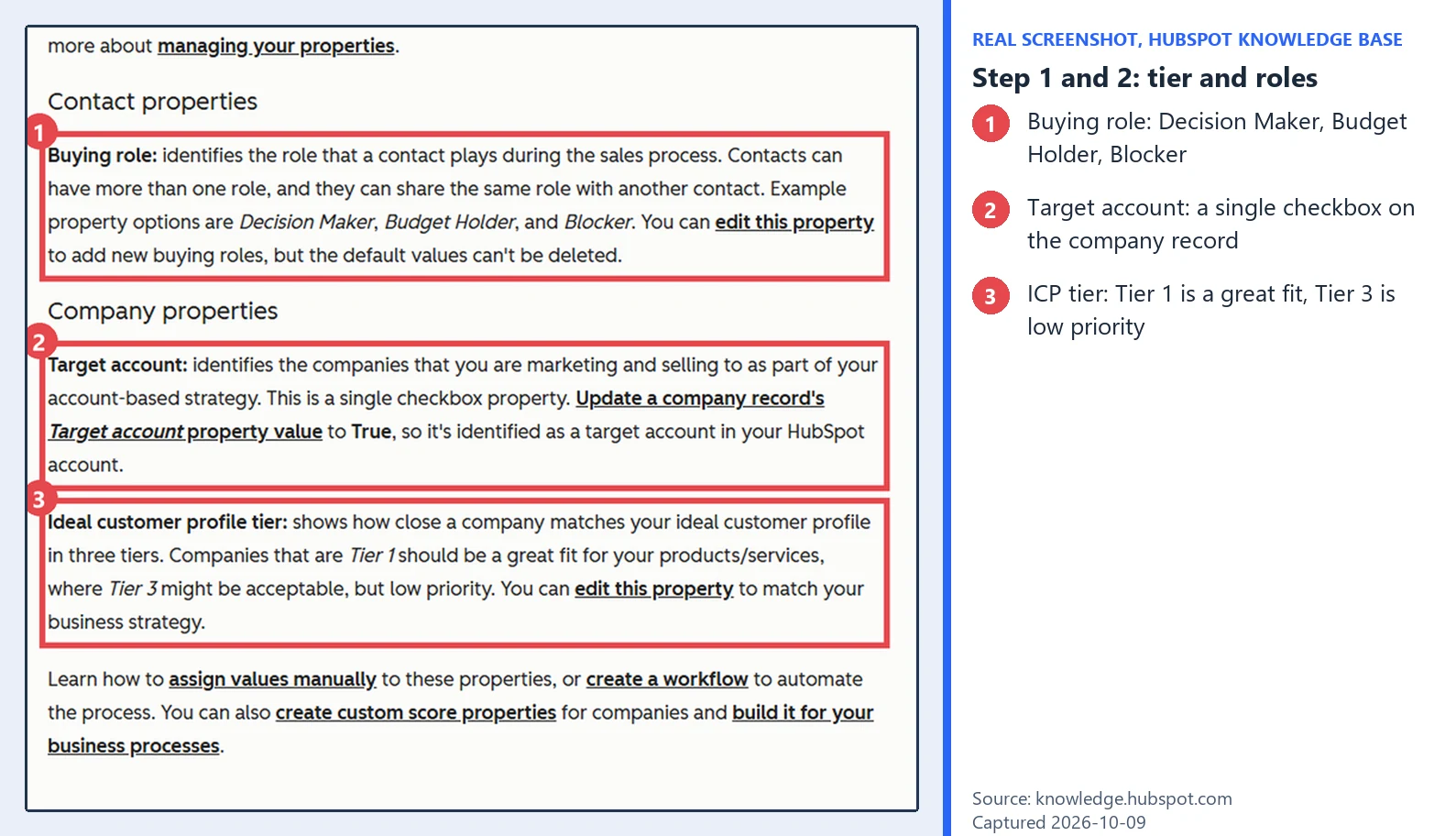
Before any list is loaded into a tool, write down what makes an account worth a personalized campaign, then tag every target account with a tier. HubSpot documents this with two company properties: a single “Target account” checkbox you set to True, and an “Ideal customer profile tier” where Tier 1 should be a great fit and Tier 3 might be acceptable but low priority. Whatever platform you use, the rule is the same: no tier, no automation.
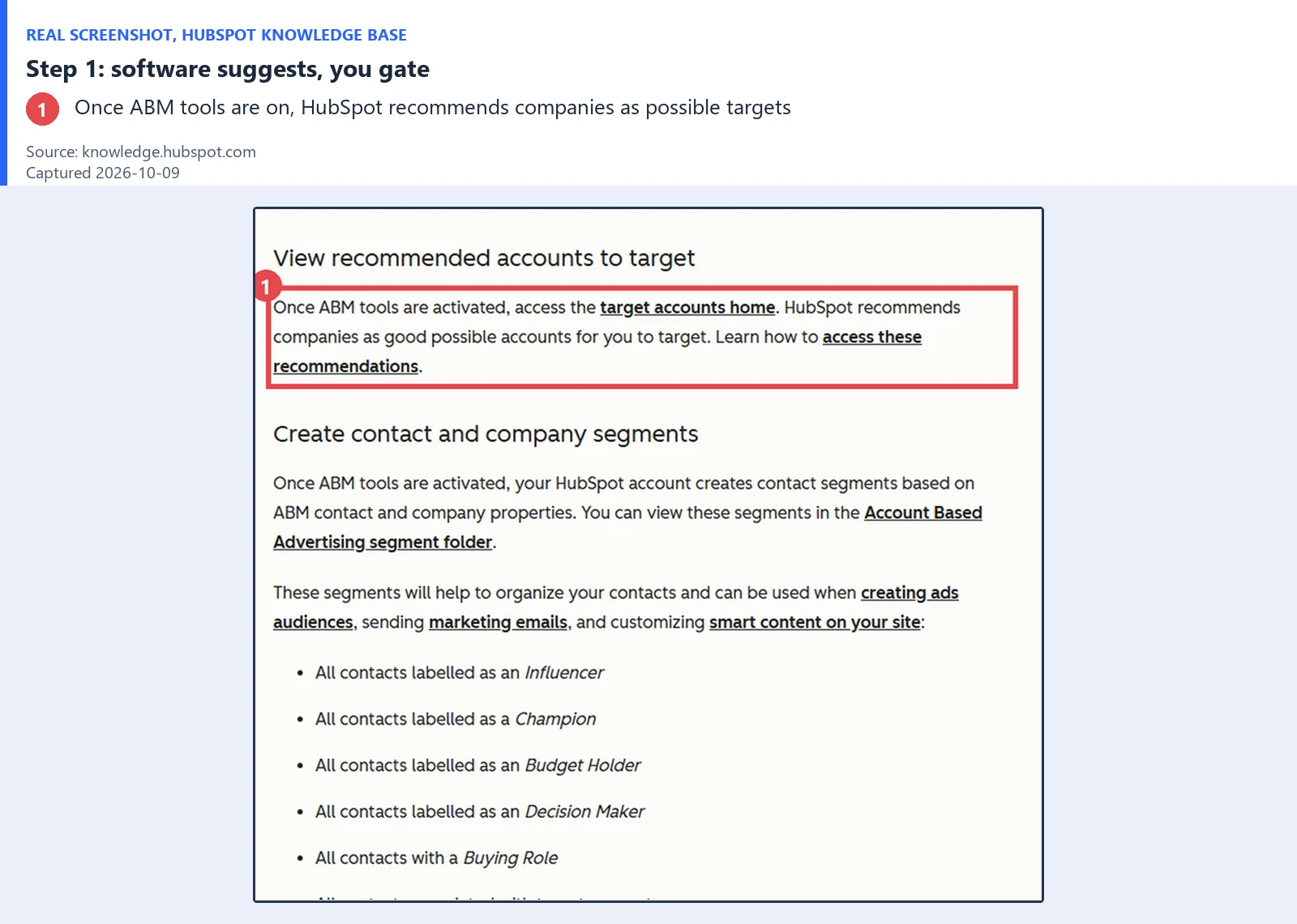
Discovery is the part software does well, and some platforms will even suggest accounts for you. HubSpot, for example, recommends companies as possible targets once its ABM tools are on. Treat those suggestions as candidates, not a list.
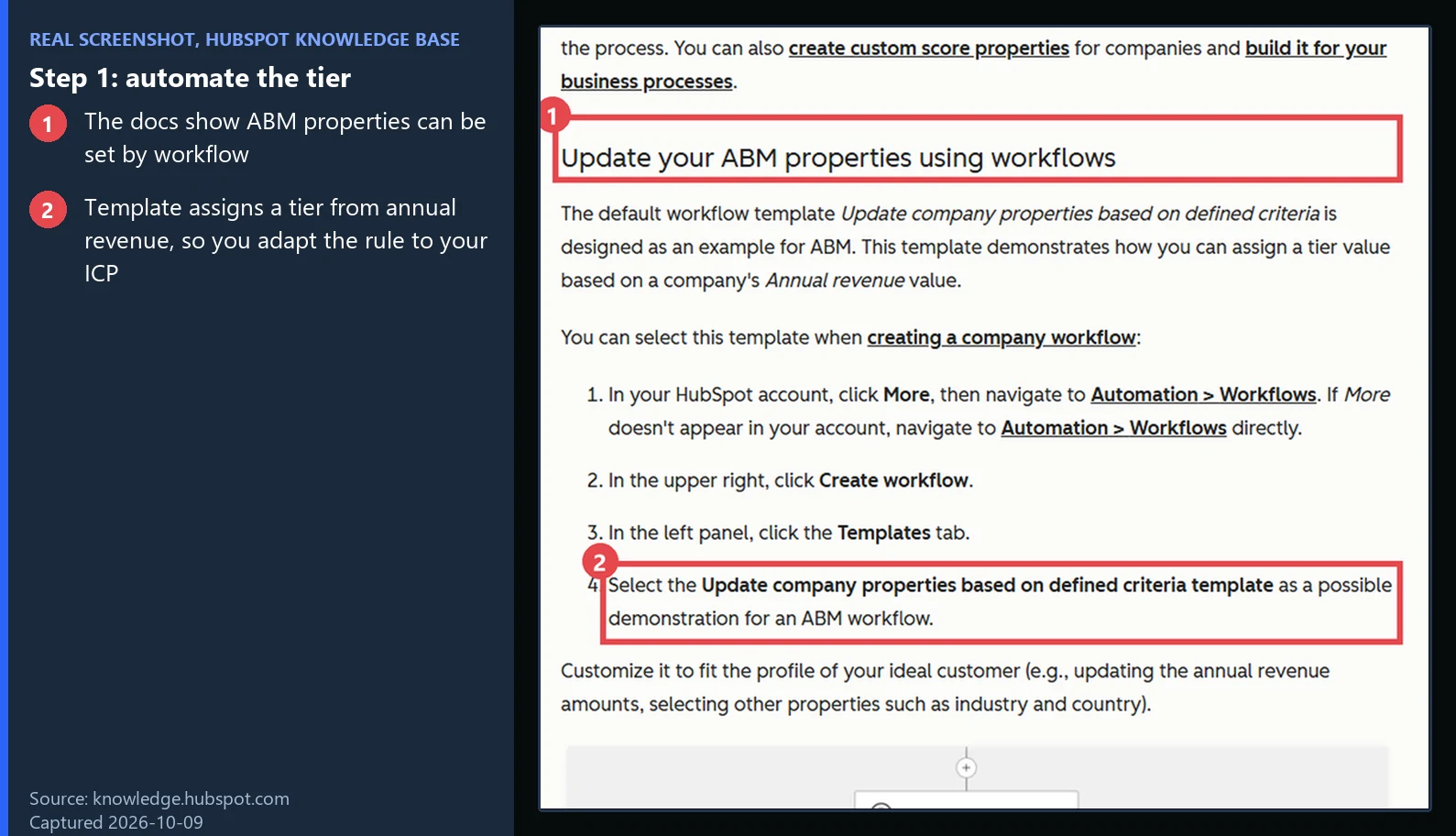
You can automate the tiering itself once the rule exists. The same documentation points to a workflow template, “Update company properties based on defined criteria”, that assigns a tier from annual revenue, and tells you to adapt it with industry and country. Treat that as a starting point and write your own criteria from your best customers.
Check it worked: filter the company list for target accounts with an empty tier. The count should be zero. Common mistake: loading a purchased intent list straight into the tool, which skips the gate and turns a 200-account program into a 2,000-account one that nobody can personalize.
Step 2: Map the buying committee by role
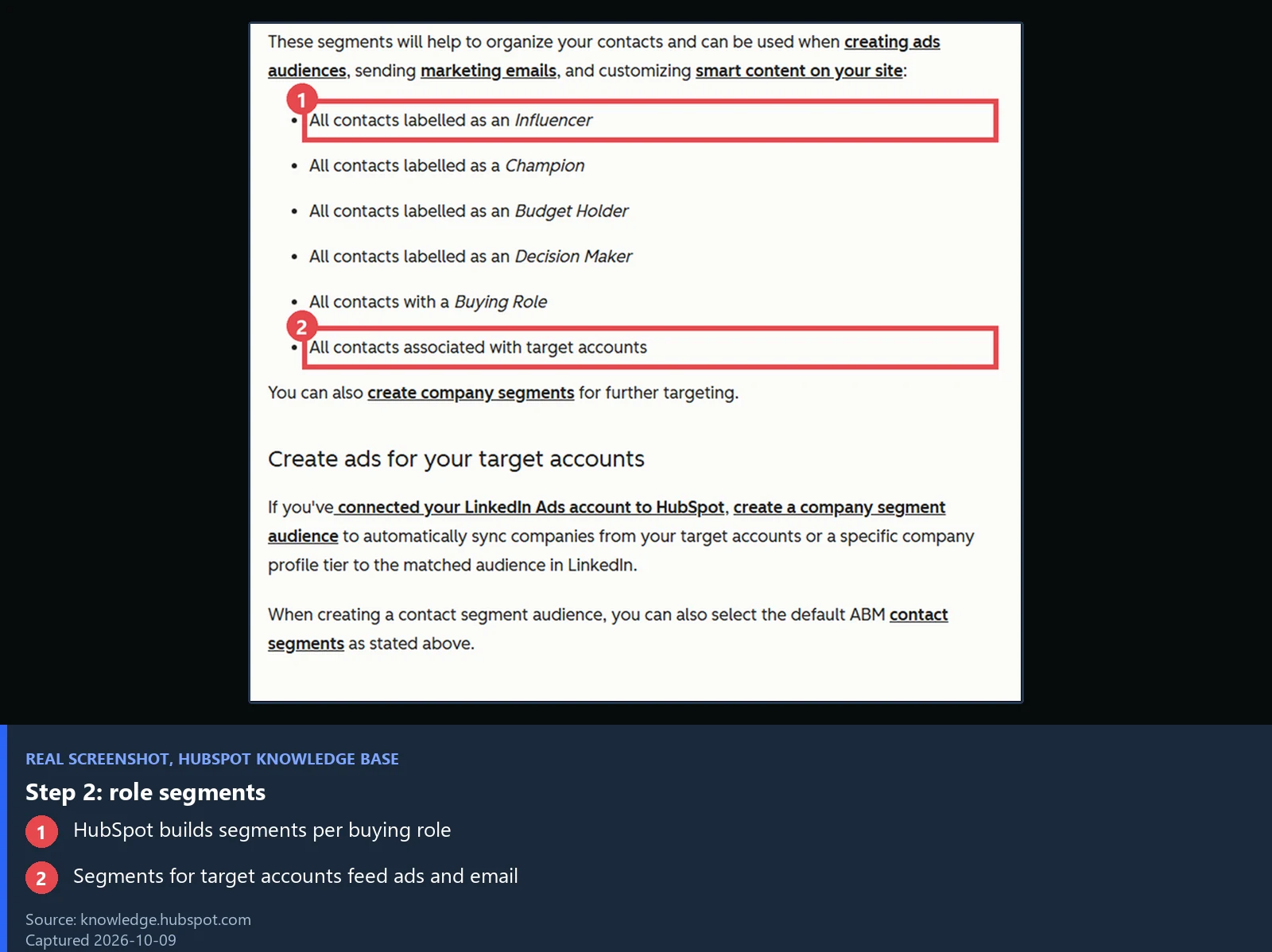
Contact discovery is a data job, so let software do the finding and enrichment, then have a person review the result. HubSpot gives contacts a “Buying role” property with options such as Decision Maker, Budget Holder and Blocker, and builds contact segments from the roles, including one for all contacts associated with target accounts. Those segments feed ads and email, which is why the roles need to be right before you automate anything on top of them.
Check it worked: every tier 1 and tier 2 account has at least three named roles. Common mistake: enriching one friendly contact and calling it a committee. A single engaged person is a lead, not a buying signal for the account.
Step 3: Pull intent signals into one account view
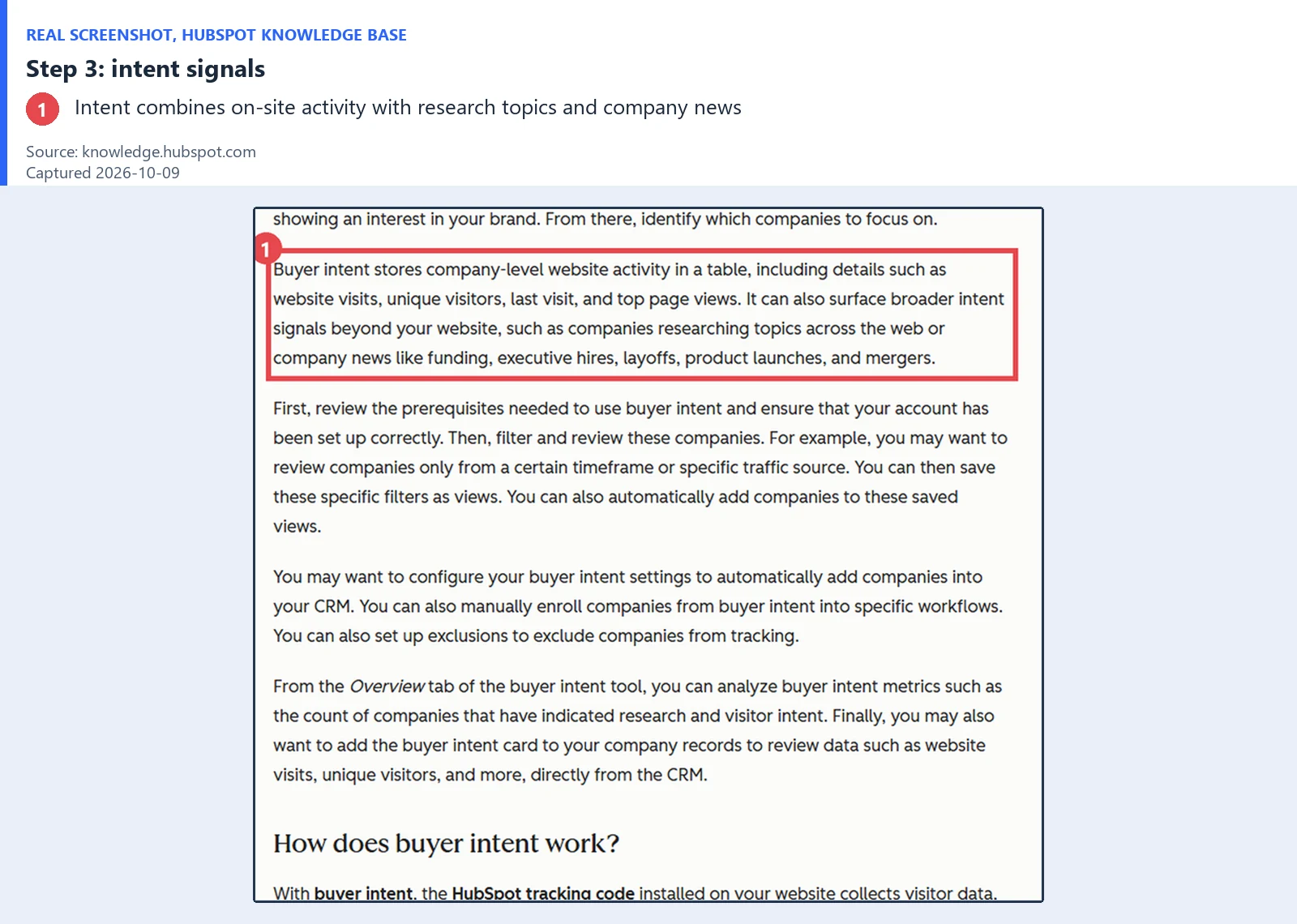
Aggregation is the clearest automation win. HubSpot describes its buyer intent tool as storing company-level website activity (visits, unique visitors, last visit, top pages) and, beyond your site, signals such as companies researching topics across the web and company news like funding, executive hires, layoffs, product launches and mergers. Whichever source you use, land everything in one row per account.
The mistake to avoid here is a single blended intent score. A prospect reading a comparison page and a prospect reading a pricing page are showing very different levels of buying intent, and software that surfaces both as equally “high intent” leads reps to waste outreach on accounts that are still early in research. Segment signal by funnel stage, not just by volume.
A simple decision framework
| Signal | What it suggests | Recommended action |
|---|---|---|
| Multiple stakeholders engaging with content | A buying committee is forming | Escalate to a rep with account-specific context |
| Single stakeholder, early-funnel content | Early research, not yet buying | Continue automated nurture |
| High third-party intent, zero owned-site engagement | Aware of the category, not yet aware of you | Targeted awareness content, not a sales touch |
Step 4: Route each signal with rules you can write down
Now turn the table into code or a workflow. The script below reads an account export and proposes one action per account. It only proposes: the output feeds a review queue, not an outbound sequence. Export one row per account with the columns shown, save it as a CSV, and run it.
The CSV needs these columns, one row per account: account, icp_tier, stakeholders_engaging, pricing_views, owned_visits and third_party_intent (0 to 100).
import csv
import sys

# Rules mirror the decision table in the post. The script only PROPOSES an action;
# a human approves every escalation.
def route(row):
    tier = int(row["icp_tier"])
    stakeholders = int(row["stakeholders_engaging"])
    pricing = int(row["pricing_views"])
    owned = int(row["owned_visits"])
    third_party = int(row["third_party_intent"])
    if tier not in (1, 2):
        return "HOLD", "outside ICP tiers 1-2, human decides if it belongs on the list"
    if stakeholders >= 2:
        return "ESCALATE", "buying committee forming, send rep a brief"
    if third_party >= 70 and owned == 0:
        return "AWARENESS", "category-aware, not yet aware of us, send content not a sales touch"
    if stakeholders == 1 and pricing >= 1:
        return "REVIEW", "one person on pricing, human checks before any outreach"
    return "NURTURE", "early research, keep automated nurture running"

def main(path):
    with open(path, newline="") as f:
        for row in csv.DictReader(f):
            action, why = route(row)
            print(f"{row['account']:<11}{action:<10}{why}")

if __name__ == "__main__":
    main(sys.argv[1])
What this does: accounts outside tiers 1 and 2 are held for a human decision, two or more engaged people propose an escalation, high outside intent with no visits proposes awareness content, one person on pricing goes to human review, and everything else stays in nurture. We ran it on the sample file and ran six unit tests against each branch; the output is below.

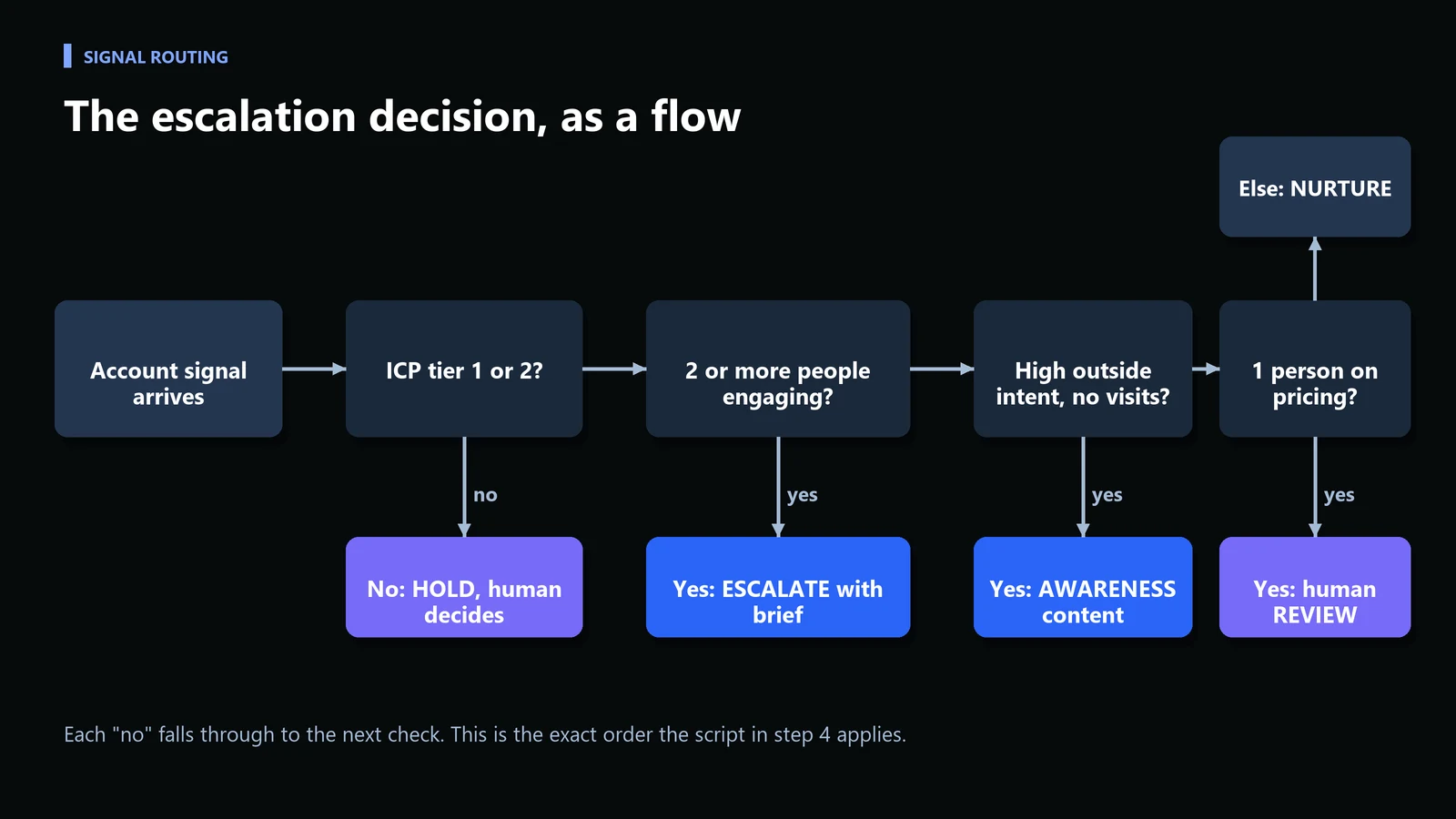
Check it worked: pick two accounts you know well and confirm the proposed action matches what an experienced rep would do. If it does not, fix the rule, not the output. Common mistake: copying thresholds from a blog post. The numbers in the script (two people, outside intent of 70) are illustrative starting points; set yours from your own closed-won history.
Worked example: eight sample accounts
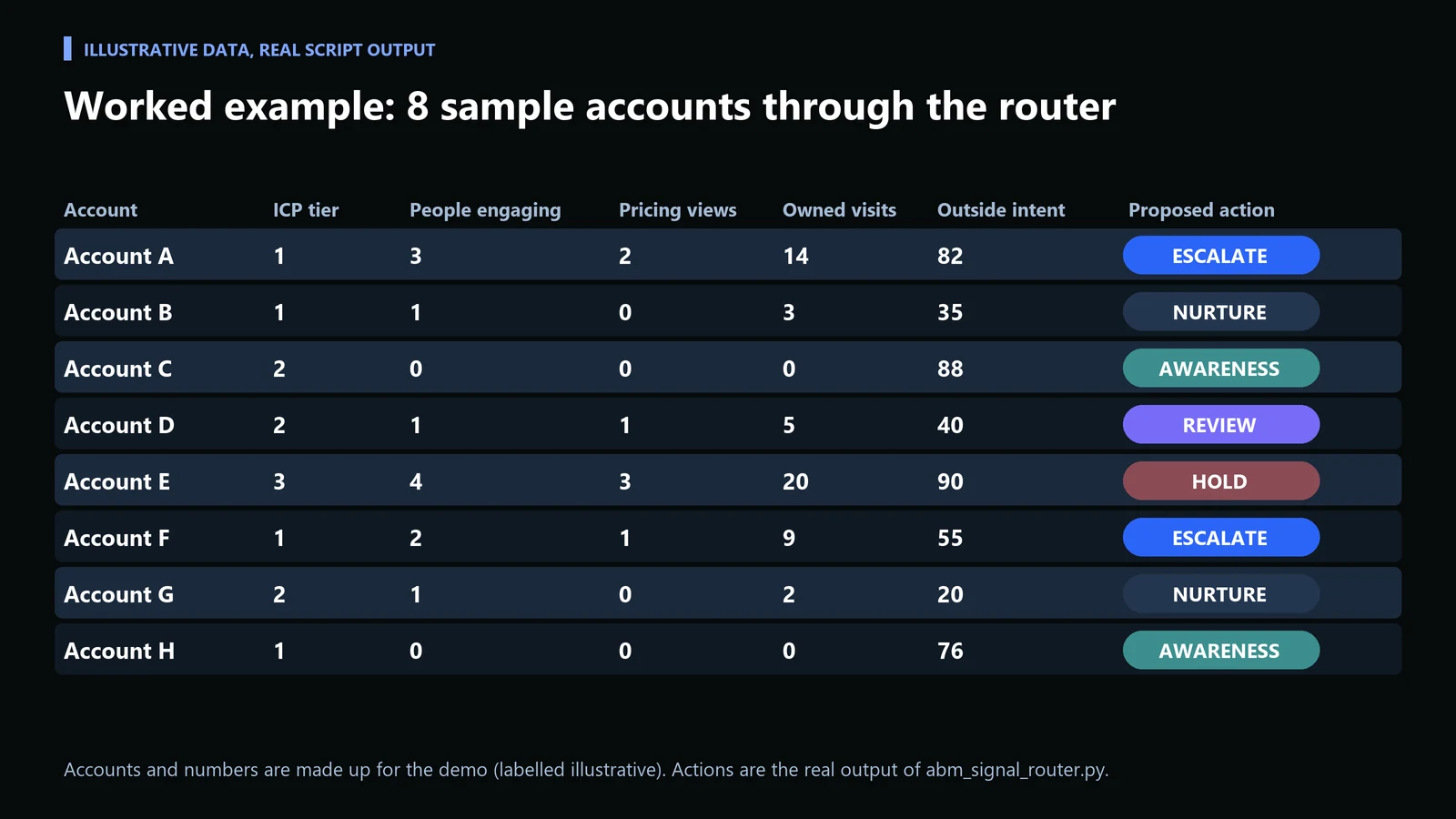
The accounts and numbers below are made up for the demo and labelled as illustrative. The actions are the real output of the script above. Account E has the loudest signals in the file, four engaged people and three pricing views, yet it is held, because it sits outside the ICP tiers. That is the point of putting the gate first: volume of activity does not substitute for fit.
Troubleshooting the router
| Symptom | Likely cause | Fix |
|---|---|---|
| KeyError: icp_tier | The export header names differ from the script | Rename the CSV columns or edit the keys at the top of route() |
| ValueError about int() | Blank cells in the export | Fill empty counts with 0 before running |
| Nearly every account says ESCALATE | Internal staff, bots or one shared office network counted as stakeholders | Exclude employees and known bots, or raise the stakeholder threshold to 3 |
| Nearly every account says NURTURE | Site visits are not joined to the account record | Check domain-to-account matching in the tracking source |
| Reps ask why a favorite account is on HOLD | Tier is missing or 3 | Review the tier with a person; do not override the script |
Step 5: Approve every escalation by hand, with a short brief
The last step stays human on purpose. Deciding when an account has shown enough real signal to justify a rep reaching out, instead of continuing automated nurture, is a call that costs trust if it is wrong. Have the person approving each ESCALATE write or confirm a four-line brief: who engaged, what they read, which role each person holds, and the one priority the message should address. If you cannot fill the four lines, it is a REVIEW, not an escalation.
Check it worked: every escalation has a named owner and a brief before the first email goes out. Common mistake: routing escalations straight into a rep sequence because the score crossed a threshold.
Watch the five steps in under a minute
Common tactical mistakes
The most common failure is running ABM software on a target account list that was never actually qualified. Intent data and enrichment tools make it easy to build a large account list quickly, and that speed creates pressure to skip the harder work of confirming those accounts genuinely fit. ABM’s entire value proposition depends on personalization depth, and depth does not scale past a certain list size regardless of tooling: a team that can write a real message for twenty accounts a week cannot do it for two thousand.
A second common mistake is treating every intent signal the same way, covered in step 3. A third is automating the escalation step because it is the easiest one to wire up. It is also the step where a wrong call is most visible to the account.
How to evaluate an ABM platform before buying
Most ABM platform evaluations start with a feature checklist: intent data sources, integration count, AI scoring claims. That is the wrong starting point. The more useful question is what decision the tool will actually improve for your specific team, because the same feature set performs very differently depending on team size and current process maturity.
A team of two marketers running ABM alongside broader demand gen needs a tool that reduces manual research time above almost everything else, since headcount to act on signals is the real constraint, not signal volume. A dedicated ABM team of six or more usually has the opposite problem: too much undifferentiated signal and not enough prioritization, so the platform that matters most is the one with the strongest segmentation and scoring logic, not the one with the largest data source count.
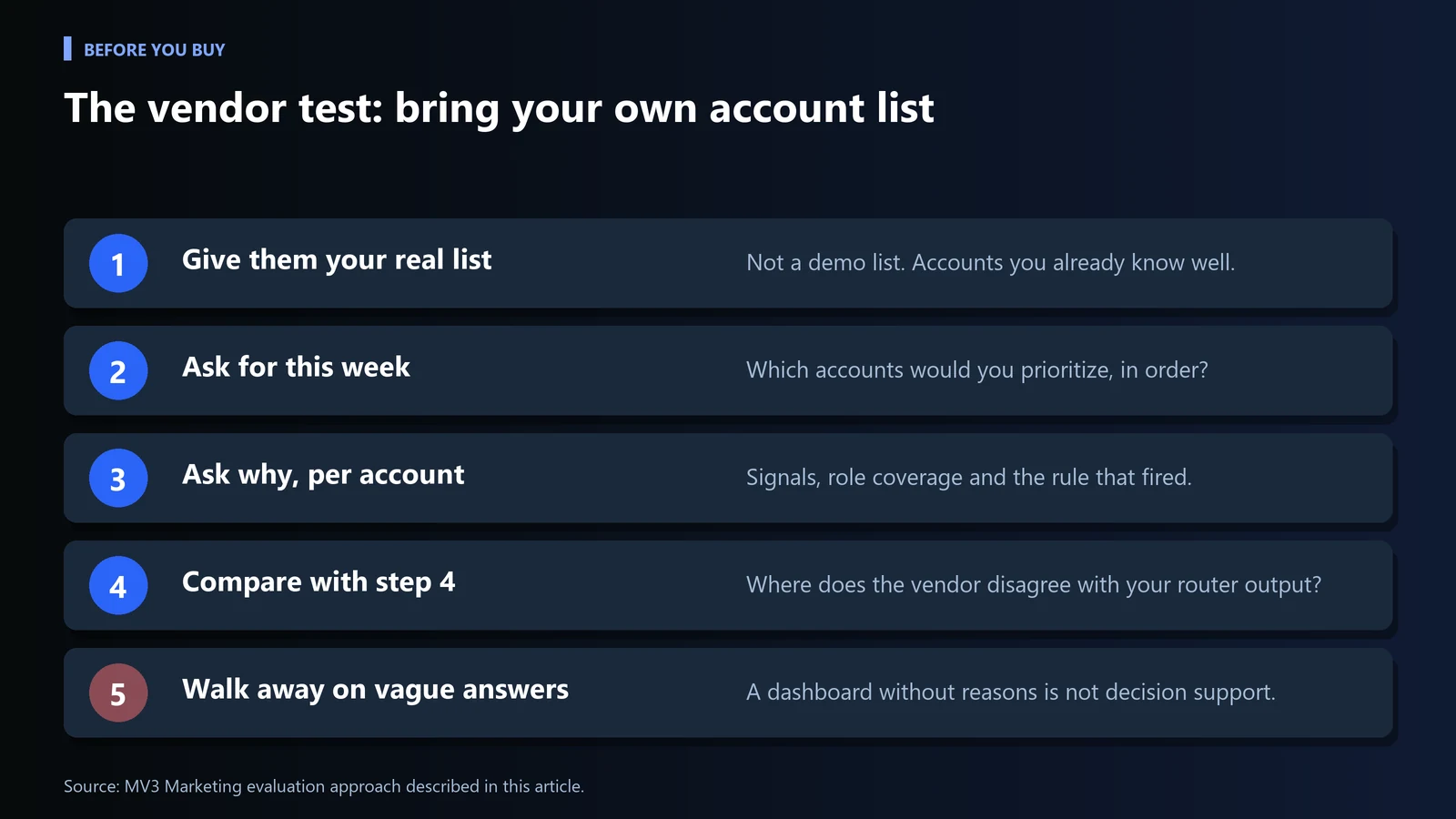
A practical evaluation approach: before buying, ask the vendor to run a real account list you already have through their platform and show you exactly which accounts it would prioritize this week and why. A vendor that cannot produce a specific, defensible answer for your actual accounts is selling a dashboard, not a decision-support tool. Bring the router output from step 4 as your baseline and ask where the vendor disagrees and why.
Frequently Asked Questions
What should ABM software actually automate?
Account and contact discovery and intent signal aggregation are strong fits for automation. Account selection, message strategy, and the decision to escalate to a sales rep should stay a human judgment call.
What is the most common ABM tactical mistake?
Running personalized campaigns against a target account list that was never properly qualified, which dilutes the personalization depth that makes ABM work in the first place.
How big should an ABM target account list be?
Smaller and tightly qualified beats large and loosely qualified. Personalization depth does not scale past a certain list size, so a list should be sized to what a team can genuinely personalize for, not to how many accounts a tool can identify.
How do I turn intent signals into a rep escalation without burning accounts?
Write the routing rules down, let software propose the action, and have a person approve every escalation with a short account brief. Require more than one engaged stakeholder before a rep reaches out.
What should I ask an ABM vendor before buying?
Ask the vendor to run an account list you already have and show which accounts it would prioritize this week and why. A specific, defensible answer for your real accounts is the test.
If your ABM program is generating a lot of activity but not enough qualified pipeline, the list-quality and signal-segmentation issues above are the first place to look. See how our team builds this into a full program on our SEO services page, read the related ABM Playbook for AI and SaaS Companies for the underlying strategy framework, check any unfamiliar term in the marketing glossary, or book a working session to pressure-test your routing rules.
Checklist
Download the checklist (CSV) with owners and done-criteria for each step, ready to paste into a spreadsheet.
| Check | Owner | Done when |
|---|---|---|
| ICP gate written and every target account tiered | Human | No target account has an empty tier |
| Buying roles mapped for tier 1 and 2 accounts | Software, human reviews | At least three named roles per account |
| Signals in one row per account, split by funnel stage | Software | Pricing and comparison views are separate fields |
| Routing rules written and tested | Human defines, software proposes | Tests pass and the output only proposes actions |
| Escalations approved with a four-line brief | Human | Every ESCALATE has an owner and a brief |
| Vendor ran your real account list | Human | Specific reasons per account |
| List size matches personalization capacity | Human | Team can write a real message for every account |
Share this article

Vance Moore is Chief Growth Officer at MV3 Marketing and leads its team of SEO professionals, engineers and auditors.
Ready to audit your organic growth opportunity?
$2,500 flat. 5 business days. Six deliverables tied to pipeline , not rankings. No retainer required.
Get the Organic Growth Audit →