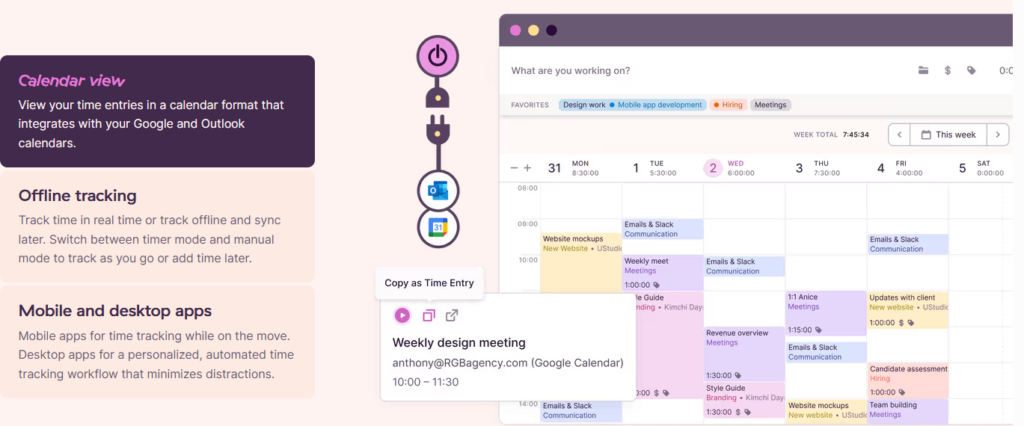
Toggl Track is a time tracking app built around a single one-click timer, available on web, desktop, mobile, and browser extension, that logs hours against projects and clients for accurate billing and reporting. It’s built for freelancers, consultants, and small agencies who need clean billing data without setting up a monitoring system.
Disclosure: MV3 Marketing participates in affiliate and partner programs, including Toggl’s partner program. This post contains affiliate links, and we may earn a commission if you sign up through them, at no additional cost to you. We only cover tools we’ve actually researched and believe are useful for SaaS and agency teams.
If you bill clients by the hour, or you just want to know where your team’s time is actually going, the tool you pick matters less for its feature list and more for whether anyone will actually use it. A time tracker that requires five clicks to start, or that makes your contractors feel like they’re being watched, gets abandoned within a month. That’s the gap Toggl Track is built to close: a timer simple enough that people forget it’s running, paired with reporting detailed enough to hand straight to a client or use to figure out which projects are actually profitable.
What Toggl Track Actually Does
Toggl Track starts and stops time entries with a single click from the web app, the desktop app (Windows and macOS), mobile apps (iOS and Android), or a browser extension for Chrome, Firefox, and Edge. You can also skip the timer entirely and add time manually, which matters if you forgot to hit start during a client call. Every entry gets tagged with a project, a client, and optionally a task, so by the end of the week your hours are already sorted instead of sitting in a notebook you have to reconstruct from memory.
The platform also supports offline tracking that syncs once you’re back online, a timeline view that can auto-track app and browser activity on the desktop app, idle detection, and a built-in Pomodoro timer for people who work in focused blocks. None of that requires a manager to configure monitoring settings first. It’s tracking built around the person doing the work, which is a different design philosophy than tools built primarily for oversight.
If you want to see exactly what that looks like before committing to anything, you can start a free Toggl Track account here and track your first week without touching a credit card field.
Integrations: Time Tracking That Sits Inside Your Existing Workflow
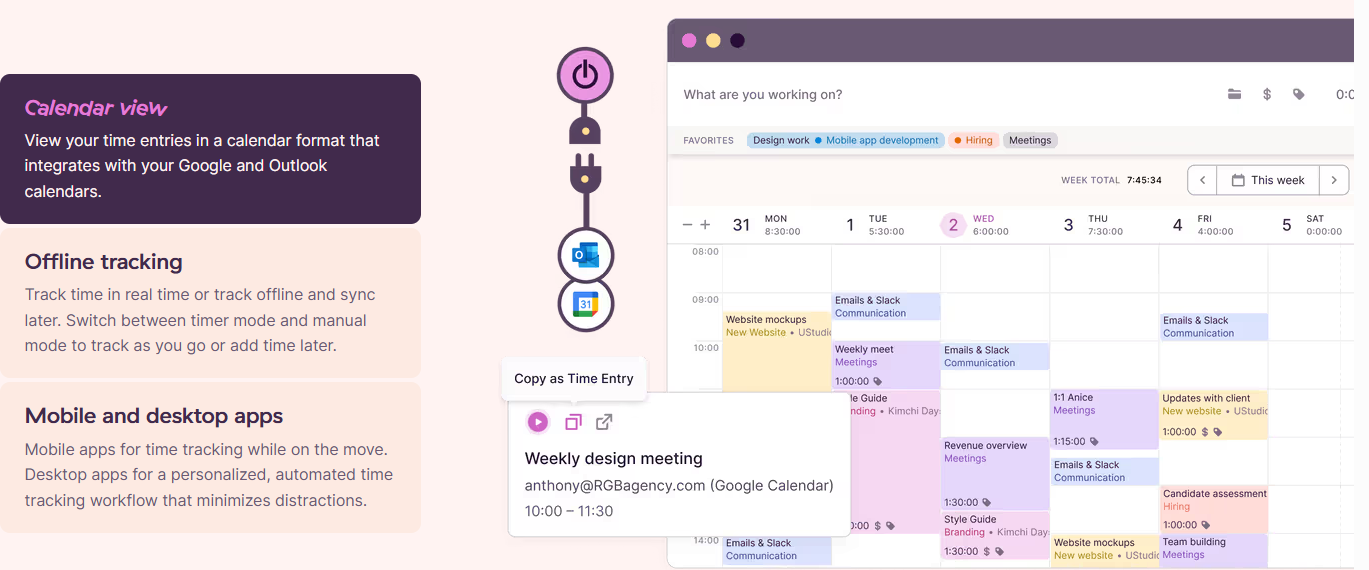
A time tracker that lives in isolation from the rest of your stack turns into another tab you forget to check. Toggl Track connects to more than 100 tools through its browser extension, plus native integrations for Slack, Asana, QuickBooks Online, Google and Outlook calendars, Jira, and Salesforce on the higher tiers. The browser extension approach means you can start a timer directly from inside a task in your project management tool instead of switching apps to log time separately, which is usually where time tracking habits break down.
For agencies that want to build their own automation on top of tracked time, whether that’s syncing entries into a custom invoicing system or triggering a Slack notification when a project crosses its estimated hours, Toggl Track exposes an API and webhooks. The number of API requests and webhook events available scales with plan tier, so a Starter account gets a reasonable allotment for basic automation while Premium and Enterprise open up higher limits for teams running more automated workflows through tools like Zapier or Make.
Team Collaboration Without Turning Into a Monitoring System
Even a two- or three-person consultancy eventually needs some shared visibility into what everyone’s billing. Toggl Track handles this through shared time entries, team-level access controls (basic member, project manager, or admin), and team time tracking goals that let you see aggregate hours without drilling into anyone’s individual activity. On the Premium tier, timesheet approval workflows let a project lead review and lock a week’s entries before they go into an invoice, which catches misattributed hours before they reach a client rather than after.
That’s a meaningfully different model than tools built around continuous activity monitoring. The team management features exist to keep billing and scheduling organized, not to score how “productive” someone looked during a given hour. For an agency owner who wants clean numbers without managing a surveillance policy, that distinction is usually the deciding factor.
Billing and Profitability: Where Toggl Track Earns Its Keep for Agencies
The feature set that actually changes how an agency or solo consultant operates lives in the billing layer, not the timer itself. Toggl Track lets you set billable rates at the workspace level, the team-member level, the project level, or the task level, which means a senior consultant’s hour and a junior associate’s hour on the same project can carry different values automatically. You can also adjust billable rates retroactively or schedule rate changes for a future date, which is useful when a contract renews at a new number and you don’t want to manually re-tag old entries.
From there, the reporting layer turns tracked time into something you can actually hand to a client or use internally. Toggl Track generates customizable PDF invoices directly from tracked billable time, supports custom branding and tax fields on those invoices, and lets you build reports filtered and grouped by client, project, team member, or task. Reports can be scheduled for automatic email delivery or shared via a link, so a client can check project status without you compiling anything by hand.
For agencies specifically, there’s a profitability layer on top of that: you can compare project estimates against actual hours logged, track labor costs against billed revenue, and see which clients or project types are actually making money once you account for the hours that went in. That’s the piece that turns time tracking from an administrative chore into something closer to a profitability dashboard.
Reporting That Clients Actually Understand
A lot of time tracking tools generate reports that make sense to the person who built them and nobody else. Toggl Track’s reporting is built to be exported or shared as-is. You can export reports as CSV, PDF, or XLS, group entries by up to a few levels at once (client, then project, then team member, for example), and apply filters so a report only shows billable hours, or only shows a specific date range tied to an invoice cycle.
The project dashboard view shows timeline and budget forecasting side by side, so you can see mid-project whether you’re on pace to come in under, at, or over the original estimate. If a project is trending over budget, Toggl Track can send an alert before you’re deep enough in that a course correction is painful. For a consultant managing four or five active clients at once, that early warning is often worth more than the time tracking itself.
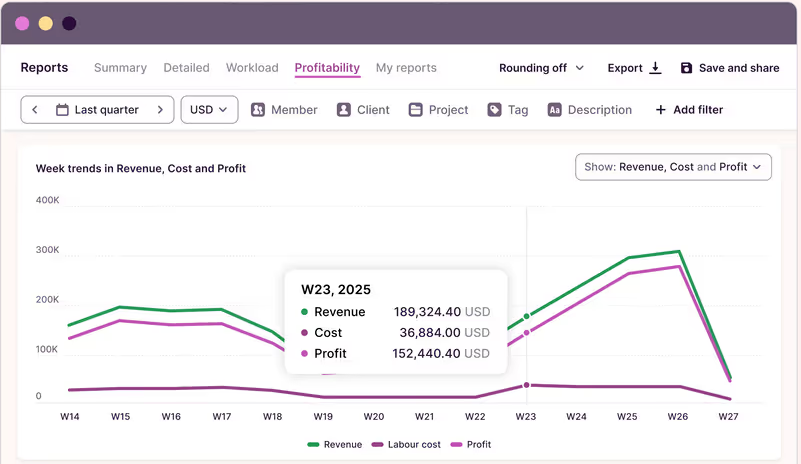
None of this requires a separate business intelligence tool bolted on top. It’s the same data you’re already generating by tracking time, just organized in a way that’s useful for a client conversation or a monthly close. If billing accuracy and project profitability are the actual problem you’re solving, Toggl Track’s reporting tools are worth testing against your current invoicing process for a billing cycle or two before you decide anything.
Real Use Cases for Freelancers, Consultants, and Small Agencies
Client Billing Accuracy
The most common failure mode for hourly billing isn’t dishonesty, it’s memory. You finish a call, get pulled into the next thing, and by the time you sit down to invoice on Friday you’re estimating how long that call actually ran. Multiply that across a week of context-switching between three clients and the invoice you send is a rough guess dressed up as a precise number. A one-click timer removes the guessing. You start it when you start the work and stop it when you’re done, and the invoice reflects what actually happened instead of what you remember happening.
Project Profitability Reporting
Fixed-fee and retainer work creates a different problem: you know what you’re getting paid, but you don’t always know if you’re making money on it until the project is over and you total up the hours. Toggl Track’s fixed fee project tracking and profitability analysis let you watch that number in real time instead of finding out at the end that a “simple” project ate 40% more hours than the quote assumed. That’s the difference between adjusting scope mid-project and eating the loss silently.
Simple Tracking Without Monitoring Overhead
Not every team needs, or wants, screenshot capture and activity-level scoring. A lot of small agencies and independent consultants are tracking their own time, or working with a small group of contractors they already trust, and what they need is accurate data, not a surveillance layer. Toggl Track’s core tracking experience doesn’t require enabling any monitoring features to get accurate billing data. You get the timer, the project tagging, and the reports, without needing to configure or explain a screenshot policy to anyone.
Why the Reliability Details Matter for a Billing Tool
If tracked time is going directly into client invoices, the tool holding that data needs to actually stay up and keep the data intact. Toggl Track’s own site lists ISO certification and SOC 2 Type II compliance, along with a 99.9% uptime figure and a stated customer base of more than 70,000 businesses. Toggl also publishes an ROI figure claiming customers see return on investment in roughly 2.4 months, which the company positions as faster than typical benchmarks for similar software categories. Those are claims from Toggl’s own marketing, not independently audited numbers we verified ourselves, but they’re consistent with a company that’s been in the time tracking category long enough to have real infrastructure behind it rather than being a side project.
For a solo consultant, uptime and data integrity matter less abstractly than they sound. If your only record of a billable Tuesday lives in an app that loses data or goes down during an invoicing deadline, that’s a real cost. It’s worth weighing platform stability alongside the feature list when you’re picking a tool your actual income depends on.
Toggl Track Pricing: What You Actually Pay
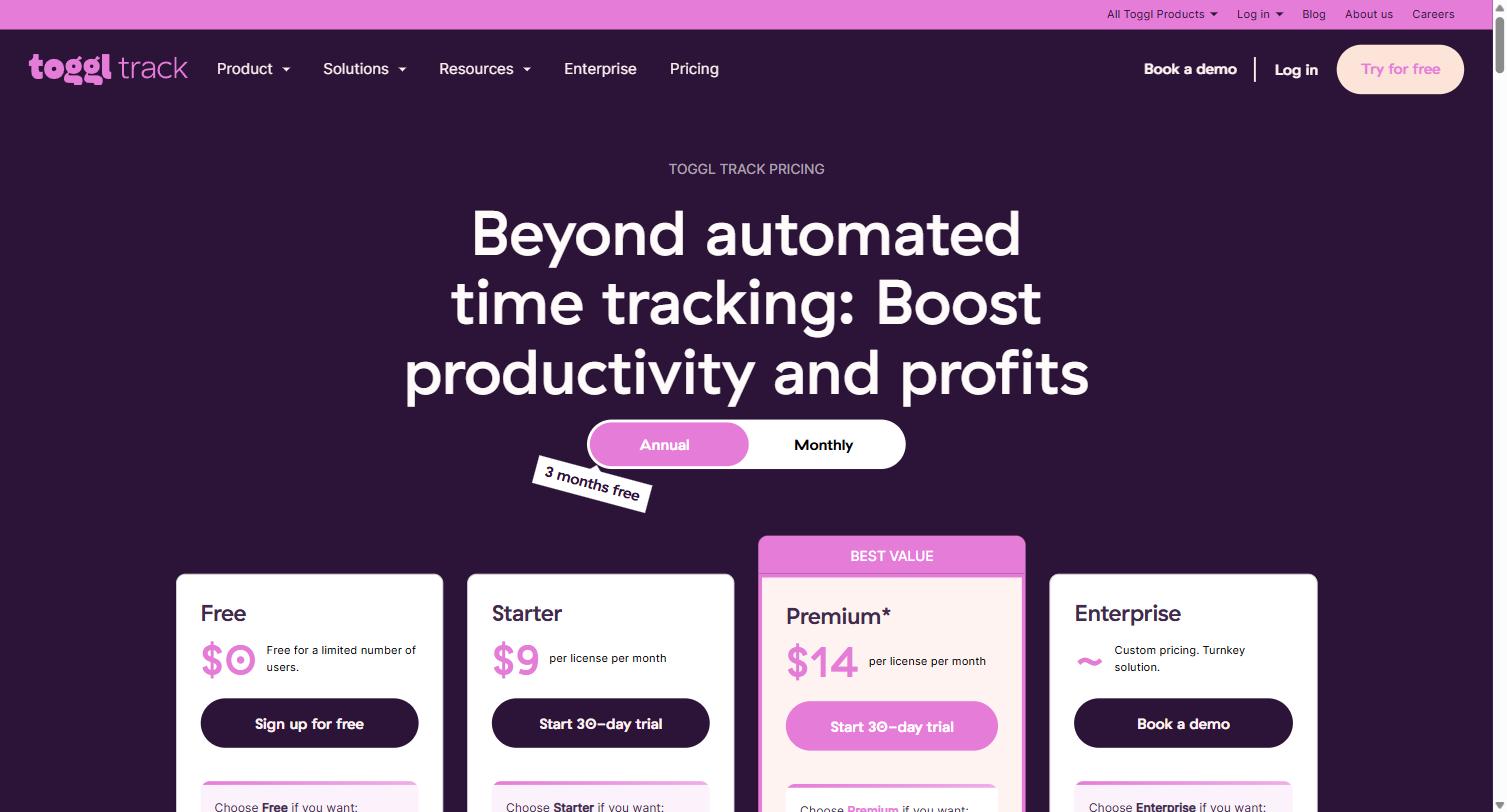
Toggl Track’s pricing is structured around a permanent free tier and three paid tiers, billed per license, with the same price whether you choose monthly or annual billing on some plans and a discount for annual commitment on others. Here’s the actual breakdown as published on Toggl’s pricing page:
| Plan | Price | Built For |
|---|---|---|
| Free | $0, free for a limited number of users | Solo freelancers or very small teams needing core tracking and basic reports |
| Starter | $9/license/month billed annually, $12/license/month billed monthly | Teams that need billable rates, project estimates, and revenue reporting |
| Premium | $14/license/month billed annually, $20/license/month billed monthly | Agencies that need profitability analysis, fixed fee projects, and timesheet approvals |
| Enterprise | Custom pricing | Larger organizations needing dedicated onboarding and custom integrations |
The Free plan includes time tracking across web, desktop, and mobile, integration with 100+ tools via the browser extension, calendar integrations, and productivity reports. Starter adds billable rates, project time estimates and alerts, and revenue and productivity analysis. Premium adds profitability analysis, fixed fee projects, scheduled reports, timesheet approvals, fully customizable reports, and integrations with Jira and Salesforce, plus single sign-on. Every paid plan comes with a 30-day free trial of Premium features, and Toggl doesn’t require a credit card to start that trial.
For most freelancers and small agencies, the honest answer is that Starter covers the billing and reporting needs described above, and Premium becomes worth it once profitability tracking and fixed-fee project monitoring start mattering, which for a lot of shops is once you’re running more than a handful of concurrent client engagements. You can compare the plans directly and start on Free to see which tier your actual workflow needs before paying for anything.
Simple Tracking vs. Monitoring-Heavy Tools: Choosing the Right Fit
It’s worth being direct about where Toggl Track fits relative to tools like Hubstaff, which we’ve covered in a separate walkthrough for teams managing distributed contractors at scale. Hubstaff is built around configurable activity monitoring: optional screenshots, activity levels, and app usage tracking that give a manager visibility into a larger remote team. That’s genuinely useful when you’re coordinating a dozen contractors across time zones and need a system of record beyond “trust me, I worked eight hours.”
Toggl Track is built for a different starting problem. If you’re a solo consultant, a two-person shop, or a small agency where the person tracking time is also the person billing the client, you generally don’t need activity monitoring, you need a timer that’s fast enough to actually use and reporting that’s clean enough to hand to a client without editing. Neither approach is wrong, they’re solving for different team sizes and different trust dynamics. Choosing between them is really a question of whether your bottleneck is “I don’t have visibility into what my team is doing” or “my billing data is a mess because tracking time is annoying.”
Common Questions Before You Switch
Do I need a credit card to try it? No. Signing up for the Free plan doesn’t require payment information, and the 30-day Premium trial that comes with every signup also doesn’t require a card upfront.
What happens to my data if I downgrade from a trial? If you use Premium features like billable rates or tasks during the trial and then drop to Free once the trial ends, that data stays in your account, it just becomes read-only or inaccessible for editing until you upgrade again. Nothing gets deleted outright.
Is the free plan actually usable long-term, or is it a bait-and-switch? Toggl states the Free plan is free forever, capped at a limited number of users rather than a time limit. For a solo freelancer or a two-person shop that doesn’t need billable rate segmentation, Free alone can realistically cover core time tracking indefinitely.
Does it work if my team is fully remote across time zones? Yes. The mobile, desktop, and web apps sync automatically, and reports can be filtered by date range and team member regardless of where someone is physically working, so time zone differences don’t create gaps in the data.
Migrating Off Spreadsheets or Sticky Notes
A surprising number of freelancers and small agencies are still tracking time in a spreadsheet, a paper notebook, or “I’ll remember it later,” which is really just an unstructured spreadsheet stored in someone’s head. The migration path into Toggl Track doesn’t require a big-bang cutover. Most people start by running the timer alongside whatever they’re already doing for a week or two, comparing the two records, and then dropping the manual method once they trust the numbers match or improve on what they were doing before.
Where this tends to pay off fastest is in the gap between what people think they’re spending on non-billable admin work versus what they’re actually spending. Once that number is visible in a report instead of a guess, it’s a lot easier to decide whether it’s worth raising rates, cutting a low-margin client, or just tightening up how meetings get scheduled.
Getting Started with Toggl Track
The practical path for most freelancers and small agencies is to start on the Free plan, run it for a full billing cycle, and see whether the entries you’re logging actually match what you’d remember without the tool. If the answer is no, and it usually is, that gap is exactly what’s been costing you in undercounted billable hours. From there, upgrading to Starter or Premium is a decision you can make with real data instead of guessing which tier you’ll need.
Setup takes a few minutes: install the browser extension or desktop app, create your first project and client, and start the timer on your next task. Sign up for Toggl Track’s free plan here and you’ll have your first tracked week done before you’d have finished configuring a more complicated system.
Time tracking software isn’t the interesting part of running a consultancy or agency. Getting paid accurately for the work you actually did is. Toggl Track’s whole design is oriented around making that second part boring and automatic, so you can spend your attention on the work itself instead of reconstructing timesheets from memory every Friday afternoon.
For more on how we think about operational and marketing tooling for distributed SaaS and agency teams, see our marketing glossary or browse our full services overview.
Share this article

Jordan Reeves leads account-based marketing and outbound pipeline strategy at MV3 Marketing, specializing in account selection, intent-signal targeting, and multi-channel orchestration for B2B companies.
Ready to audit your organic growth opportunity?
$2,500 flat. 5 business days. Six deliverables tied to pipeline , not rankings. No retainer required.
Get the Organic Growth Audit →