Before you start
You need read access to your CRM’s company or account table and a way to run a simple count query, either through your CRM’s own reporting tool or direct database access. No new software purchase is required for this audit.
| Item | Why it matters | Time to set up |
|---|---|---|
| Read access to the company or account table | You are counting fill rate, not editing anything yet | Usually already in place |
| A list of the firmographic fields you actually use | Auditing fields nobody looks at wastes the exercise | 10 minutes to list |
| A way to run or export a count query | SQL access or a CRM report builder both work | Varies by CRM |
Step 1: Count fill rate per field
Run one query that counts total records and, separately, how many have a non-empty value in each firmographic field you care about. This is the query we ran against our own company table.
SELECT count(*) AS total_companies,
 count(industry) AS has_industry,
 count(employee_count) AS has_employee_count,
 count(vertical) AS has_vertical,
 count(employee_band) AS has_employee_band,
 count(funding_stage) AS has_funding_stage,
 count(hq_country) AS has_hq_country,
 count(intent_score) AS has_intent_score
FROM crm_companies;

-- output:
-- total_companies=45, has_industry=29, has_employee_count=20, has_vertical=11,
-- has_employee_band=3, has_funding_stage=0, has_hq_country=6, has_intent_score=0Step 2: Turn counts into a ranked gap list
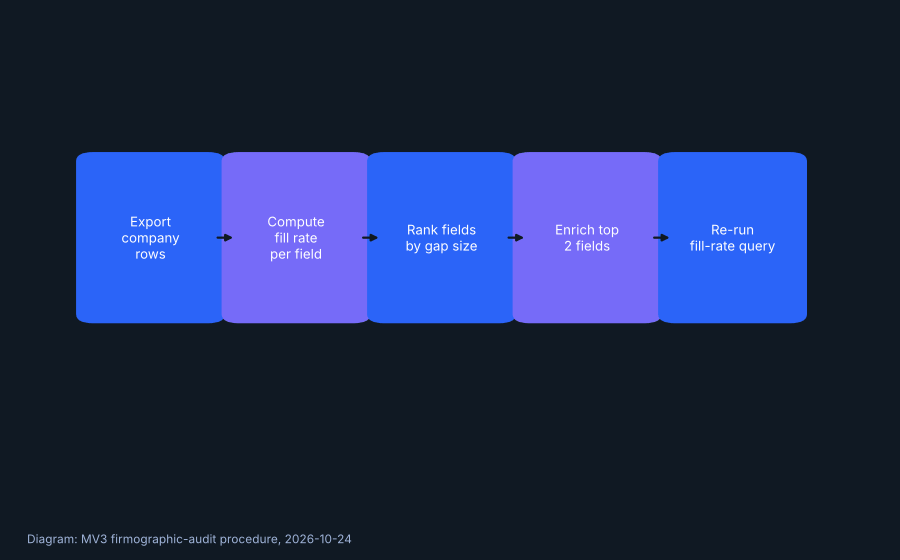
Divide each field’s count by the total record count, then sort the list from lowest to highest. The fields at the bottom of that list are your actual priority, not the fields anyone assumes are missing.
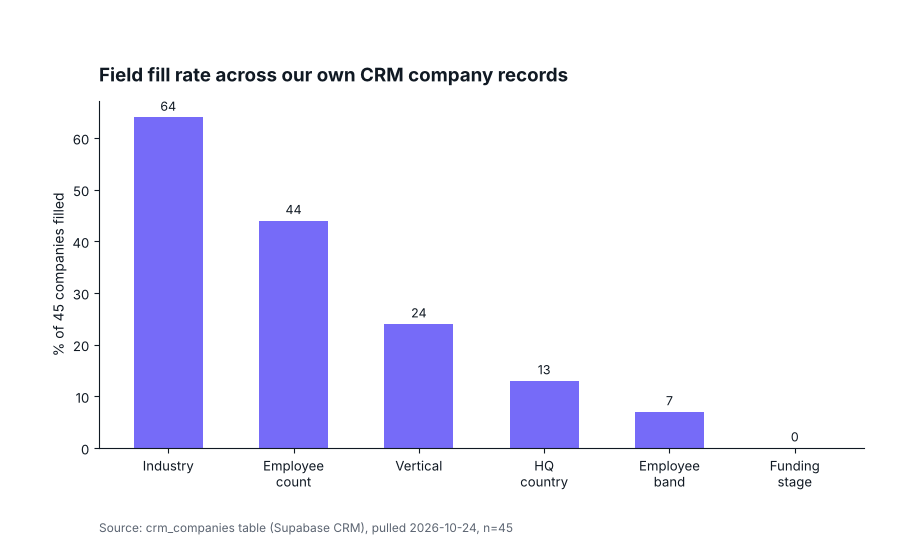
Source: crm_companies table (Supabase CRM), pulled 2026-10-24, n=45 companies.
In our own data, industry led at 64 percent and employee count followed at 44 percent. Vertical, employee band, HQ country, funding stage, and intent score all trailed well behind, with the last two at zero.
Step 3: Pick two fields to prioritize
Resist the urge to fix everything at once. Pick the two fields with the most impact on whatever decision the data feeds, whether that is lead routing, segmentation, or reporting, and leave the rest for a later pass.
Step 4: Set an enrichment method for each field
Some fields can be filled manually in under an hour if the record count is small, which was true for our own 45 company table. Larger lists usually need either a bulk enrichment pass or a required field added to the intake form so new records arrive complete.
Whichever method you choose, write it down next to the field so the next person running this audit does not have to guess what was tried already.
Step 5: Re-run the query monthly
Save the query from step one and re-run it on a schedule. A single audit tells you where you stand today. A repeated one tells you whether your intake process is actually improving or just moving the gap around.
Troubleshooting
| Symptom | Likely cause | What to check first |
|---|---|---|
| Fill rate looks high but segmentation still fails | Field is filled with inconsistent or placeholder values | Spot check actual values, not just whether the field is non-empty |
| New records arrive incomplete every time | No required field at intake | Add a required field to the form or import template |
| Fill rate improves then quietly drops again | No recurring audit scheduled | Put the monthly re-run on a calendar, not just a to-do list |
Checklist recap
| Step | Done when |
|---|---|
| 1. Fill rate counted | One query, one row of counts per field |
| 2. Gaps ranked | Fields sorted lowest fill rate first |
| 3. Two fields prioritized | Named fields with an owner |
| 4. Enrichment method set | One line plan written per field |
| 5. Monthly re-check scheduled | Query re-run added to a recurring calendar item |
What we found
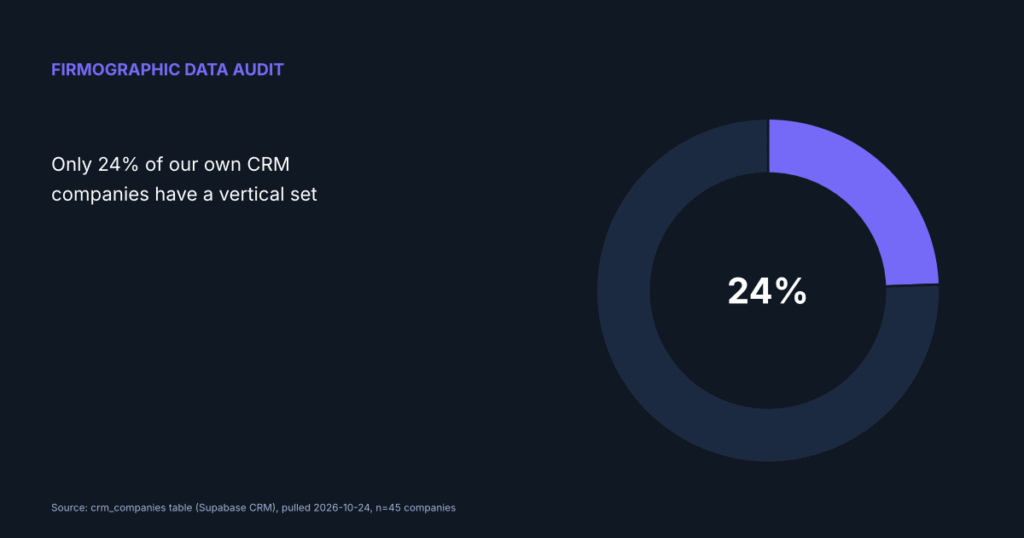
Running this audit on our own 45 company CRM table was not flattering. Industry was the strongest field at 64 percent filled. Employee count followed at 44 percent. Vertical sat at 24 percent, employee band at 7 percent, HQ country at 13 percent, and funding stage and intent score were both at zero.
We are naming our own gap here on purpose. A firmographic data audit is only useful if it is honest about what it finds, including when the finding is unflattering to the team running it.
We offer CRM and lifecycle data cleanup as part of our services at MV3, so the recommendation to prioritize two fields rather than attempt a full cleanup at once reflects what we have found actually gets finished, not a neutral academic claim.
DataForSEO recorded 320 monthly U.S. searches for firmographic data with low keyword competition and a CPC of USD 35.67, pulled from the seo_keywords table on 2026-10-24, the highest CPC of any keyword in this batch, which points to real budget behind the searches despite the modest volume.
FAQ
What counts as firmographic data?
Company level attributes like industry, employee count, revenue band, location, and funding stage. It describes the business, not an individual person at that business.
How often should a firmographic audit run?
Monthly for a small CRM like ours. A larger database with heavier inbound volume may need it weekly, since gaps reopen faster with more new records.
Should we buy an enrichment tool before auditing?
No. Audit first. Buying a tool before you know which fields actually matter to your own segmentation often means paying to fill fields nobody uses.
For the data quality work that pairs with this audit, see our piece on auditing CRM data quality with the HubSpot API. If your systems need a broader cleanup first, our guide on CRM integration without breaking data covers that groundwork. If you want MV3 to run this audit for your team, book a call.
Share this article

Vance Moore is Chief Growth Officer at MV3 Marketing and leads its team of SEO professionals, engineers and auditors.
Ready to audit your organic growth opportunity?
$2,500 flat. 5 business days. Six deliverables tied to pipeline , not rankings. No retainer required.
Get the Organic Growth Audit →