
Manychat is a chat automation platform that lets businesses build no-code conversation flows across Instagram, WhatsApp, Facebook Messenger, TikTok, SMS, and email. It is built for creators and consumer brands first, but the same automation logic (auto-replying to comments, qualifying leads inside a DM thread, routing support questions) works just as well for B2B SaaS teams and the agencies that run demand gen for them.
Most B2B marketing stacks are still built around two channels: email and web forms. Both work, but both also assume the buyer is willing to fill out a field, wait for a reply, and check their inbox later. A growing share of your audience, especially anyone under 40, is more responsive in a DM thread than an inbox. This piece is a walkthrough of what Manychat actually does, where it fits into a SaaS or agency marketing motion, and what it costs at each tier.
The context worth naming up front: most SaaS marketing content is written for developers building custom chatbots on top of an API, or for ecommerce brands running abandoned-cart flows. There’s very little written for a B2B marketer who just wants to stop losing warm leads in a comments section and start capturing them in a structured way. That’s the gap this walkthrough tries to close. Everything below comes from time spent directly in Manychat’s product pages, pricing page, and help documentation, not from a spec sheet or a press release.
Affiliate disclosure: MV3 Marketing participates in affiliate and partner programs, including with Manychat. This post contains affiliate links, and we may earn a commission if you sign up through them, at no additional cost to you. We only recommend tools we have researched directly and believe are useful for SaaS and agency marketing teams.
What Manychat actually is
Manychat started as an Instagram and Messenger automation tool for creators and has expanded into a full conversational marketing platform. According to Manychat’s own site, the platform is used by more than a million creators, marketers, and brands, and it holds official Meta Business Partner and TikTok Marketing Partner status, which matters if you are worried about a chatbot tool getting your account flagged or restricted.
The core idea is simple: instead of building a landing page and a form to capture a lead, you build a “flow,” a sequence of automated messages and decision branches, and trigger it from a comment, a DM, a keyword, a button tap, or a scheduled broadcast. The flow can ask qualifying questions, hand off a resource link, tag the contact, and route a hot lead to a human, all inside the same chat thread the prospect is already in.
For a SaaS or agency marketing team, the practical use is turning organic and paid social engagement into a two-way conversation instead of a one-way comment. Someone comments “link please” on a LinkedIn-adjacent post you cross-posted to Instagram, or reacts to a TikTok explainer about your product, and instead of losing that intent the moment they scroll away, Manychat can auto-DM them the resource, capture an email or phone number, and drop them into a nurture sequence.
If you want to see the platform’s own signup and trial flow before committing to anything, you can start with Manychat’s free plan here and get a feel for the flow builder before evaluating a paid tier.
It’s worth being direct about who this tool is built for. Manychat’s homepage, testimonials, and onboarding language are aimed squarely at individual creators and consumer brands: the case studies on the site talk about follower growth and Instagram sales, not pipeline or CAC. A SaaS marketing team evaluating Manychat should go in expecting to adapt the tool to a B2B use case rather than finding B2B messaging baked into the product itself. The mechanics (flows, triggers, channels, AI Step) are channel-agnostic and work fine for a demo request as easily as they do for a product giveaway. The go-to-market language just isn’t written with a VP of Marketing in mind.
Instagram and comment-to-DM automation
Instagram is Manychat’s most mature channel, and it is where most of the platform’s marketing content is focused. The core mechanic is what Manychat calls comment-to-DM automation: a post or Reel gets a comment containing a trigger word (something like “GUIDE” or “DEMO”), and the platform automatically sends that commenter a private message with a link, a lead magnet, or the start of a qualifying conversation.
For a SaaS company, this is a direct answer to a problem that content teams run into constantly: you publish a genuinely useful post (a product comparison, a workflow breakdown, a “here’s how we built X” thread) and the comments fill up with “is this available for teams” or “does this work with Salesforce,” and someone on your team has to manually reply to each one with a link, hours or days later. Comment-to-DM automation replies inside seconds and keeps the entire exchange inside the DM, which is also where the prospect is most likely to actually read it, since Instagram and Messenger open rates tend to run well above email.
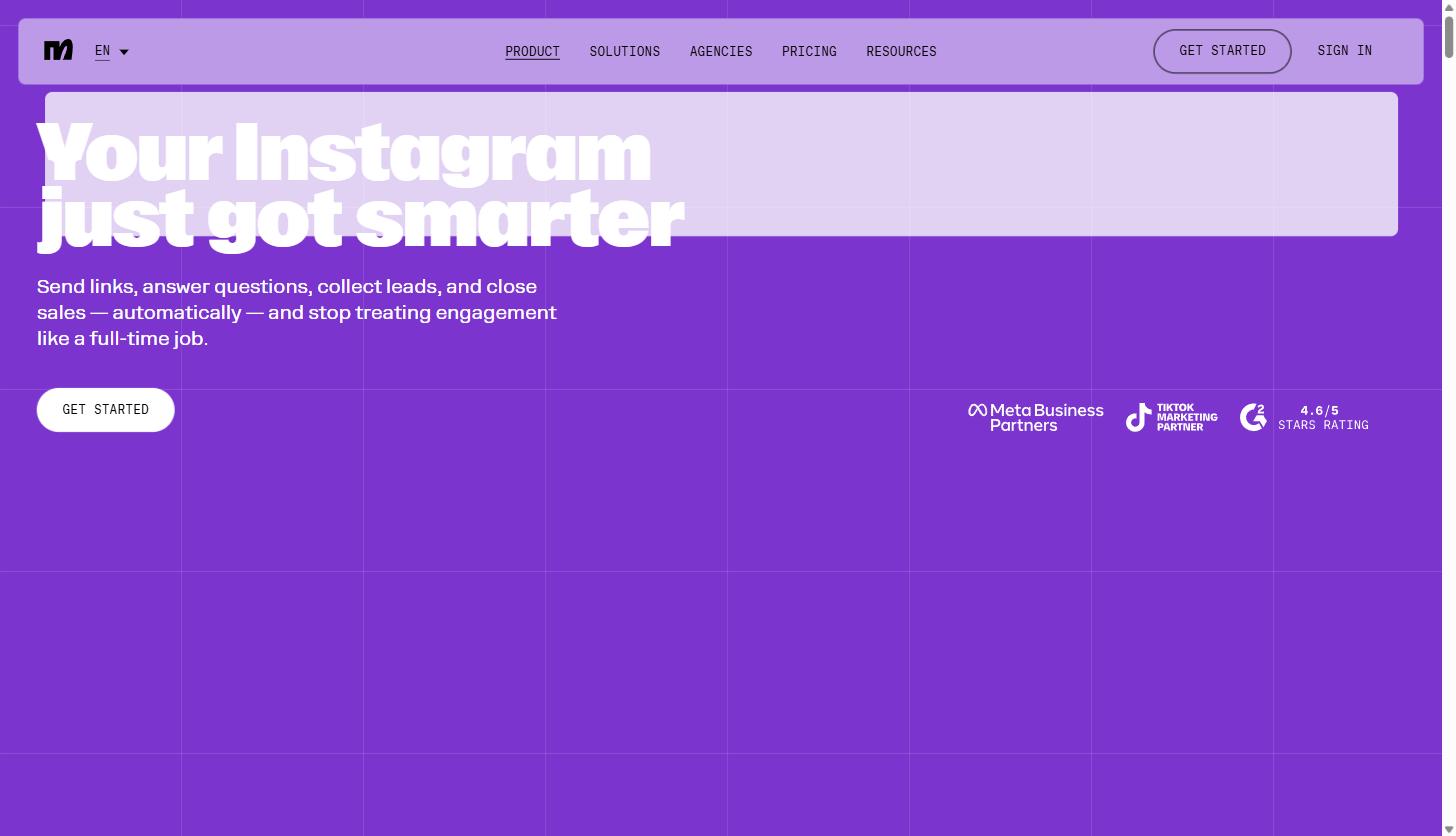
Manychat’s own product page for Instagram sums up the pitch as sending links, answering questions, collecting leads, and closing sales automatically, so engagement stops being a full-time manual job. That is a fair description of what the flow builder does mechanically, whether you’re a creator or a demand gen team running an account for a SaaS brand.
A few things worth flagging before you build your first Instagram flow. First, comment-to-DM automation only works reliably when the trigger word is specific. A generic trigger like “info” will catch unrelated comments and send your flow to people who never actually wanted it, which wastes your Active Contact allowance and annoys the people who get an unsolicited DM. Second, Instagram’s own platform rules require the first message in a DM sequence to relate directly to the comment or interaction that triggered it, so a flow that goes straight into an unrelated pitch is both a bad experience and a policy risk. Manychat’s Meta Business Partner status gives it deeper API access than most third-party tools, but it doesn’t override Meta’s messaging policies, and it’s still on the business running the flow to follow them.
WhatsApp, Messenger, SMS, email, and the AI Step
Beyond Instagram, Manychat connects the same flow-builder logic to WhatsApp, Facebook Messenger, TikTok, Telegram, SMS, and email, all from one account. That matters for agencies managing multiple brands or regions: a WhatsApp-heavy market (much of Latin America, the Middle East, and parts of Europe) and an SMS-heavy market (the US) can run through the same underlying automation logic instead of requiring two separate tools.
The feature that has changed the most in the last couple of years is Manychat AI, specifically what the platform calls the AI Step. According to Manychat’s own help documentation, the AI Step lets an AI assistant take over part of a conversation to collect information or handle a defined task, operating from a script and a set of goals you configure rather than responding freely. In practice, that means you can set up an AI Step to ask a handful of qualifying questions (company size, current tool, timeline) inside a chat thread, and only route the conversation to a rep once the AI Step has confirmed the lead is worth a human’s time.
The Flow Builder itself is the part most marketers will spend time in day to day. It is a drag-and-drop, node-based canvas, similar in spirit to what you would find in an email automation platform, except the nodes are chat messages, quick-reply buttons, conditions, and delays instead of email sends and wait steps. Manychat also offers “Quick Automations,” pre-built flow templates for common jobs like welcoming a new follower or answering FAQs, for teams that do not want to build a flow from a blank canvas.
A typical B2B flow, in practice, looks something like this: a trigger fires off a comment keyword or a DM containing a phrase like “demo” or “pricing.” The flow opens with a short acknowledgment message, then a quick-reply question (“Are you exploring this for yourself or your team?”). Depending on the answer, the flow branches: an individual gets routed to a self-serve signup link, while a team-plan answer triggers a follow-up question about company size, then hands off to either a calendar booking link or, on the AI Step tiers, a short AI-led qualifying exchange before the booking link appears. None of that requires custom code. It requires mapping out the branches on the canvas and writing the message copy, which is closer to building an email nurture sequence than building software.
Teams running this at agency scale should also know that Manychat supports multiple team members per account (the exact number scales with plan, from 1 user on Free up to 10 on Advanced) and a shared inbox on the Business and Advanced tiers, so a flow that generates a qualified lead can hand off to a specific team member rather than dropping into a single shared queue.
If your team has been putting off chat automation because it felt like it needed a developer, this is the part worth testing yourself. Manychat’s 14-day free trial on the Essential or Pro plan gives enough room to build a real flow and test it against actual traffic before you decide if it is worth paying for.
Practical use cases for service business and agency marketing teams
The features above translate into a handful of concrete use cases that fit naturally into a B2B SaaS or agency marketing motion:
Lead qualification inside a DM
Instead of sending every inbound DM or comment straight to a generic “book a call” link, a flow can ask two or three qualifying questions first (team size, current tool, budget range) and only surface the booking link once those answers clear a threshold. This is the same logic covered in most B2B marketing terminology around progressive profiling, applied to a chat thread instead of a form. The advantage over a gated form is completion rate: a three-question conversational exchange inside a familiar chat interface tends to get finished at a much higher rate than a three-field form on an unfamiliar landing page, mostly because it doesn’t feel like filling out paperwork.
Webinar and demo reminders
Broadcast messages through WhatsApp or SMS tend to get read faster than a reminder email buried in a promotions tab. A flow can confirm a demo booking, send a reminder the morning of, and follow up automatically if the prospect no-shows, all without a human touching the sequence. For agencies running webinars on behalf of SaaS clients, this is one of the more direct ways to cut no-show rates without adding headcount, since the reminder sequence runs identically for every registrant regardless of volume.
Support deflection for common questions
Pricing questions, integration questions, and “does this work with X” questions eat a disproportionate amount of a small support or sales team’s time. An automated flow (or an AI Step layered on top) can answer the recurring 80% of questions instantly and only escalate the genuinely complex ones to a person. This matters most for early-stage SaaS companies where the same two or three people are handling support, sales, and marketing, and every hour spent re-answering “what’s the difference between your plans” is an hour not spent on something that actually needs a human.
Content-to-pipeline on social
If your team already runs an ABM or outbound motion, comment-to-DM automation gives you a low-friction way to convert social engagement from target accounts into a real conversation, complementing the kind of account-based sequencing described in our ABM playbook for AI and SaaS companies. If someone from a target account comments on a founder’s post or a product announcement, an automated DM that opens a real conversation is a faster path to a meeting than waiting for that same person to eventually respond to a cold email.
Event and conference follow-up
Agencies and in-house teams running booths at industry events can use a QR code or keyword tied to a WhatsApp or SMS flow to capture contact details on the spot, skip the business-card-to-spreadsheet transcription step, and start a nurture sequence before the prospect has even left the conference floor. Because the flow lives in a channel the prospect already checks constantly, the follow-up sequence gets read at a much higher rate than a bulk post-event email blast sent two weeks later.
Manychat pricing, honestly broken down
Manychat’s pricing is based on “Active Contacts,” meaning any unique person your account exchanges messages with (through automation, AI, broadcasts, or the inbox) during a monthly billing period. Here is what the platform’s pricing page actually shows, billed monthly:
| Plan | Price | Active contacts included | Channels |
|---|---|---|---|
| Free | $0 | 25 | Any 2 channels, up to 4 active automations |
| Essential | $14/mo | 250 | Any 2 channels, unlimited custom automations |
| Pro | $29/mo | 2,500 | Any 3 channels, AI Step included |
| Business | $69/mo | 7,500 | Unlimited channels, shared team inbox |
| Advanced | $139/mo | 25,000 | Unlimited channels, 10 users, priority support |
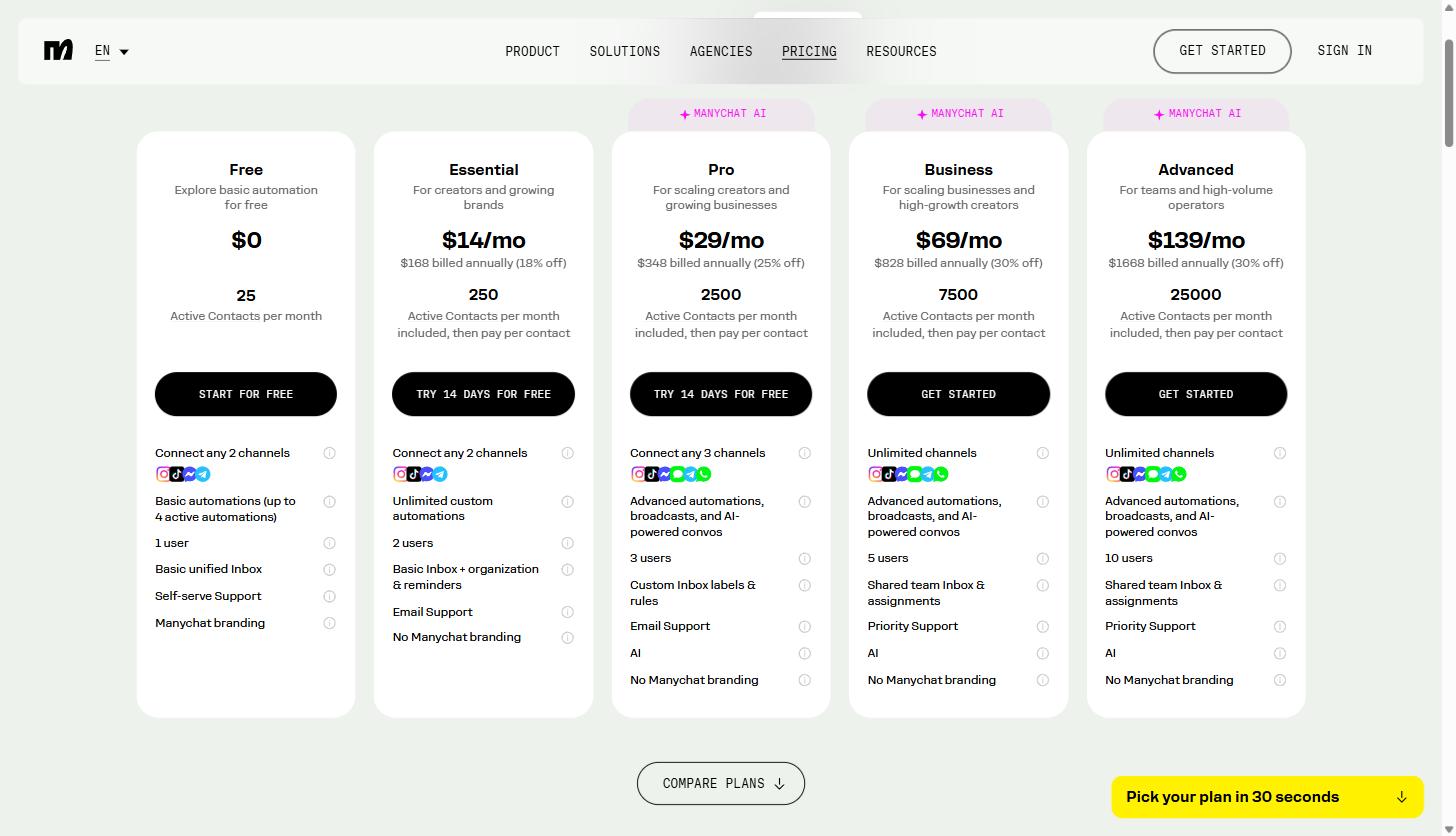
Annual billing knocks the price down further, up to 30% off on the higher tiers according to the pricing page. Once you go over the included contact allowance, you are billed per additional active contact rather than being cut off, and the per-contact overage rate drops significantly as you move up plans (from $0.10 per extra contact on Essential down to $0.004 on Advanced). Essential and Pro both come with a 14-day free trial, and the Free plan does not require a credit card at all, which makes it a reasonable way to test the comment-to-DM mechanic on a real account before spending anything.
The AI Step and Manychat AI features are only available starting on the Pro plan, so if the qualifying-questions-via-AI use case is the main reason you’re evaluating the tool, budget for Pro or above rather than Essential.
For most B2B SaaS marketing teams testing this for the first time, starting on Manychat’s Pro plan is the more realistic entry point, since it is the lowest tier that includes both the AI Step and three connected channels.
Chat automation versus email and forms
None of this replaces email or your existing form-based lead capture, and it shouldn’t try to. Email is still the better channel for longer-form nurture content, and forms are still the standard for anything that needs structured data collection tied directly into a CRM field. What chat automation is better at is speed and read rate at the moment someone shows interest.
A prospect who comments on a product demo video and gets a DM back within seconds is having a fundamentally different experience than one who fills out a form and waits for a “thanks for your interest” autoresponder, then a follow-up email two days later from a rep. Neither channel is strictly better; they are suited to different moments in the funnel. The teams that get the most out of a tool like Manychat treat it as a capture and qualification layer that feeds into the same CRM and nurture sequences their email and sales tools already use, rather than a replacement for either.
The practical integration point is usually a webhook or a native CRM connector: a completed Manychat flow tags the contact and pushes their answers (email, phone number, qualifying question responses) into whatever system your sales team already works out of, so the DM conversation becomes just another lead source feeding the same pipeline, not a separate silo your sales team has to check manually.
Common questions before you start
Do I need a developer to set this up? No. The flow builder is visual and does not require code for standard use cases like comment-to-DM, welcome messages, or FAQ automation. Custom integrations with your CRM or a proprietary backend system may need light technical help, but the core automation does not.
Will this get my Instagram or WhatsApp account restricted? Manychat’s Meta Business Partner and TikTok Marketing Partner status means it operates through approved API access rather than scraping or unofficial workarounds, which is the main reason it has stayed usable at scale where less official tools have run into platform enforcement. That said, any automation tool carries some risk if it’s used to spam users who never opted in, so the trigger design matters as much as the tool itself.
Can one account manage multiple brands? Each Manychat account connects to one set of channels for one brand or business. Agencies managing several SaaS clients typically run a separate Manychat account per client, which is worth factoring into the pricing math if you’re quoting this as a service line rather than a single internal tool.
Getting started
If you’re running organic social for a SaaS brand or managing accounts for SaaS clients as an agency, the lowest-risk way to evaluate Manychat is to pick one recurring comment pattern (a pricing question, a “send me the guide” comment, a demo request) and build a single flow around it on the free plan. That gives you a real read on response quality and lead volume before deciding whether the AI Step or a higher contact tier is worth paying for.
You can also see how the platform organizes automation by channel and connects to Instagram, WhatsApp, TikTok, Messenger, SMS, and email in one place, which is useful context for teams evaluating this against the broader chat and messaging platform category more generally.
You can create a free Manychat account here and have a working comment-to-DM flow live in under an hour, without needing a developer or a rebuild of your existing marketing stack.
Share this article

Jordan Reeves leads account-based marketing and outbound pipeline strategy at MV3 Marketing, specializing in account selection, intent-signal targeting, and multi-channel orchestration for B2B companies.
Ready to audit your organic growth opportunity?
$2,500 flat. 5 business days. Six deliverables tied to pipeline , not rankings. No retainer required.
Get the Organic Growth Audit →