LearnWorlds is a course platform and LMS built for businesses that want to create, sell, and deliver structured online learning, from customer onboarding academies to paid certification programs. For B2B SaaS companies and the agencies that support them, it turns scattered product training into a branded, trackable academy that can also become its own revenue line.
Disclosure: MV3 Marketing participates in affiliate and partner programs, including one with LearnWorlds. This post contains affiliate links, and if you sign up through one of them, MV3 may earn a commission at no additional cost to you. We only feature tools we’ve actually researched and believe are relevant to B2B SaaS and agency teams.
Why more service businesses are building a training academy instead of a help center
Most SaaS companies start customer education with a help center, a handful of onboarding emails, and maybe a YouTube playlist. That works for a while. It stops working once the product gets complex enough that “read the docs” isn’t a real onboarding strategy, or once sales starts fielding the same “how do we get our team trained” question from every enterprise buyer.
A structured course platform solves a different problem than a help center does. A help center answers questions when someone already knows what to search for. A course academy takes someone from zero to competent in a defined sequence, tracks whether they finished, and can issue a certificate at the end. That distinction matters for three groups inside a B2B SaaS company: the customer success team trying to reduce time-to-value, the partner or channel team trying to certify resellers, and revenue leadership looking at whether training itself could be sold as a paid tier.
LearnWorlds is built specifically for that use case rather than being a general video host with a quiz bolted on. We put it through a real walkthrough, screenshots included, to see what a SaaS company or agency actually gets for the price.
The course builder: what you’re actually working with
LearnWorlds positions itself as an LMS for what it calls “learning businesses,” and the platform is built around that framing throughout. Courses are built in a no-code, drag-and-drop editor rather than requiring a developer or a third-party page builder. You can host content on your own domain, and the course structure supports free courses, private courses, and paid courses side by side, so a SaaS company could run a free onboarding track next to a paid certification program in the same academy without needing two separate tools.
Content types go beyond plain video. The platform supports interactive ebooks, assessments (both graded exams and self-assessments), SCORM and LTI packages for teams that already have compliance-style training content, live 1:1 and group sessions, and social/community activities. For a SaaS company building a certification track, that combination matters: you can pair a video walkthrough of a feature with a graded quiz and a live office-hours session inside the same course, rather than stitching together three different tools.
Integrations are worth checking early rather than after you’ve built out a course catalog. LearnWorlds lists more than 50 built-in integrations plus LTI 1.3 support, which is what lets you pull in outside content like LinkedIn Learning or H5P activities and have them behave as native course content rather than an embedded iframe. For a SaaS company, the integrations that matter most in practice are the ones connecting the academy to your existing CRM and product analytics, so that “completed certification” or “finished onboarding course” can become a real lifecycle field instead of a fact that only lives inside the LMS.
If you’re evaluating this for a customer education program, it’s worth starting the free trial through LearnWorlds and building one real module before committing to a plan. The no-code builder is fast enough that you can get a usable first draft of a course in an afternoon.
Interactive learning and flexible course structure
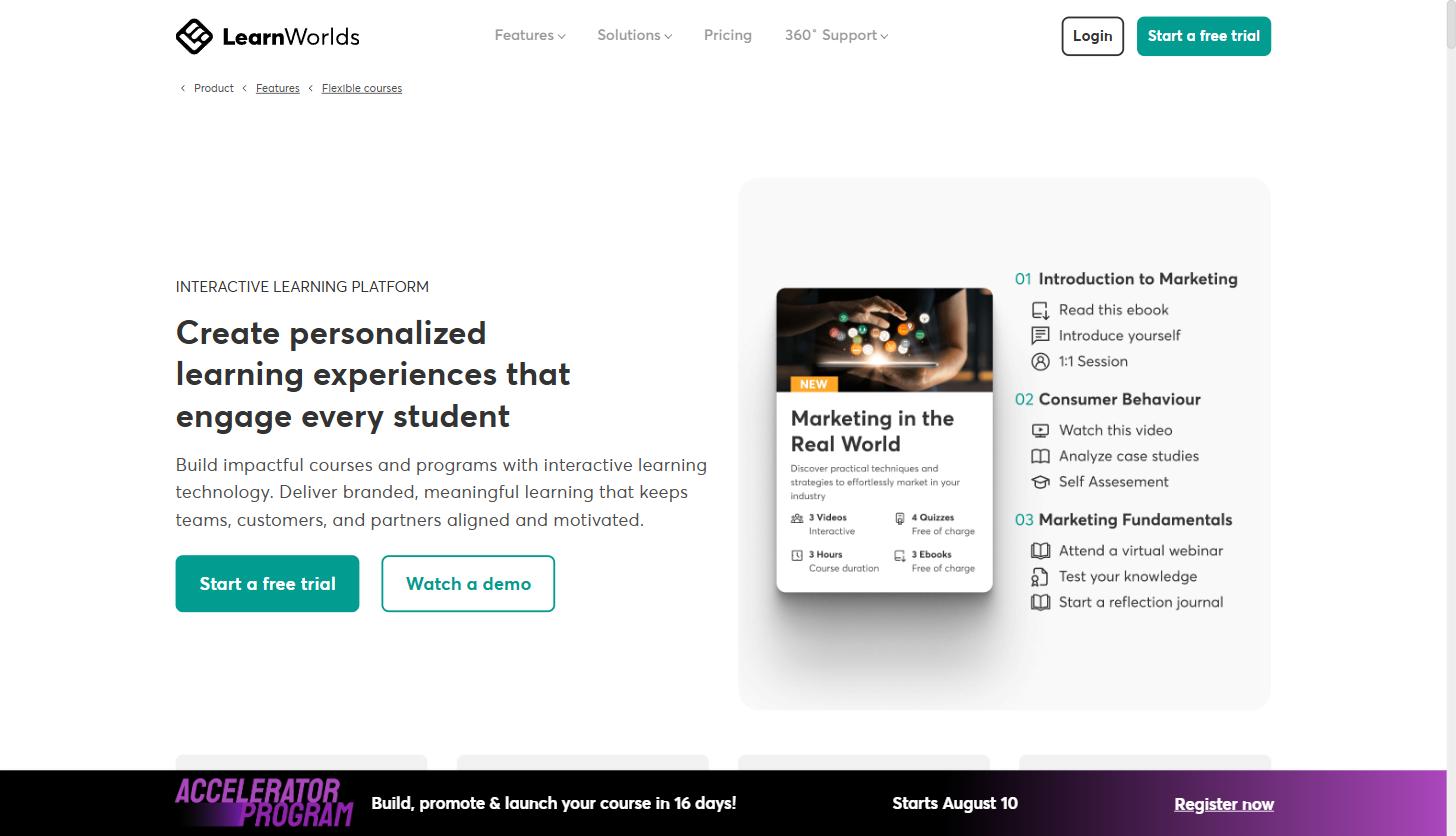
The feature that separates LearnWorlds from a basic video-hosting setup is how much control you get over pacing and structure. Courses can be set to sequential navigation, free navigation, or navigation gated by prerequisites, and individual sections can be marked public, private, paid, or drip-fed on a schedule. For a SaaS onboarding academy, that means you can require a customer to finish the “core setup” module before unlocking “advanced workflows,” which mirrors how most product adoption actually happens.
Multiple courses can also be combined into what LearnWorlds calls Learning Paths (a structured, guided sequence) or Learning Collections (a flexible library learners explore at their own pace). That’s directly useful for a certification program: bundle a “Foundations,” “Implementation,” and “Advanced Administration” course into a single Learning Path, sell it as one enrollment, and track completion across all three as a single program rather than three disconnected purchases.
The platform also includes an AI Insights Hub for reporting, which surfaces answers about academy performance (completion rates, drop-off points, engagement by course) without building a custom dashboard. For a customer success team trying to prove that a training academy is actually reducing support tickets or improving retention, that reporting layer is the part that turns the academy from a nice-to-have into something finance can see the value of.
The AI course creator, and where it actually helps
LearnWorlds has built AI tools directly into the course creation workflow rather than treating it as a separate add-on. The stated purpose is to let you start from material you already have (uploaded documents, pasted notes, or existing academy content) and turn it into structured learning assets: course outlines, assessments, supporting pages, and even marketing copy for the course itself. It also generates supporting visuals and images from the course context.
Worth calling out directly: LearnWorlds’ own product marketing lists “B2B Commercial Training” as one of the specific use cases for its AI tools, described as helping a training provider “deliver your best core program to multiple clients while adapting examples, pages, materials, visuals, and setup for different sectors.” That’s essentially the exact workflow an agency or a SaaS partner enablement team runs when it needs to deliver the same certification curriculum to different client segments without rebuilding it from scratch each time.
In practice, treat the AI tools as a first-draft accelerator, not a replacement for a subject-matter expert. It’s genuinely useful for turning a rough support doc or a recorded onboarding call into a starting outline. It’s not a substitute for someone on your team reviewing the output for accuracy, especially for anything technical or product-specific. Teams that get the most value out of it are ones who feed it their own source material rather than asking it to invent product knowledge from nothing.
Marketing and sales tools built for course creators
Because LearnWorlds is built for businesses that sell courses, not just deliver them, it includes marketing automation that a generic LMS typically leaves out. The platform ships with roughly 19 ready-made email templates and more than 30 customizable triggers and conditions, so you can automatically enroll a customer into a follow-up course after they finish the first one, or send a re-engagement email to anyone who has gone quiet for 30 days on a course they’re partway through. For a customer success team, that second pattern alone is useful: instead of manually tracking who stalled out on onboarding, the platform can nudge them automatically based on actual behavior in the course.
On the selling side, LearnWorlds supports bundles, subscriptions, payment plans, coupons, and what it describes as one-click B2B licensing for bulk purchases, meaning a company can buy 50 seats in a certification course for its team in a single transaction rather than 50 separate signups. For a SaaS company selling a paid certification to enterprise accounts, that bulk-purchase flow removes a real point of friction that a lot of course platforms don’t handle well.
Branded mobile apps for training that lives where your customers already are
LearnWorlds also offers a no-code mobile app builder that publishes a white-label app to the Apple App Store and Google Play under your own branding, not LearnWorlds’. The app supports in-app purchases through Apple Pay and Google Pay and can send push notifications to bring learners back into a course they’ve stalled on. For a SaaS company running a certification program for external partners or resellers, having training available as a branded app (rather than a browser-only experience) can matter for adoption, particularly with field-based or mobile-first users who aren’t sitting at a desktop.
This is priced as an add-on rather than something bundled into every plan by default, so it’s worth checking current add-on pricing during a demo or trial signup if a branded app is a requirement rather than a nice-to-have for your program.
Practical use cases for service businesses and agencies
A course platform is only useful if it maps to something your business actually needs to ship. Four patterns come up repeatedly for SaaS and agency teams specifically:
1. Customer onboarding academies
Instead of a static onboarding email sequence, structure onboarding as a short required course: account setup, core workflow, one advanced feature. Gate access to a “power user” community or bonus content behind course completion. This gives customer success a concrete, trackable definition of “onboarded” instead of a vague sense that someone probably read the welcome emails.
2. Certification programs for partners and resellers
If your SaaS product sells through implementation partners, agencies, or resellers, a certification track (built as a Learning Path with a graded assessment and a certificate at the end) gives you a way to formally verify partner competence before they touch a client’s account. This is the same model companies like HubSpot and Salesforce have used for their partner ecosystems for years, just built on infrastructure a mid-size SaaS company can actually afford and run itself.
3. A paid course as a standalone revenue line
Some SaaS companies package deep product expertise (advanced configuration, industry-specific implementation playbooks, admin certification) as a paid course sold separately from the software subscription. LearnWorlds’ built-in checkout, subscriptions, bundles, and coupon tools support this without needing a separate ecommerce platform bolted onto the LMS.
4. Agencies delivering training on behalf of multiple service business clients
This is the direct fit for marketing and consulting agencies rather than the SaaS company itself. The Learning Center plan explicitly supports running training for up to 10 separate client groups under one account, with full white-label branding per client. An agency managing customer education for several SaaS clients can run all of it from a single LearnWorlds account instead of standing up a separate LMS instance for every client.
Honest pricing breakdown
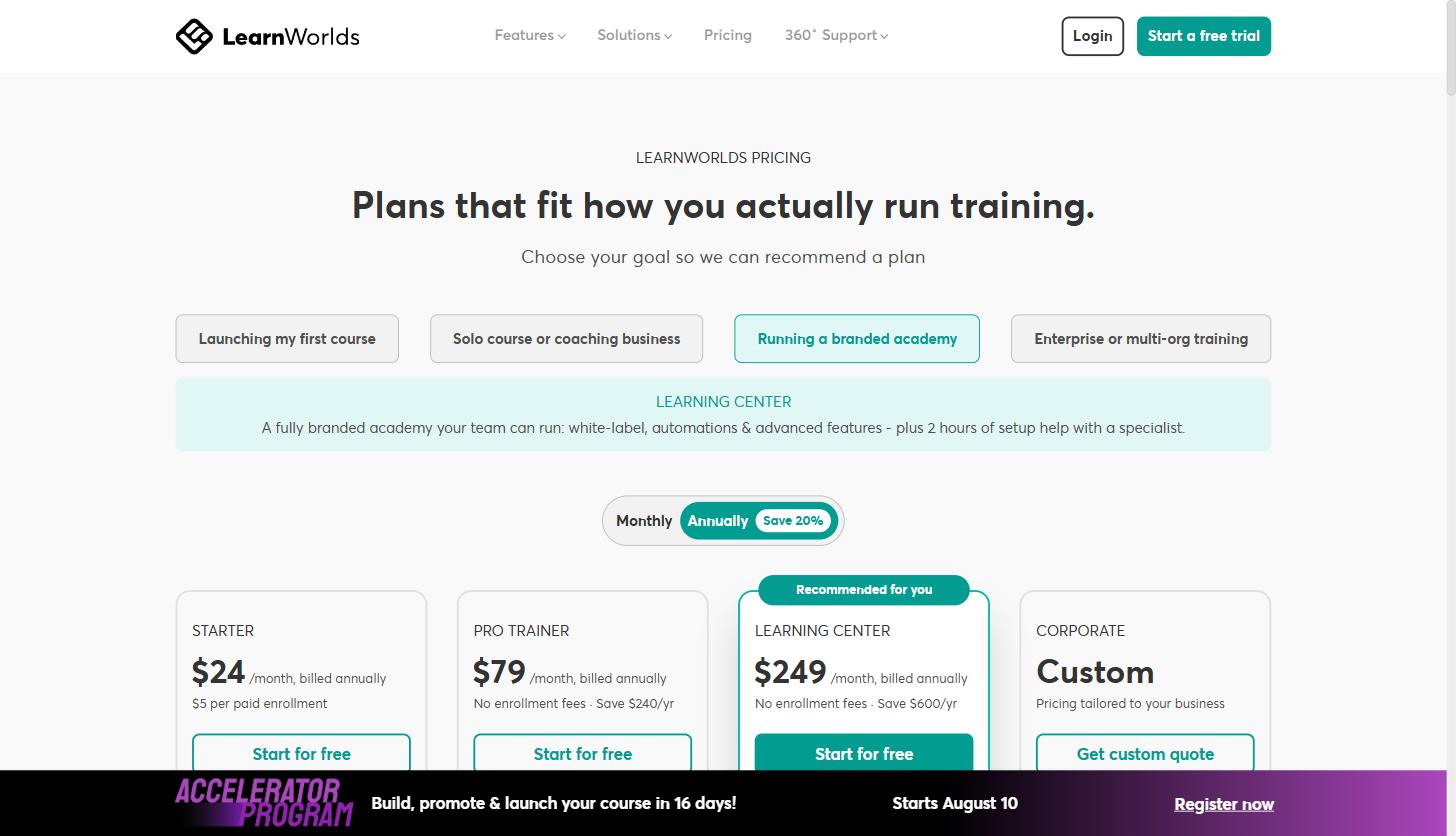
LearnWorlds prices in four tiers, shown here at the annual-billing rate (annual billing saves roughly 20% compared to paying monthly):
| Plan | Price (billed annually) | Active learners / month | Admins | Notable inclusions |
|---|---|---|---|---|
| Starter | $24/mo + $5 per paid enrollment | 1,000 | 1 | AI course builder, own domain, Stripe/PayPal checkout, live sessions |
| Pro Trainer | $79/mo, no enrollment fees | 2,000 | 5 | Unlimited courses, subscriptions/memberships, certificates, up to 20 SCORM uploads, 50+ integrations |
| Learning Center | $249/mo, no enrollment fees | 2,000 | 25 | Full white-label, training for up to 10 client groups, workflow automation, scheduled reports |
| Corporate | Custom quote | Custom | Custom | 99.95% uptime SLA, daily backups, dedicated success manager, 24/7 phone support |
A few things worth knowing before you pick a tier. The Starter plan charges $5 per paid enrollment on top of the base price, which is fine for a low-volume paid course but adds up fast if you’re certifying hundreds of partners a year, at which point Pro Trainer’s flat no-enrollment-fee pricing becomes the better deal even before you need its other features. The jump to Learning Center is really about white-labeling and multi-client management, which is the tier that matters most for agencies running training on behalf of clients rather than for a single-brand SaaS company running its own academy.
The clearest way to figure out which tier actually fits is to start a free trial and build a real course against your own content before comparing plans on paper.
LearnWorlds vs. hosting course videos yourself
The realistic alternative most SaaS companies are actually choosing between isn’t one LMS versus another. It’s a dedicated course platform versus the DIY approach: unlisted YouTube or Vimeo videos, a Google Drive folder of PDFs, and maybe a Notion page tying it together. The DIY approach is free and fast to start, which is exactly why so many companies begin there.
It breaks down at exactly the point where a training program starts to matter for the business. There’s no reliable way to gate content behind a prerequisite, no built-in way to know whether someone actually finished the material versus watched the first two minutes, no certificate to issue at the end, and no checkout flow if you decide the training is worth charging for. A dedicated platform trades some of that initial simplicity for structure, tracking, and monetization you can’t easily bolt onto a folder of videos later. For a one-off internal training video, the DIY route is still fine. For anything you plan to certify people against or sell, the gap shows up fast.
LearnWorlds also publishes that it runs migrations for teams moving off other platforms, including Kajabi, Thinkific, Teachable, Podia, Moodle, LearnDash, WordPress, and Skilljar, which suggests the more common comparison in practice is switching from one structured platform to another rather than starting completely from scratch.
Where this fits in a broader service business growth strategy
A training academy doesn’t replace core marketing and SEO fundamentals, but it does something most SEO and paid campaigns can’t: it turns existing customers into more successful, better-retained accounts, and it can turn partner education into a controlled, repeatable process instead of an ad hoc set of calls and PDFs. Companies in corporate training and broader eLearning categories have built entire businesses on exactly this infrastructure, and the same tooling works just as well as a supporting layer inside a SaaS company that isn’t primarily a training company.
If you’re weighing whether to build this in-house or have it built for you, start small: pick the one workflow (onboarding, certification, or a paid course) that has the clearest business case, and prove it out in a single course before expanding into a full academy.
What a realistic rollout looks like
Teams that get a training academy live quickly tend to follow a similar sequence, and it’s rarely “build the entire academy, then launch.”
- Audit what already exists. Most SaaS companies already have onboarding call scripts, support macros, and a knowledge base. That’s raw material for a first course outline, not a blank page.
- Build one pilot module in the trial. Pick the single highest-friction part of onboarding or the most requested piece of partner training, and build just that as a real course, not a demo.
- Run it with a small group before opening it up. A handful of real customers or partners going through the course will surface where the sequencing is confusing faster than any internal review will.
- Use the completion and drop-off data to fix the weak points. This is where the reporting layer matters. If most learners stall on the same lesson, that’s a content problem to fix before you scale the course to everyone.
- Expand into a full academy once the pilot proves out. Add the certification track, the partner tier, or the paid course only after the free or required core course is working.
The mistake to avoid is trying to build a fully white-labeled, multi-tier academy on day one. A single working course that people actually finish is worth more than an ambitious structure that never launches.
Who this fits, and who it doesn’t
LearnWorlds is a strong fit for a SaaS company or agency that has real training content already (or the people to create it) and needs a place to structure, gate, and optionally sell it. It’s also a reasonable fit for an agency managing training across several client brands, given the Learning Center tier’s explicit support for up to 10 white-labeled client groups.
It’s a weaker fit for a company that needs training folded directly into a single existing product experience, where an embedded, white-labeled LMS component inside your own app (rather than a separate branded academy) is the actual requirement. It’s also not the right tool if the real need is a lightweight internal wiki for a five-person team; that’s a case where a simpler, cheaper tool will do the job without the overhead of a course platform built for selling to external learners.
Getting started
The most efficient way to evaluate LearnWorlds isn’t reading a comparison chart, it’s building one real module with your own content and seeing how it feels to both build and take. Most of the platform’s core building blocks (course builder, AI assistant, checkout, and one admin seat) are available starting on the Starter plan, so you can test the actual workflow before committing to a higher tier.
You can start a free trial with LearnWorlds here and have a working course outline built before your next customer success or partner enablement meeting.
Share this article

Alex Carter leads SEO and content strategy at MV3 Marketing, specializing in generative engine optimization, technical SEO, and AI-driven content systems for B2B companies.
Ready to audit your organic growth opportunity?
$2,500 flat. 5 business days. Six deliverables tied to pipeline , not rankings. No retainer required.
Get the Organic Growth Audit →