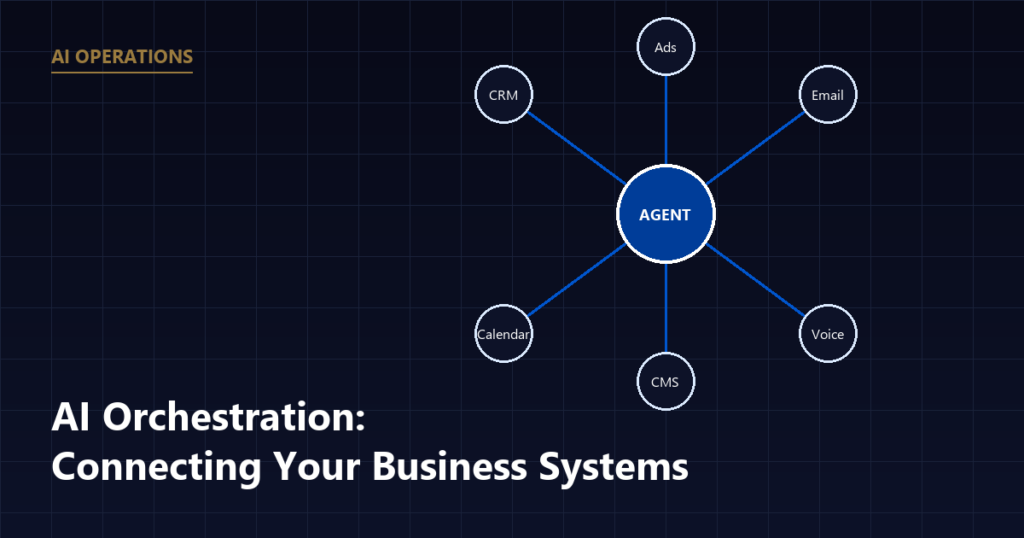
AI orchestration is the practice of connecting separate AI agents and business tools, your CRM, email, scheduling, and phone system, so they work off the same data and hand off tasks to each other automatically. For a B2B SaaS or fintech company, it means a lead entering one system triggers the right follow-up everywhere else without a person moving it by hand.
Why Orchestration Matters More Than Any Single AI Tool
Most businesses that try AI start with one tool: a chatbot on the website, an AI email
drafter, or a call-transcription app. Each one helps in isolation, but the value drops off
fast when none of them talk to each other. A lead fills out a form, the chatbot answers a
question, and then a human still has to copy that information into the CRM, tell the
scheduling team, and follow up by email days later.
Orchestration is what closes that gap. Instead of three disconnected tools, you get one
event, a new lead, a job completed, an invoice sent, and an orchestration layer that knows
which agent should act next and what data they need to act on it.
What Orchestration Actually Looks Like for a B2B SaaS Company
Take a SaaS company that gets a demo request through its website. Without
orchestration, that request lands in an inbox, someone reads it, manually enters it into the
CRM, and emails the prospect back, sometimes the next business day.
With orchestration in place, the same form submission can:
- Create the contact record in the CRM automatically, with company size and use case already filled in.
- Trigger an AI agent to send an immediate acknowledgment email, confirming the request was received.
- Notify the AE or SDR through the tool they already check, whether that is Slack, a shared inbox, or a task in the CRM.
- Queue a follow-up reminder if no call has been scheduled within a set number of hours.
None of these steps requires a person to move data from one screen to another. The
orchestration layer is what decides, based on the event that just happened, which of those
actions fires and in what order.
Before building any of this, it helps to know exactly which touchpoints a lead moves
through in the first place, since that’s what an orchestration layer is actually connecting.
Customer journey automation covers how to map that path and
find the specific gaps worth automating first.
The Core Components of an Orchestration Setup
A working orchestration setup for a B2B SaaS or fintech company generally has four parts:
- A trigger source. This is the event that starts the sequence, a new form submission, a missed call, a job marked complete, an invoice going unpaid.
- A data layer. This is usually the CRM or a database that holds the customer record, so every agent involved is working from the same information instead of guessing.
- One or more agents or automated actions. These are the individual tasks, sending a message, updating a status, creating a calendar hold, that get executed once triggered.
- Rules for sequencing and exceptions. This governs order (confirm before scheduling, not after), timing (wait two hours before a follow-up), and what happens when something fails, like a phone number that bounces.
HOW THE FOUR PARTS CONNECT ON ONE EVENT
The first three parts are what most businesses build first. The fourth is the one that gets skipped, and it’s the one covered in the next section.
The technical implementation can vary. Some businesses run this through a workflow
automation platform tied to their CRM’s API; others use a purpose-built agent framework. What
matters for the business owner is not the specific tool, it is whether the four components
above are actually wired together, rather than living as separate, manually-bridged tools.
Where Orchestration Breaks Down
The most common failure point is not the AI itself, it is inconsistent data. If a lead’s
phone number is formatted differently in the web form than in the CRM, or if a job status
field means different things in two different tools, the orchestration layer cannot make
reliable decisions. Before layering on agents, it is worth confirming that the systems being
connected actually agree on what a “lead,” a “customer,” and a “completed job” look like as
data, not just as concepts.
The second common failure point is trying to orchestrate too much at once. A SaaS
or fintech company is usually better served by getting one sequence, lead intake through
first follow-up, working reliably before adding a second and third automated sequence on top
of it.
Building this out from scratch touches more of the stack than most in-house teams have time
for. MV3 Marketing’s AI agent build process and ongoing
AI operations work is exactly this: connecting
the tools a B2B SaaS or fintech company already runs so a lead moving through the pipeline
triggers the right next step automatically, without a rebuild of the entire tech stack.
Frequently Asked Questions
What is AI orchestration in plain terms?
AI orchestration is the layer that connects individual AI agents and existing software so they share data and trigger each other in sequence, instead of each tool operating on its own. A scheduling agent, a follow-up email agent, and a CRM update can all fire off one event instead of requiring separate manual steps.
Do I need multiple AI agents before orchestration makes sense?
Orchestration matters most once you have two or more automated steps that depend on the same information, for example a form-fill that should update your CRM and also notify your dispatcher. A single standalone chatbot does not need an orchestration layer; a lead-to-job-scheduled workflow usually does.
What business systems typically get orchestrated first?
For most B2B SaaS teams, the most common starting points are the CRM, the lead intake form, email or SMS follow-up, and calendar or scheduling software, since those are the systems a lead touches in the first hour after they contact you.
Does AI orchestration replace my CRM or scheduling software?
No. Orchestration sits alongside your existing CRM and scheduling tools and moves data between them; it does not replace the systems your team already knows how to use.
If your team is still manually re-entering the same lead information into two or three
different systems, that is usually the clearest sign an orchestration layer would pay for
itself quickly. Book a call to walk through what that would look
like for your specific stack.
Share this article

Alex Carter leads SEO and content strategy at MV3 Marketing, specializing in generative engine optimization, technical SEO, and AI-driven content systems for B2B companies.
Ready to audit your organic growth opportunity?
$2,500 flat. 5 business days. Six deliverables tied to pipeline , not rankings. No retainer required.
Get the Organic Growth Audit →