Trainual is a training and process documentation platform that turns your team’s SOPs, roles, and onboarding steps into one searchable system instead of a folder of Google Docs no one opens. It’s built for growing companies, agencies, and SaaS teams somewhere between 25 and 1,000 employees who are past the point where “ask Sarah, she knows how we do it” is a viable process.
Disclosure: MV3 Marketing participates in Trainual’s affiliate/partner program. If you sign up through the links in this article, we may earn a commission at no extra cost to you. We only recommend tools we’ve actually researched and use with clients, and this post reflects our honest read of the product.
The problem: your operations live in people, not systems
Every agency and SaaS company hits the same wall at some point. Somewhere between 15 and 40 employees, the informal way of doing things stops working. New hires get onboarded by whoever has 20 free minutes that week. Client-delivery steps vary depending on which account manager is running the project. The person who actually knows how the reporting process works is on vacation, and everyone else is guessing.
This isn’t a training problem so much as a documentation problem. Most companies don’t lack knowledge, they lack a system for capturing it and handing it off. A shared drive full of half-updated Google Docs isn’t a system. Nobody can tell what’s current, nobody’s accountable for reading it, and there’s no way to check whether a new hire actually understood the process before they’re running client campaigns unsupervised.
Trainual exists to fix that specific gap: it’s the layer between “we know how we do things” and “everyone on the team can independently execute how we do things.”
What Trainual actually does
Trainual bills itself as an all-in-one employee training platform, and the feature set backs that up. Here’s what’s actually inside it, based on a direct look at the product and its live pricing and feature pages.
AI-assisted SOP creation
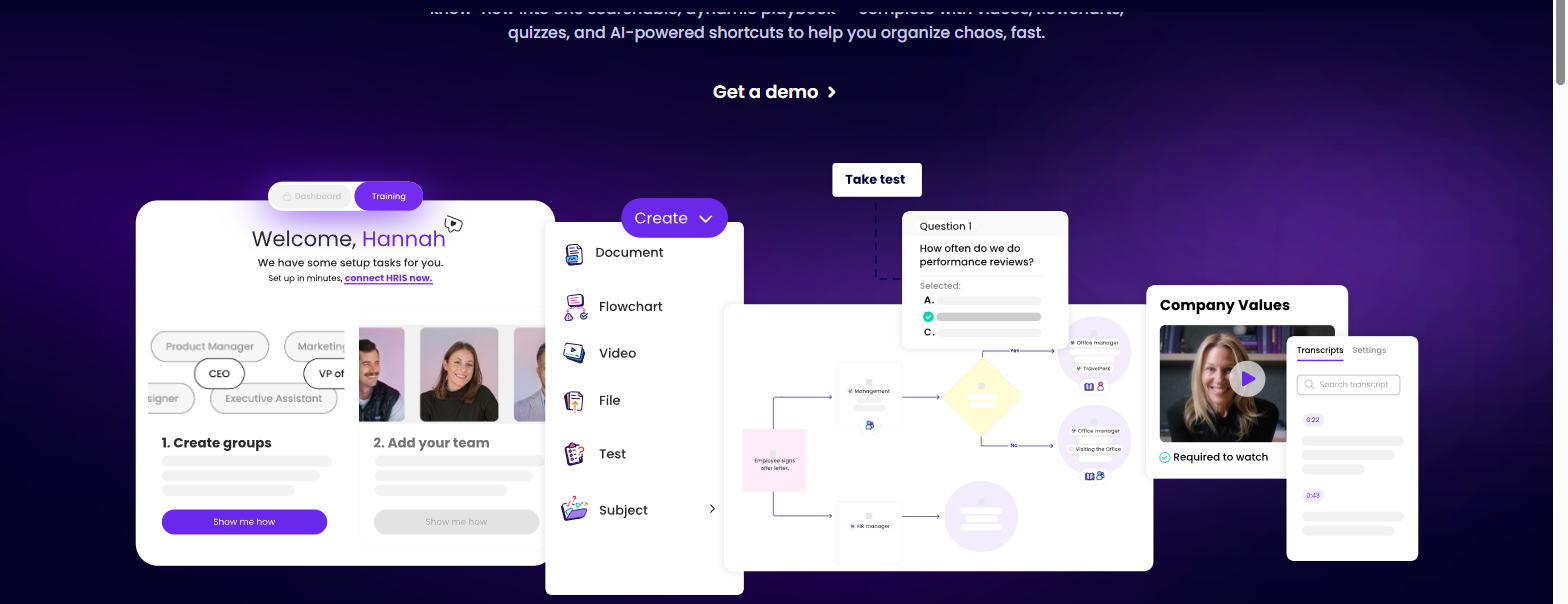
The most immediately useful part of Trainual is how it handles the blank-page problem. Instead of writing every SOP from scratch, you can turn existing material (a Loom recording, a rough outline, a policy you already have written down somewhere) into a structured, step-by-step training document in a few minutes. The platform’s built-in AI takes a prompt like “can you help me with this” and returns a formatted draft with headers and steps you then edit and approve. You can also record your screen directly inside Trainual and it will turn that recording into documented steps, which matters more than it sounds like it should: most SOPs never get written because nobody wants to sit down and type out ten steps they could just show someone in ninety seconds.
Role-based training paths
Once content exists, Trainual lets you assign it by role, team, or location instead of dumping everything on every new hire. A training path for a new account manager looks different from one for a new developer, and Trainual’s path builder sequences content by week (intro to the company, key policies, role-specific processes, 30/60/90-day development content) so people aren’t drowning in irrelevant material on day one.
Org charts and roles & responsibilities
Trainual includes an interactive org chart and a roles-and-responsibilities builder that connects each person and role to the specific SOPs they own. This is a small feature that solves a real problem: in most growing companies, “who owns this process” is tribal knowledge too. Making that explicit, and connecting it directly to the documented how-to, is one of the more underrated parts of the platform.

An AI assistant that answers process questions
Trainual’s AI assistant lets employees ask plain-language questions (“can you walk me through how to do this?”) and get answers pulled directly from your documented content, along with a note on when that content was last updated. In practice this means fewer Slack messages interrupting senior staff to explain something that’s already written down, assuming the documentation actually exists and is current.
If you’re weighing whether AI-assisted documentation belongs in your broader operations stack, it’s worth reading how we think about AI automation for marketing operations, since the same logic (systemize the repeatable work so people spend time on what actually needs judgment) applies whether you’re automating a workflow or documenting one.
Reporting and accountability
Completion tracking, testing, and e-signatures let you verify people actually went through training rather than just clicking through it. The reporting dashboard flags who’s overdue on content and lets you send a nudge instead of manually chasing people down in Slack.
Where it plugs into the rest of your stack
Trainual connects to the tools most agencies and SaaS teams are already running day to day: Slack, Asana, and Gusto show up as native integrations for surfacing content and syncing people data, and there’s a dedicated BambooHR integration that can auto-add your BambooHR users into Trainual so new hires show up without manual entry. The Gusto connection pulls your team roster over too, though it’s worth knowing that sync isn’t fully automated; someone still needs to trigger it when a new person is added on the Gusto side. For teams that want to go further, Enterprise plans include API access for custom integration work, and Premium and above include an MCP server that lets you connect Trainual’s content to your own AI agents and workflows, which is a fairly unusual thing to see in this category of software right now.
You can see the AI content tools, the roles and responsibilities cards, and the reporting dashboard for yourself; you can start with Trainual here and poke around the free trial before committing to anything.
Where this actually matters for agencies and SaaS teams
The theoretical case for SOP software is easy to make. The practical case is what matters, so here’s where this shows up in day-to-day agency and SaaS operations.
Standardizing client-delivery processes
If you run an agency, the biggest inconsistency risk isn’t your strategy, it’s execution. Two account managers running “the same” campaign-setup process differently is how naming conventions get messy, how reporting templates drift, and how a client notices that their experience depends on which person is assigned to them. Documenting the actual campaign-setup steps, the reporting template, and the client-communication checklist (response-time expectations, how you frame performance updates) in one searchable place means the process is the same regardless of who’s running it.
Cutting new-hire ramp time
Marketing agencies deal with unusually high turnover, and it’s expensive. Trainual’s own research puts marketing agency turnover at around 30% annually, the second-highest of any industry it tracks, with replacement costs running 90 to 200% of the departing employee’s salary once you count the lost productivity and rehiring effort. That math is what makes documented onboarding worth the setup time: the same training path that ramps one new hire ramps the next one, and the next, without a senior person burning a week walking someone through the basics each time.
Freeing up senior staff for billable work
Every hour a strategist or senior account manager spends re-explaining a process they’ve already explained a dozen times is an hour not spent on client work. Role-based training paths and a searchable AI assistant push that burden onto the system instead of onto people, which is the actual ROI case for this category of software, not the training itself but the hours it gives back to people who bill by the hour.
Keeping documentation from rotting
Content verification reminders and version history mean an SOP doesn’t just get written once and go stale. You can flag documents for periodic review, and Trainual tracks when something was last updated, which matters more than most companies realize until a new hire follows a two-year-old process that nobody bothered to fix.
For teams that already lean on structured content workflows, it’s worth cross-referencing this against how you’re already thinking about content marketing production, since a lot of the same discipline (templates, ownership, review cadence) that makes content programs scale is exactly what makes SOP documentation stick instead of decaying into another dead folder.
Real examples, not hypotheticals
Trainual publishes case examples from its own customer base, and a couple are specific enough to be useful reference points rather than vague testimonials. High Five Plumbing, an HVAC, plumbing, and electrical services company, reported cutting onboarding time from about 7 hours down to 90 minutes after documenting their process in Trainual. Xpodigital, a technology company, reported cutting training time roughly in half while improving retention. Neither of these is a SaaS agency specifically, but the underlying mechanism (turning a walk-through that used to require a person’s time into a self-serve documented process) is the same one that applies to onboarding a new SDR, a new account manager, or a new developer.
If you want to see whether the setup would work for your team’s specific workflow before committing, Trainual offers a 14-day free trial with no card required, which is enough time to build out one real onboarding path and see if your team actually uses it.
Pricing tiers, honestly
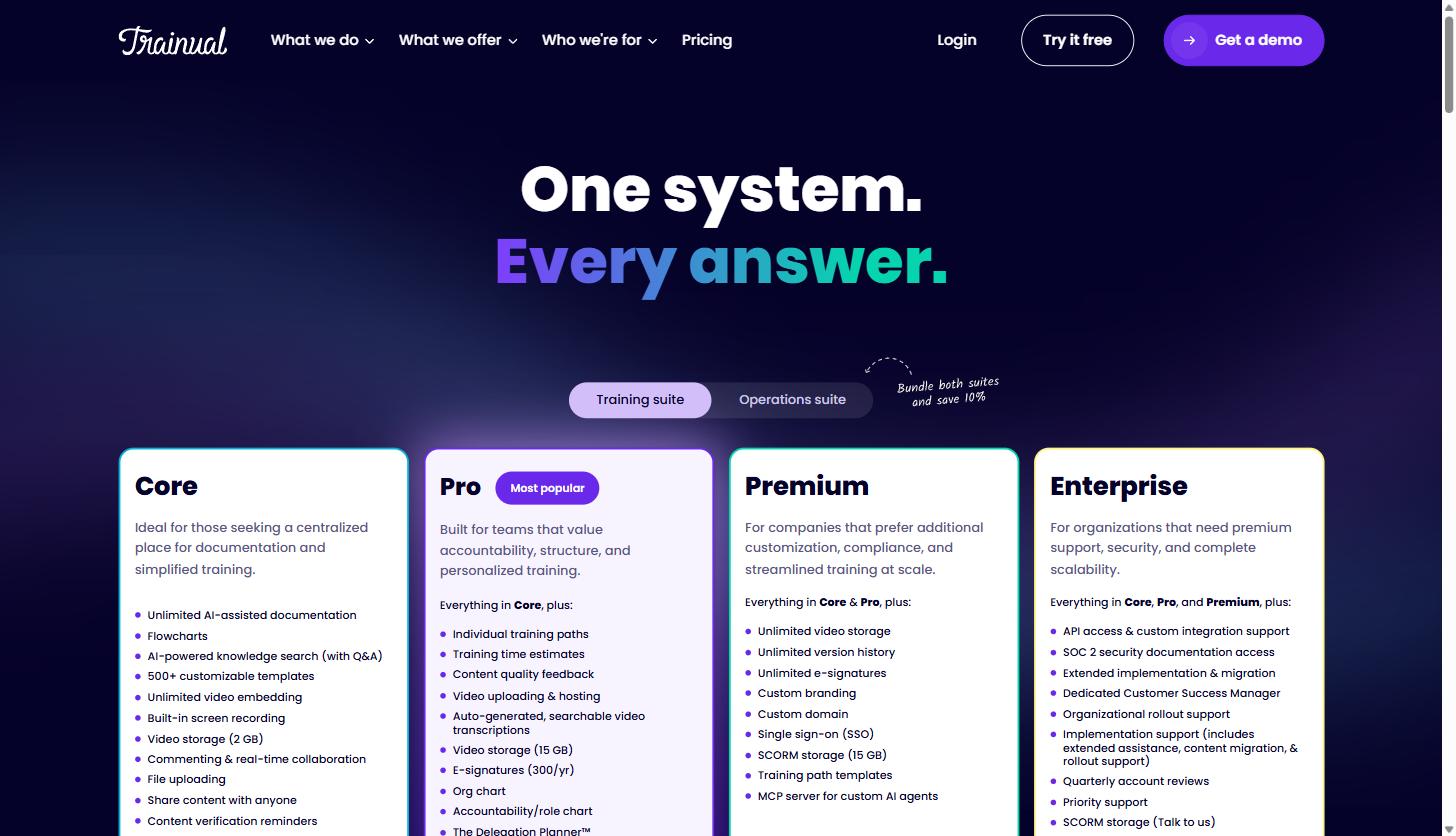
Trainual has moved away from publishing flat per-seat dollar figures and now gates exact pricing behind a demo call, which is a common shift for B2B software as it scales upmarket. What is public is the tier structure and exactly what each tier includes, pulled directly from their current pricing page:
| Tier | Built for | What it adds |
|---|---|---|
| Core | Teams that need centralized documentation and training | Unlimited AI-assisted documentation, flowcharts, AI knowledge search, 500+ templates, screen recording, roles & responsibilities builder, 30-day version history |
| Pro (most popular) | Teams that need structure and accountability | Everything in Core, plus individual training paths, org chart, accountability/role chart, the Delegation Planner, e-signatures (300/year), a dedicated Customer Success Manager, 90-day version history |
| Premium | Companies that need customization and compliance at scale | Everything in Pro, plus unlimited video storage and version history, unlimited e-signatures, custom branding and domain, single sign-on, and an MCP server for connecting custom AI agents |
| Enterprise | Organizations that need security and scale | Everything in Premium, plus API access, SOC 2 security documentation access, dedicated implementation and migration support, and quarterly account reviews |
Two things worth knowing before you book a demo: there’s a one-time $1,000 implementation fee across plans, which covers a dedicated implementation specialist working with your team for the first 4 to 6 weeks to migrate existing content and structure your account. Trainual’s own guidance says the goal is to have your interviews completed and initial content live within 10 business days. Third-party pricing trackers list reference figures in the low-to-mid $300s per month for entry-level plans with 10 seats, but treat those as dated ballpark numbers rather than current quotes; Trainual’s own site no longer publishes exact dollar amounts, so the accurate number for your team size is whatever comes back from their sales call.
All four tiers include the 500+ template library for documenting processes, policies, and roles faster than starting from a blank page, and there’s an add-on courses library (Trainual cites nearly 400 expert-built courses) for teams that want ready-made compliance or leadership content rather than building it themselves. It’s also worth knowing what you’re comparing against: Trainual reports being trusted by 10,000-plus teams with a 4.7-star rating across more than 2,000 reviews site-wide, and it separately crossed 1,000 reviews on G2 this year, picking up 22 G2 badges and leader status across categories including onboarding and knowledge management. None of that guarantees it’s right for your team, but it’s a reasonably well-vetted product rather than an unproven one.
Who this is actually a good fit for
Trainual states plainly that it’s built for companies with 25 to 1,000 employees, though they note some larger organizations use it successfully too. That range tracks with what the product is designed to solve: below 25 people, you can usually get away with informal handoffs and a founder who still remembers every process. Above that, you can’t, and the cost of not documenting starts showing up as inconsistent client work, slow ramp times, and senior staff spending too much of their week re-explaining things.
If you’re a five-person shop, this is probably more infrastructure than you need yet. If you’re a 40-person agency or a SaaS company scaling its customer success or delivery team, it’s squarely in the zone where this pays for itself.
The signal worth watching for isn’t headcount on its own, it’s how often the same question gets asked twice. If your account managers are independently re-learning the campaign QA checklist, if new SDRs take a month to ramp because the sales process only lives in a manager’s head, or if your client-success team improvises onboarding differently for every account, that’s the point where documented, role-assigned training stops being nice to have and starts being the thing standing between you and hiring your next ten people without your delivery quality slipping.
Trainual versus a shared folder of Google Docs
The honest comparison most growing teams are actually making isn’t Trainual versus another piece of SOP software, it’s Trainual versus what they’re already doing: a Google Drive folder, a Notion workspace, or a wiki nobody maintains.
Google Docs and similar tools are genuinely fine for a small team, and there’s no reason to rip that out on day one if it’s working. The gap shows up as you scale: a shared doc has no way to verify who’s actually read it, no structure for sequencing what a new hire sees in week one versus week four, no tracking for whether someone passed a comprehension check, and no accountability trail showing who owns a given process. Documents also don’t tell you when they’ve gone stale. A doc written 18 months ago looks exactly as authoritative as one written yesterday, even if the process it describes has completely changed.
Purpose-built SOP and training software earns its cost specifically at the point where you need that accountability layer: assigning training to a role, confirming comprehension, tracking completion, and keeping one source of truth as headcount grows. If you’re not there yet, stick with docs. If you’re already fielding “wait, is this the current version?” questions on a weekly basis, that’s usually the signal you’ve outgrown them.
Getting started without overbuilding it
The most common way teams fail at this isn’t picking the wrong software, it’s trying to document everything on day one. A more workable rollout looks like this:
- Start with the process that causes the most repeated questions right now (usually client onboarding or new-hire onboarding itself)
- Use the AI content tools to turn an existing Loom, doc, or verbal walkthrough into a first draft instead of writing from scratch
- Assign it to one role and get real feedback from the next person who goes through it before you scale it company-wide
- Set a review reminder so the document doesn’t quietly go stale six months from now
- Add the next process once the first one is actually being used, not before
Trying to document your entire operation in the first week is how these tools end up half-finished and abandoned. Pick the process costing you the most time right now, document that one well, and expand from there. The 14-day free trial is enough runway to run through this exact sequence once before deciding whether to roll it out further; you can grab that trial here and use it on the one process your team complains about most.
Where to go from here
If tribal knowledge is genuinely slowing down how fast you can onboard people or how consistently your team delivers for clients, this is a solvable problem, and it’s solvable without hiring someone whose full-time job is writing documentation. Start a free trial with Trainual, pick the one process that’s costing your team the most repeated explanation time, and build that path first. You’ll know within a couple of weeks whether it’s the right fit for how your team actually operates, and you’ll have at least one real SOP out of it either way.
Share this article

Vance Moore is Chief Growth Officer at MV3 Marketing and leads its team of SEO professionals, engineers and auditors.
Ready to audit your organic growth opportunity?
$2,500 flat. 5 business days. Six deliverables tied to pipeline , not rankings. No retainer required.
Get the Organic Growth Audit →