
A Google Ads specialist plans, builds and keeps improving campaigns inside the Google Ads platform. They own account structure, keywords, ads, bidding and tracking, and they answer for one result: cost per lead, return on ad spend or revenue. This guide shows the weekly work, the skills and credentials that matter, and when to hire one.
Quick definition
A Google Ads specialist is a paid media professional who plans, builds, launches, and continuously optimizes campaigns inside the Google Ads platform, including Search, Display, Shopping, Performance Max, and YouTube, with the goal of hitting a specific cost per lead, return on ad spend, or revenue target.
What Does a Google Ads Specialist Do?
The job is turning a budget into predictable, measurable results inside one advertising platform. That sounds narrow, but the platform is not. Google describes its campaign types by goal: Performance Max, Search, Display, Video, App and Shopping each fit a different objective, and a specialist decides which ones an account needs and how they fit together.

The role sits between strategy, data analysis and hands-on account management. A specialist is not just “running ads”. They keep asking whether the account spends efficiently, whether the targeting still matches the business, and whether the structure will hold up as budgets grow.
Structure is where most of those decisions live. An account contains campaigns, campaigns contain ad groups, and ad groups hold the ads and keywords. Budget and bidding choices sit at the campaign level; keyword themes and ad copy sit lower down.

What Does a Google Ads Specialist Do Day to Day?
The workload varies by account size and industry, but most specialists spend their time on a consistent set of tasks:
- Keyword research and match type strategy, including negative keyword lists to cut wasted spend
- Campaign structure and account architecture, organizing campaigns and ad groups so budget and Quality Score work in the account’s favor
- Ad copywriting and testing, including responsive search ads, extensions, and creative for Display and YouTube
- Bid strategy management, choosing and adjusting between manual bidding and automated strategies such as Target CPA, Target ROAS, or Maximize conversions
- Conversion tracking setup, working with Google Tag Manager and Google Analytics so the account optimizes toward real business outcomes, not vanity clicks
- Budget pacing and forecasting, monitoring daily and monthly spend against targets
- Audience and remarketing strategy, layering first party data, in market audiences, and customer match lists onto campaigns
- Reporting and analysis, turning account performance into a narrative that clients or leadership can use to make decisions
- Landing page and Quality Score troubleshooting, flagging when a weak landing page is dragging down ad performance
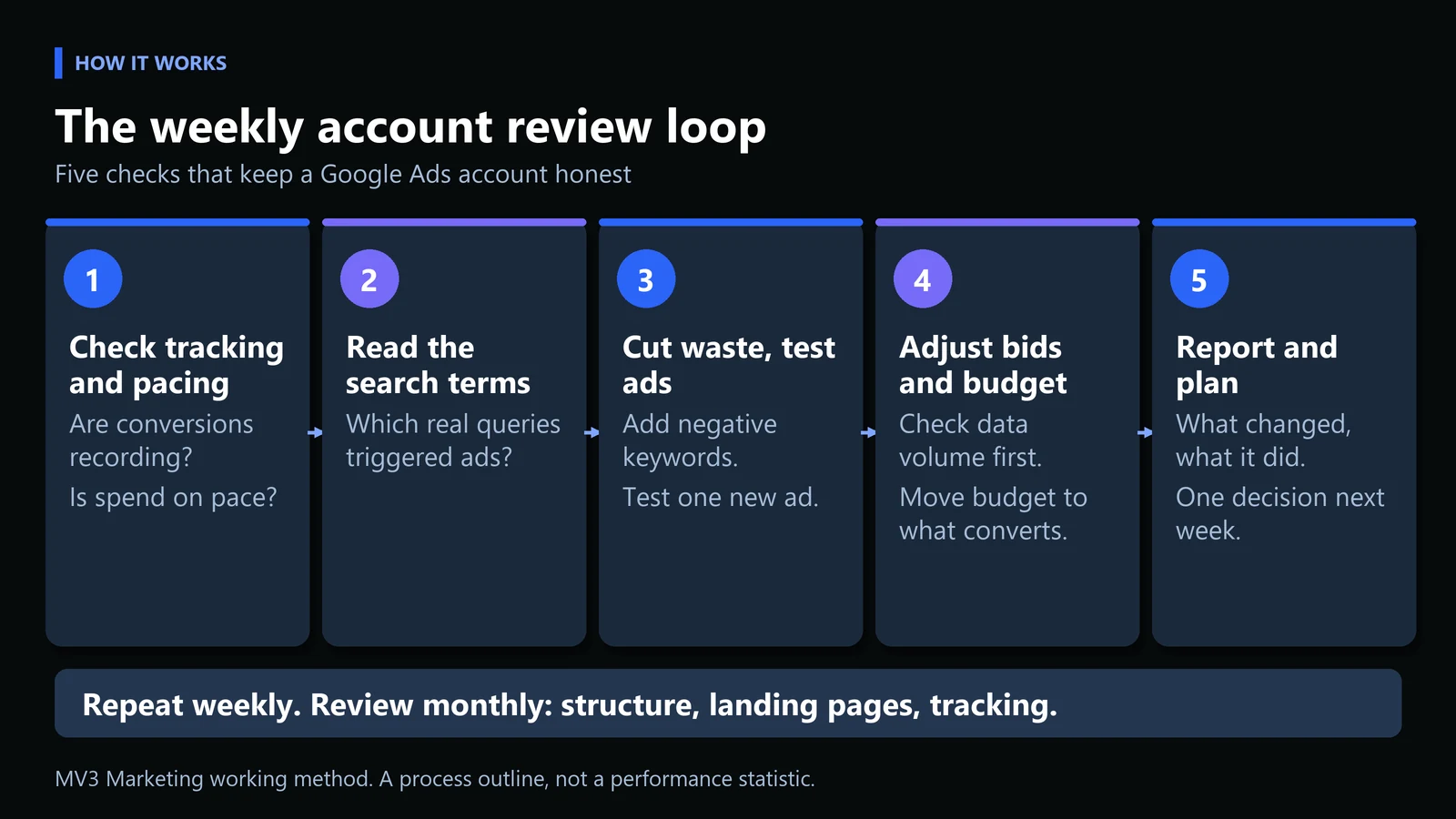
Those tasks repeat on a rhythm. A simple weekly loop keeps the account honest: confirm tracking, read the search terms, cut waste, adjust bids against what the data supports, and write down what changed.
How Do You Review a Google Ads Account Each Week?
This is the part of the job you can learn in an afternoon and practice for years. Plan on roughly an hour per account once you know where to look. You need a Google Ads login with read access at least, and you end with a short written note. Work through the seven steps in order.
Step 1: Confirm tracking and pacing
Open the account and check that conversions were recorded in the last seven days and roughly match what the CRM or order system shows. Then compare month-to-date spend with the monthly plan. If tracking is broken, stop here: every later step depends on it. The common mistake is optimizing a week of data that was never being recorded.
Step 2: Open the search terms report
In Google Ads, select Campaigns, then go to Search terms under Insights and reports. Google explains the difference that matters here: a search term is what a person typed, a keyword is what you chose to target. The report shows the real queries that triggered your ads and how each performed. Expect to find searches you never intended to buy.
Step 3: Flag terms that spend without converting
Sort by cost and list the terms with meaningful clicks and no conversions. You can do this by eye in a spreadsheet, or with a short script. The snippet below reads a search terms export and prints the candidates. It runs as written with the sample data embedded, so you can test it before pointing it at your own download.
import csv, io

# Illustrative export. Replace with your own Search terms report download.
DATA = """search_term,clicks,cost,conversions
google ads specialist course,41,86.50,0
google ads specialist jobs,33,64.10,0
hire google ads specialist,12,58.20,3
ppc specialist near me,9,31.00,2
free google ads templates,27,40.70,0
google ads consultant pricing,14,52.30,1
"""

MIN_CLICKS = 20   # ignore terms with too little data
rows = list(csv.DictReader(io.StringIO(DATA)))
candidates = [r for r in rows
              if int(r["clicks"]) >= MIN_CLICKS and float(r["conversions"]) == 0]
candidates.sort(key=lambda r: float(r["cost"]), reverse=True)

for r in candidates:
    print(f'{r["search_term"]:<32} clicks={r["clicks"]:>3} cost={r["cost"]:>6} conversions={r["conversions"]}')
print(f"{len(candidates)} candidate negative keywords to review by hand")
Expected output when you run it:
google ads specialist course     clicks= 41 cost= 86.50 conversions=0
google ads specialist jobs       clicks= 33 cost= 64.10 conversions=0
free google ads templates        clicks= 27 cost= 40.70 conversions=0
3 candidate negative keywords to review by hand
What it does: keeps terms with at least 20 clicks and zero conversions, then sorts them by cost. Common error: a KeyError means your export uses different column names, so rename the CSV headers to match the four used above. The script only suggests candidates. A person decides which terms are truly irrelevant.
| Search term (illustrative) | Clicks | Cost | Conversions | Decision |
|---|---|---|---|---|
| google ads specialist course | 41 | 86.50 | 0 | Add as negative: learners, not buyers |
| google ads specialist jobs | 33 | 64.10 | 0 | Add as negative: job seekers |
| free google ads templates | 27 | 40.70 | 0 | Add as negative: wants a free download |
| hire google ads specialist | 12 | 58.20 | 3 | Keep: converting |
| google ads consultant pricing | 14 | 52.30 | 1 | Keep: too little data to cut |
| ppc specialist near me | 9 | 31.00 | 2 | Keep: converting |
Worked example with made-up numbers for a specialist services advertiser. Cost shown as plain units. The three flagged terms cost 191.30 of 332.80 total, about 57 percent, and produced no conversions.
Step 4: Add negative keywords carefully
Add the irrelevant terms as negative keywords. Google’s own guidance is to look for terms similar to your keywords that cater to a different product, and it uses an optometrist excluding “wine glasses” as the example.
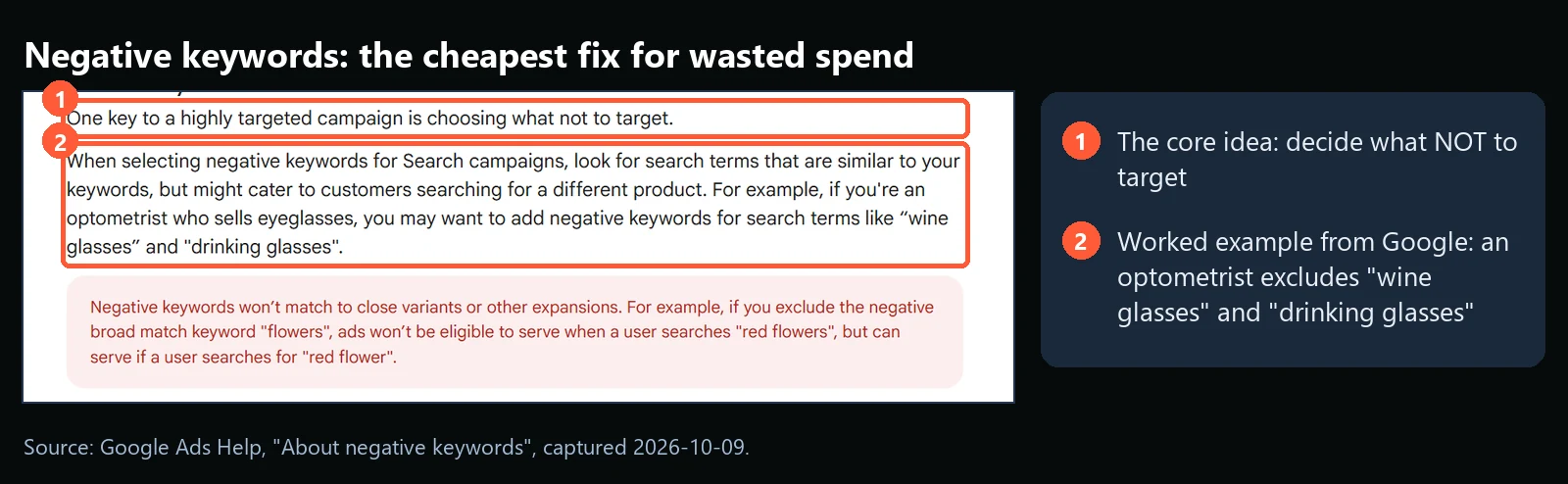
Check the match type before you save. Google notes that negative keywords do not match close variants: excluding the broad match negative “flowers” blocks “red flowers”, but ads can still serve for “red flower”. Add the singular and plural forms you want blocked.
Step 5: Read the Quality Score components
Open the Keywords view, add the Quality Score columns, and look at the three components. Google defines Quality Score as a diagnostic, not an input to the auction, so use it to find the weak part rather than to chase a number.

A “below average” landing page experience is usually a page problem, not an ad problem. Flag it to whoever owns the site and move on.
Step 6: Check each bidding strategy against its data
Smart Bidding strategies learn from conversions, so a campaign with very few conversions gives them little to learn from. Google recommends evaluating results over longer periods that contain at least 30 conversions, and 50 for Target ROAS.
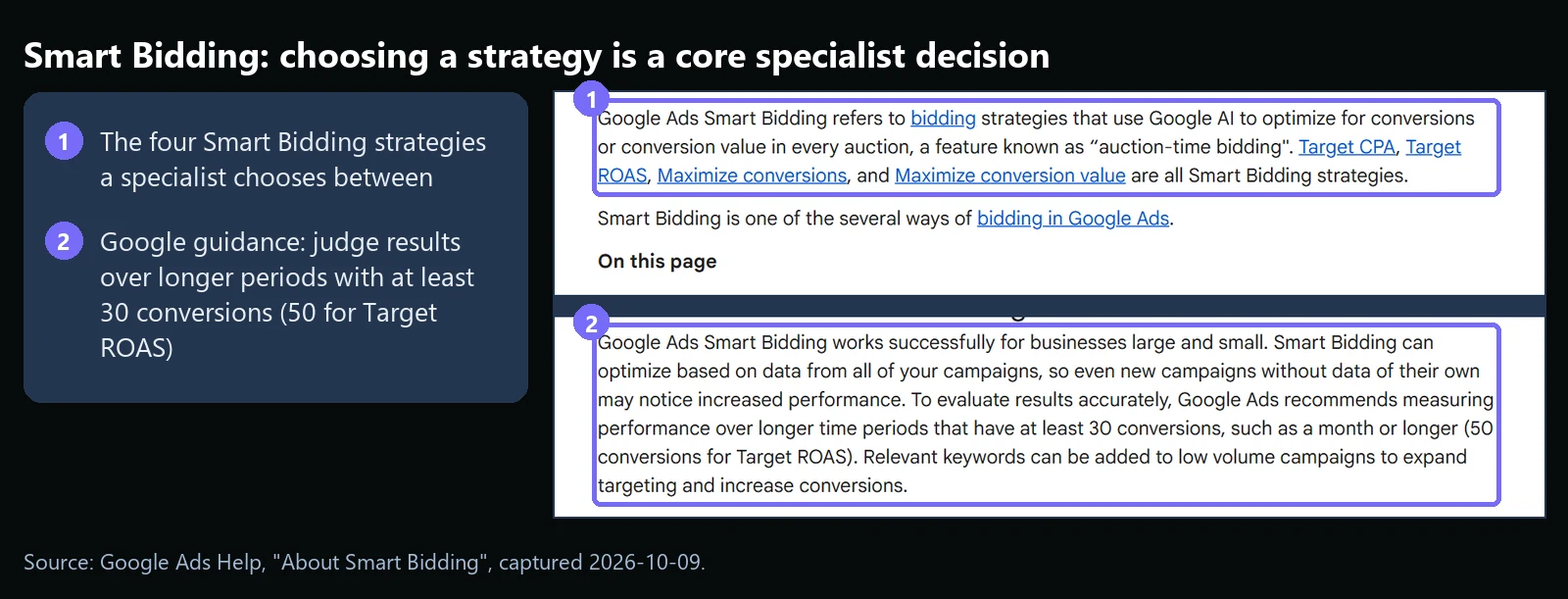
If a campaign is below that volume, avoid changing its target every few days. Wait, or widen the campaign so it collects more conversions.
Step 7: Write three lines and decide one thing
Finish with a note: what changed this week, what it did to cost per lead or return on ad spend, and the one decision for next week. A report nobody reads is not worth the hour it took, so keep it short enough to be read.
Use the table below when a weekly review turns up something odd.
| Symptom | Likely cause | Fix |
|---|---|---|
| Spend rising, conversions flat | Search terms drifting away from intent, or conversions not recording | Run steps 1 to 4; check tracking first, then add negatives |
| Quality Score column shows a dash | Too few exact match searches to score the keyword (per Google) | Use higher volume keywords or broaden match types to gather data |
| Target CPA or Target ROAS results swing week to week | Too few conversions for the strategy to learn from | Judge over a month or longer, aim for 30+ conversions (50+ for Target ROAS) |
| Ads get clicks but landing page experience is below average | Page does not match the ad promise, or loads slowly | Fix message match and speed on the landing page; do not just rewrite the ad |
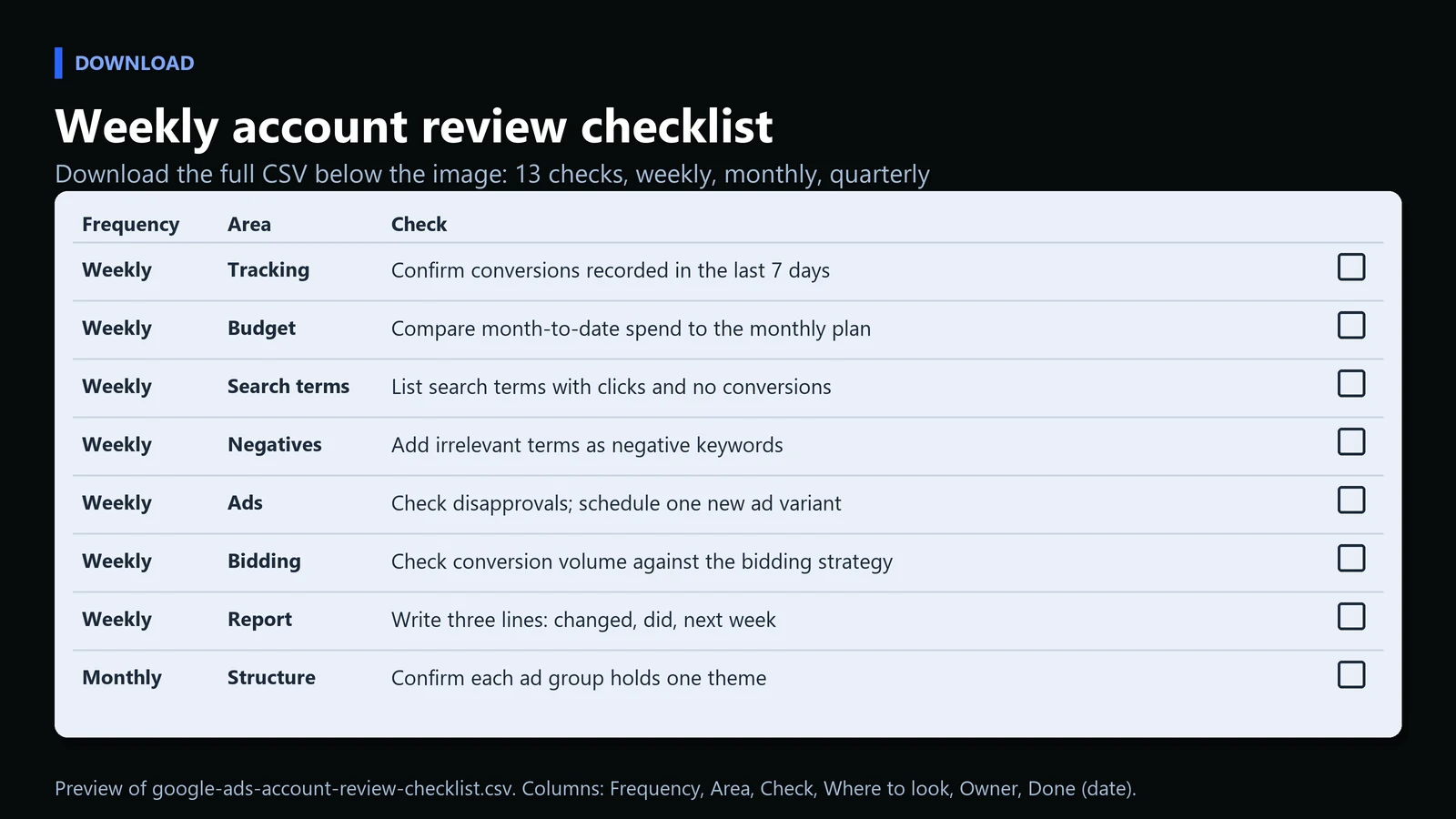
Download: Google Ads account review checklist (CSV, 13 checks). It covers the weekly steps above plus monthly and quarterly checks.
What Skills Does a Google Ads Specialist Need?
Fluency in the Google Ads interface is table stakes. What separates a strong specialist is the surrounding skill set, and each skill leaves evidence you can ask to see.
| Skill | What it looks like in practice | Evidence to ask for |
|---|---|---|
| Data analysis | Segments performance, spots trends before they become problems | A past account review with the decision it led to |
| Copywriting | Writes ads that earn a click inside strict character limits | Before and after ad tests |
| Budget management | Moves spend toward campaigns that return more, not just activity | A budget reallocation and its result |
| Cross channel context | Understands how paid connects to SEO, email and other channels | How paid and organic data were used together |
| Stakeholder communication | Explains a conversion rate drop or a cost per click rise in plain language | A client or leadership report |
| Related tools | Works in Google Analytics, Google Tag Manager and Merchant Center for ecommerce | A tracking setup or feed fix they handled |
Which Google Ads Certifications Matter?
Most professional specialists hold at least one Google Ads certification through Skillshop, Google’s training platform. Google says certifications are professional accreditations for people who show proficiency in Google Ads, and that five of them count toward a company’s Google Partner status: Search, Display, Video, Shopping ads and Apps.
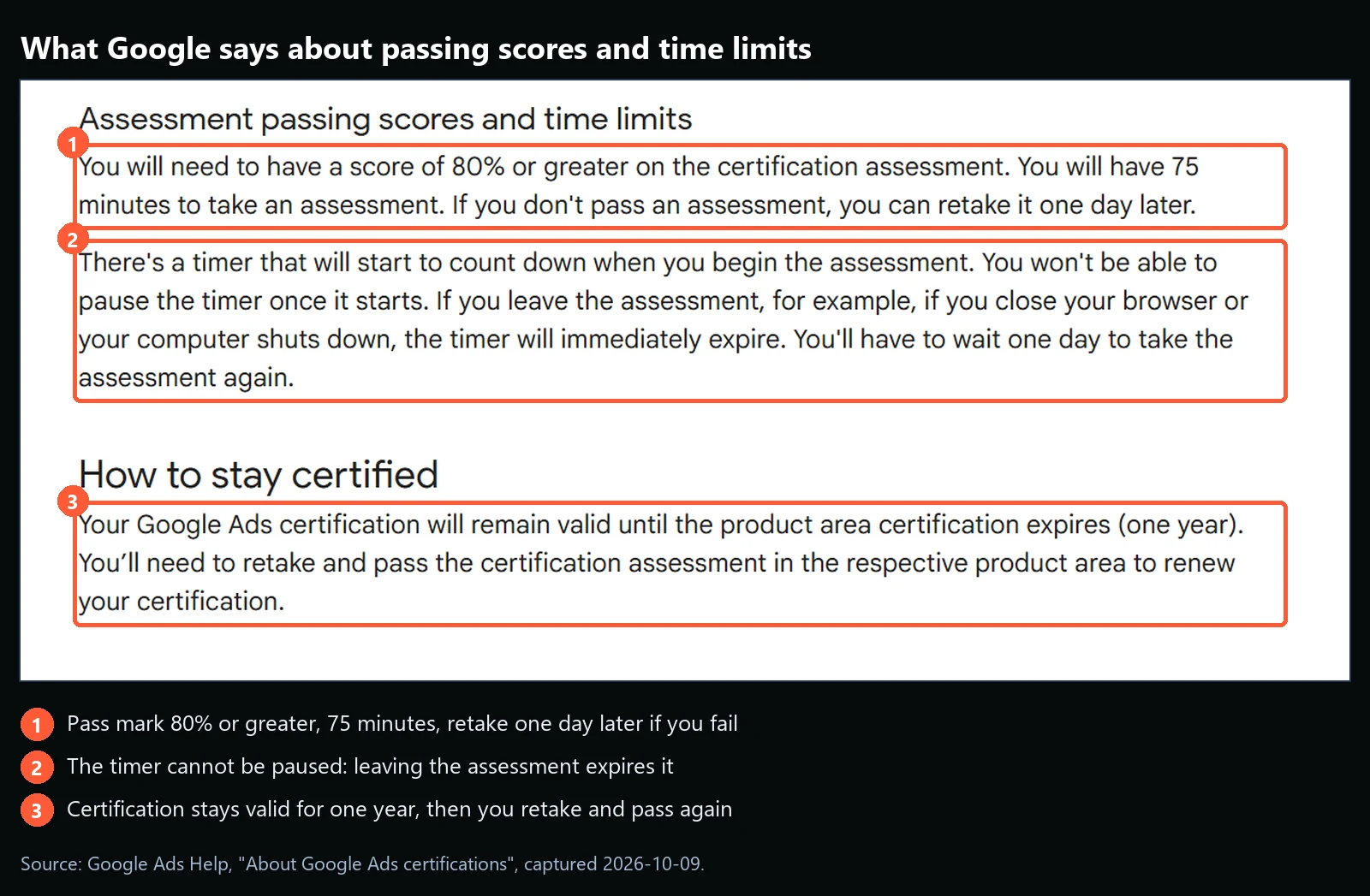
The yearly renewal is the useful part. Google Ads changes often, so current certification status is a reasonable sign that someone keeps up. It is not a substitute for experience: a specialist who has managed real budgets through seasonal swings and account audits brings judgment an exam cannot test. The strongest hires have both. For the full process, see our guide on how to get Google Ads certified.
What Does the Career Path Look Like?
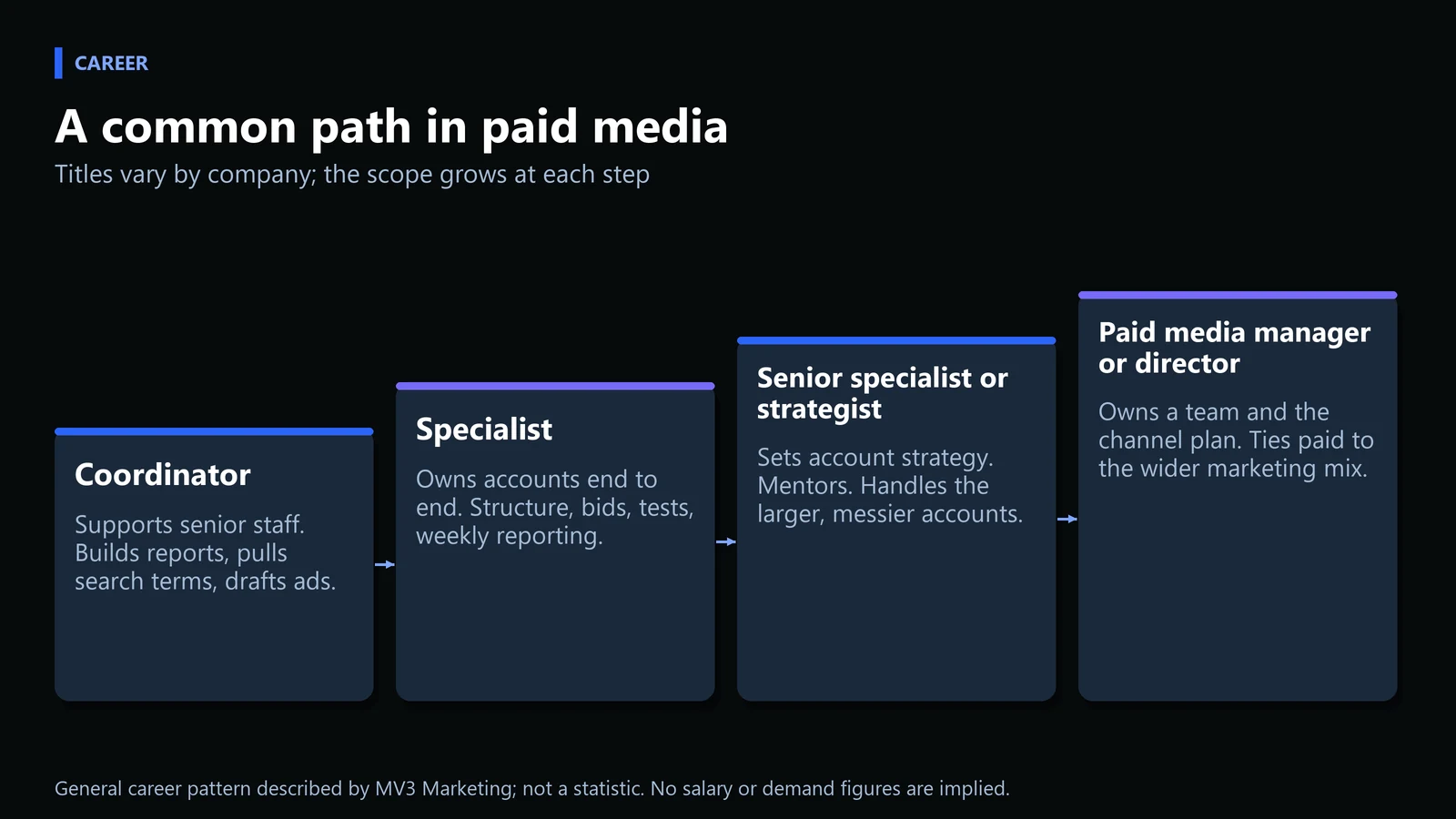
Most specialists start as a coordinator or associate, supporting a senior person on a handful of accounts. The usual path runs to specialist, then senior specialist or paid media strategist, and later to paid media manager or director with a team and a larger set of budgets. Some move in house at one company. Others stay at agencies, which tends to expose them to more industries and account sizes faster.
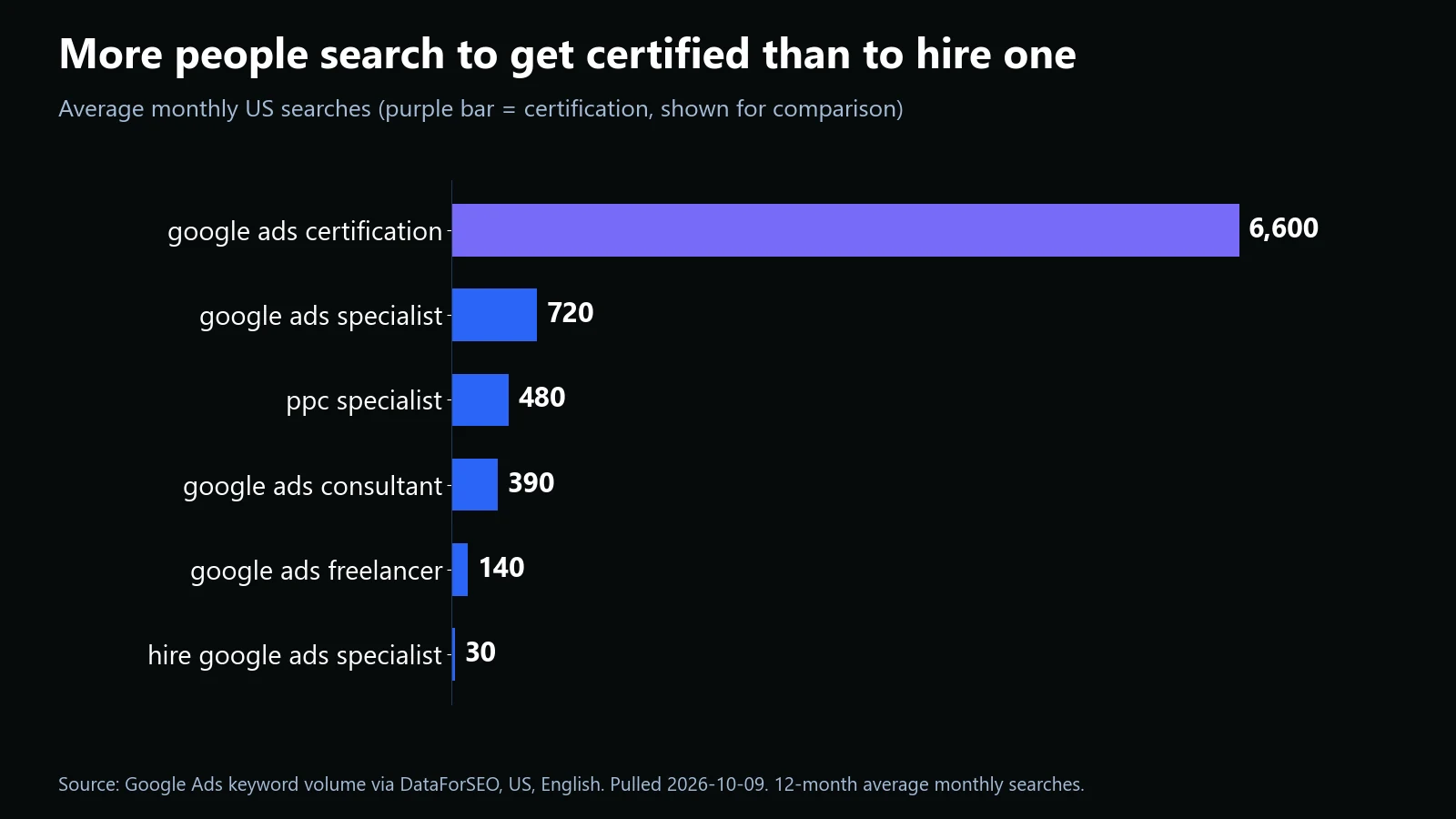
One signal of how people enter the field: search demand for getting certified is far larger than search demand for the role itself. People look up the credential first and the job title second.
How Is a Google Ads Specialist Different From a General PPC Manager?
“PPC manager” is a broader title. It can cover Google Ads, Microsoft Ads, Amazon Ads, Meta Ads, LinkedIn Ads and other pay per click platforms. A Google Ads specialist is narrower and deeper, focused on one ecosystem.
| Factor | Google Ads Specialist | General PPC Manager |
|---|---|---|
| Platform focus | Google Ads only: Search, Display, Shopping, Performance Max, YouTube | Multiple platforms, often Google, Microsoft, Meta and more |
| Depth vs. breadth | Deep expertise in one platform’s auction dynamics and features | Broader view across channels, sometimes less depth in any single one |
| Best fit | Businesses where Google Search or Shopping is the primary revenue channel | Businesses running coordinated campaigns across several ad networks |
| Typical certification | Google Ads Search, Display or Shopping certification | Certifications across multiple ad platforms |
Should You Hire a Google Ads Specialist or Partner With an Agency?
The decision comes down to how much attention the account needs, how many channels you want covered, and whether you can manage and back-fill a hire. Three questions settle most cases.
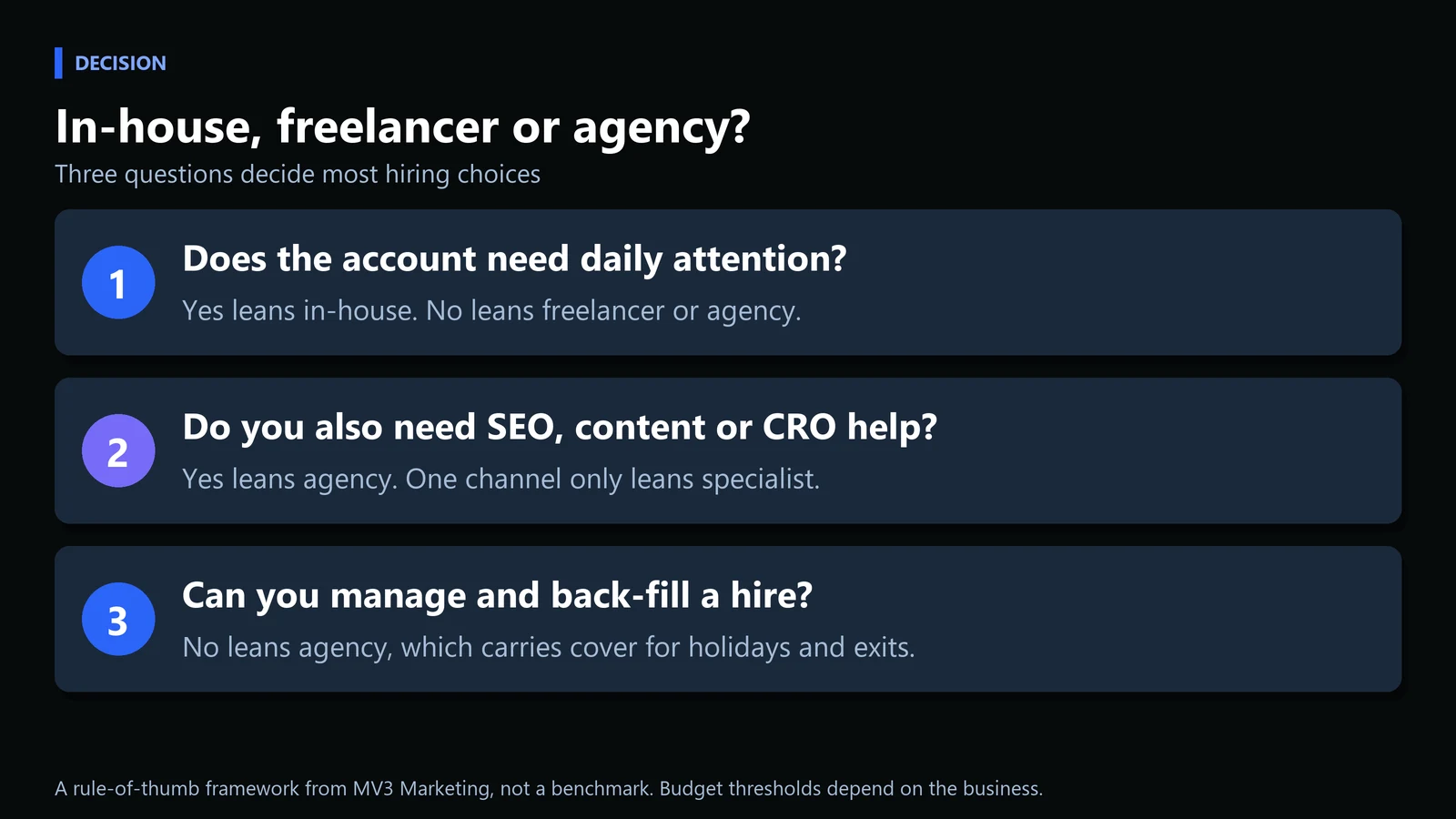
| Option | Strongest when | Watch out for |
|---|---|---|
| In-house specialist | Google Search or Shopping is a main revenue channel and the account needs daily attention | Single point of failure when the person is on leave or leaves |
| Freelancer | One focused account, a defined scope, and someone internal to direct the work | Limited cover and capacity; scope can narrow to what one person can do |
| Agency | You want paid search coordinated with organic, content and conversion work | Needs a clear owner on your side and clear reporting |
Paid and organic results share the same page, so businesses often do better when paid campaigns are coordinated with dedicated SEO services instead of run in isolation. Search visibility then gets covered from both directions rather than competing for the same internal attention. If you want help deciding, book a call and we will review the account with you.
Frequently Asked Questions
What is the difference between a Google Ads specialist and a digital marketing generalist?
A generalist typically handles a mix of channels, including social media, email, and content, without deep specialization in any one platform. A Google Ads specialist focuses specifically on paid search and display advertising inside the Google Ads platform, with much deeper technical knowledge of bidding, auction dynamics, and account structure.
Do I need a Google Ads certification to work as a Google Ads specialist?
Certification is not legally required, but it is widely expected in the industry and is often listed as a preferred or required qualification in job postings. Google states that a certification stays valid for one year, after which you retake and pass the assessment to renew it.
How much does a Google Ads specialist typically manage in ad spend?
It varies widely by employer, industry and experience level, and there is no standard figure. A small business account and an enterprise account at an agency can be very different in size, so ask any candidate what budgets they have actually managed.
Can a Google Ads specialist also handle SEO?
Some professionals work across both disciplines, but they require different skill sets. Paid search rewards fast iteration and bid management, while SEO is a longer term, content and technical optimization discipline. Many businesses use a specialist for paid campaigns and a separate SEO team or service for organic strategy.
What tools does a Google Ads specialist use besides Google Ads itself?
Common tools include Google Analytics for conversion analysis, Google Tag Manager for tracking implementation, Google Merchant Center for Shopping campaigns, and various third party bid management or reporting platforms depending on account size.
Share this article

Vance Moore is Chief Growth Officer at MV3 Marketing and leads its team of SEO professionals, engineers and auditors.
Ready to audit your organic growth opportunity?
$2,500 flat. 5 business days. Six deliverables tied to pipeline , not rankings. No retainer required.
Get the Organic Growth Audit →