Disclosure: This article contains an affiliate link. If you sign up through it, MV3 Marketing may earn a commission at no extra cost to you. We only recommend tools we’d actually put in front of our own clients, and n8n runs a meaningful share of MV3’s own internal operations, from lead routing to reporting.
If you run a B2B SaaS company or a marketing agency, you already know the problem: your stack has more tools than your team has hours. Leads land in one system, billing lives in another, support tickets pile up in a third, and somewhere in the middle a human is supposed to be the glue holding it all together. That’s the gap workflow automation platforms are built to close, and n8n has become one of the most widely adopted tools for closing it, particularly for teams that have outgrown what point-and-click automation tools like Zapier can do but don’t want to hand the whole problem to an engineering team.
What Is n8n, and Who Is It For?
n8n (pronounced “n-eight-n,” short for “nodemation”) is a workflow automation platform built around a visual, node-based canvas. You connect a trigger (a form submission, a webhook, a new row in a spreadsheet, a scheduled time) to a chain of actions across the apps you already use. Each step in the chain is a “node,” and nodes snap together on a drag-and-drop canvas the same way you’d sketch a flowchart on a whiteboard.
What sets n8n apart from most of the automation category is that it isn’t only a no-code tool. According to n8n’s own GitHub repository, it’s distributed as a fair-code platform under the Sustainable Use License and an n8n Enterprise License: meaning the source code is always visible, the software is self-hostable on your own infrastructure, and you’re free to extend it with custom nodes. You can build an entire workflow visually with zero code, drop into JavaScript or Python for a single step when the visual tools run out of runway, or self-host the whole platform behind your own firewall. Few competitors let you move between all three modes in the same workflow.
For B2B SaaS and agency teams specifically, n8n tends to show up in a handful of recurring places: routing inbound leads from a form or ad platform into a CRM with enrichment and scoring attached, syncing client reporting data across ad platforms and a dashboard, onboarding new customers with a sequence of provisioning and welcome-email steps, and, increasingly, building AI agents that can triage support tickets, summarize sales calls, or answer internal questions against a company’s own documents.
What n8n Actually Does: The Core Feature Set
Strip away the AI headlines for a moment and n8n is, at its foundation, an integration and orchestration platform. Here’s what’s actually included:
- A visual, node-based canvas. Every workflow is built by connecting nodes on a canvas you can see end to end: no hidden logic buried in a settings panel you have to hunt for.
- 500+ pre-built integrations. n8n maintains ready-made nodes for the apps agencies and SaaS teams already run (CRMs, Slack, Google Workspace, Postgres, Salesforce, HubSpot, and hundreds more) plus a generic HTTP Request node and cURL import for anything that isn’t natively supported.
- Native code steps. JavaScript and Python can be dropped into any point in a workflow, so a single custom transformation doesn’t force you to abandon the visual builder for the rest of the flow.
- Native AI agent building blocks. AI Agent nodes, chat memory, vector store connectors, and Model Context Protocol (MCP) support are built into the core product, not bolted on as a separate app.
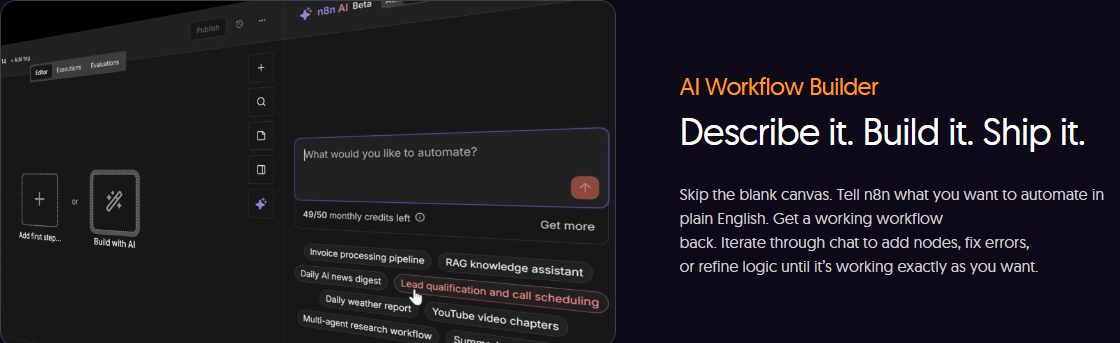
- An AI Workflow Builder. You can describe what you want to automate in plain English and get a working starting workflow back, then refine it through chat.
- Self-hosted or cloud deployment. Run n8n on your own infrastructure with Docker (or try it instantly with
npx n8n), or let n8n host it for you. - Debugging built for iteration. Re-run a single failed step instead of the whole workflow, replay or mock data from external systems, and inspect the input and output of every node right next to its settings.
n8n reports it’s backed by nearly 200,000 GitHub stars, a 4.7-out-of-5 rating on G2, and a community of more than 200,000 members, all figures visible live on n8n.io as of this writing. It’s also SOC 2 compliant, which matters if your agency or SaaS company has to answer security questionnaires from your own clients before you’re allowed to connect a new tool to their data.
Inside the Visual Workflow Builder
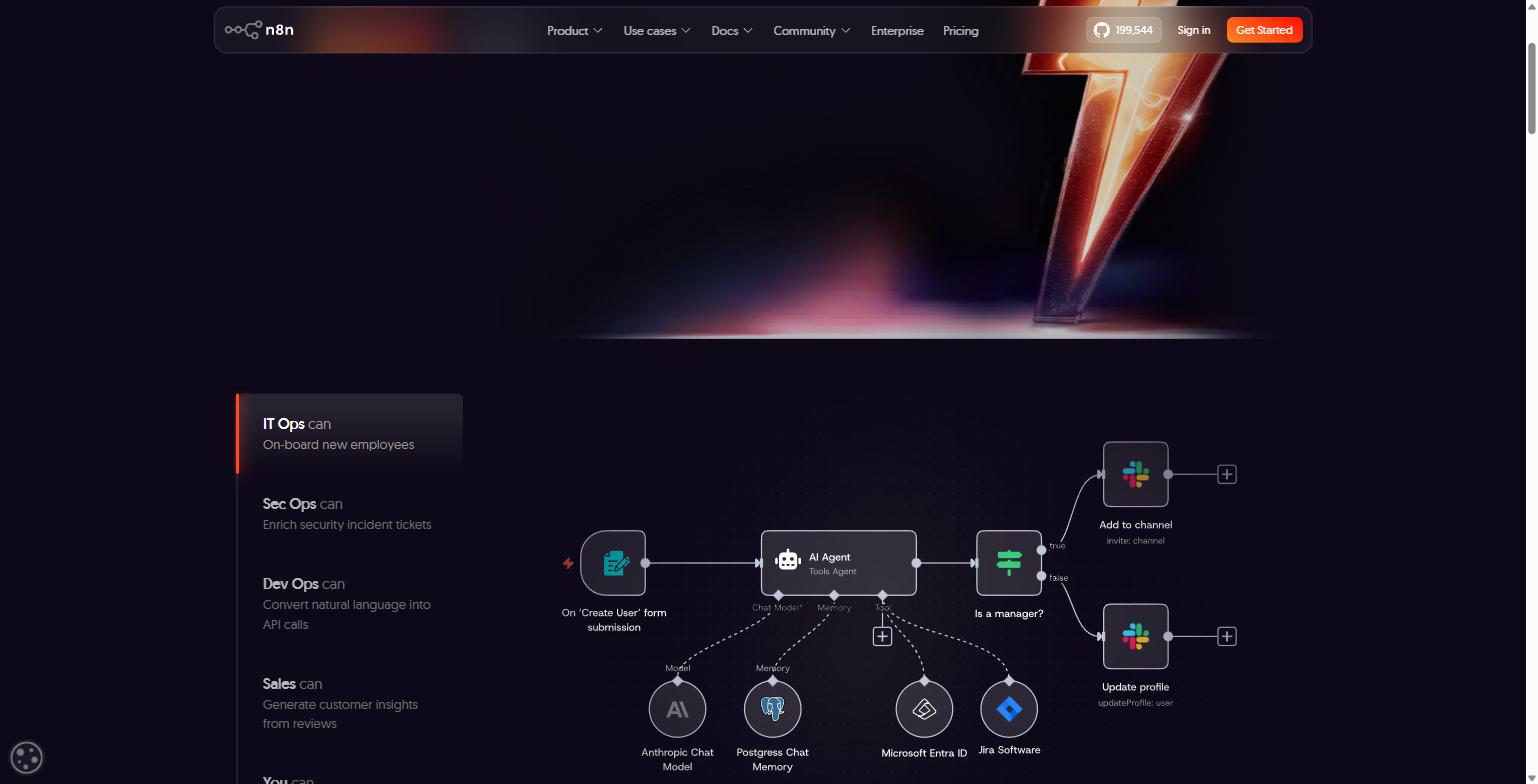
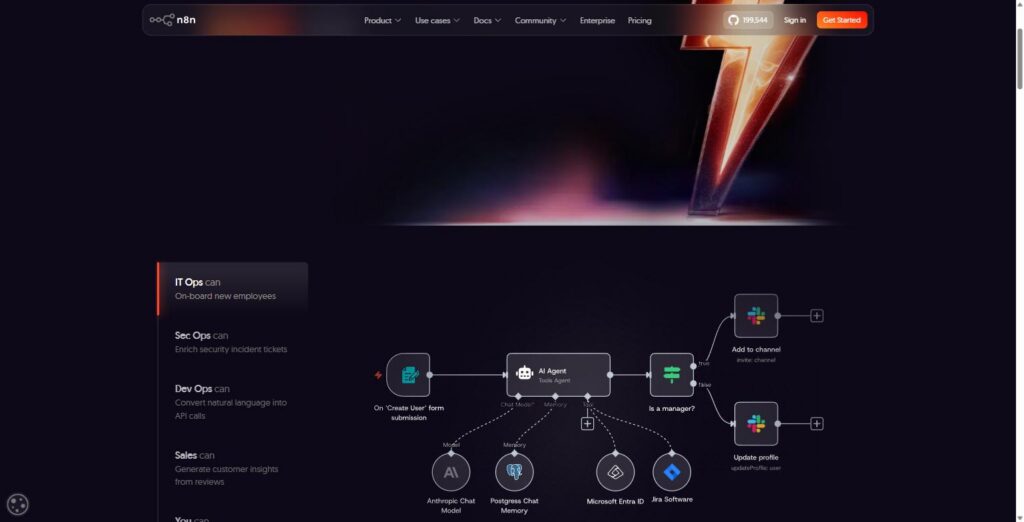
The screenshot above is pulled directly from n8n.io’s homepage, and it’s a fair representation of what building in n8n actually looks like: a form trigger feeds into an AI Agent node, which has a chat model, memory, and a set of tools wired underneath it, which then routes conditionally (true or false) into two different Slack actions. That’s a real workflow pattern, not a marketing mockup: an employee onboarding automation that checks whether a new hire is a manager and updates their Slack profile and channel access accordingly.
For an agency, the same pattern shows up constantly. A lead comes in through a form. It gets enriched, scored, and routed to a CRM. If it clears a threshold, it triggers a Slack alert to the sales team and a calendar invite goes out; if it doesn’t, it drops into a nurture sequence instead. The value of the visual canvas isn’t that it’s pretty: it’s that anyone on the team, not just the engineer who built it, can look at the canvas and understand what will happen when a lead comes in, without reading a single line of code.
n8n’s own product messaging leans hard on this idea of traceability: “every step of your agents’ reasoning, traceable on the canvas.” Given how much of the current automation conversation is dominated by AI agents nobody fully understands once they’re in production, that’s a meaningfully different pitch than “just let the AI figure it out.”
Where n8n Pulls Ahead: Native AI Agent Nodes
This is the feature that separates n8n most clearly from Zapier and most of the legacy automation category, and it’s why AI-forward marketing and SaaS teams keep gravitating toward it. Rather than treating “AI” as a single action step that calls an API and returns text, n8n builds AI agents as first-class citizens of the workflow: an AI Agent node can be given tools (other nodes it’s allowed to call), memory (so it retains context across a conversation), and a specific model: Anthropic, OpenAI, Google, or a self-hosted open-source model, switchable without rebuilding the workflow around a single vendor.
The screenshot above shows n8n’s AI Workflow Builder, reachable directly from the editor: you describe what you want to automate in the prompt box: the interface suggests starting points like “RAG knowledge assistant,” “Lead qualification and call scheduling,” and “Invoice processing pipeline,” and n8n generates a working draft workflow you then refine through chat. It’s a genuinely different starting experience than opening a blank canvas.
For agencies and SaaS support teams, the practical use cases pile up quickly: a support agent that uses retrieval-augmented generation (RAG) to answer customer questions from internal documentation, a research agent that can pull citations and generate a report, or a sales-ops agent that qualifies a lead and schedules a call without a human touching the CRM until the call is confirmed. n8n also ships with human-in-the-loop controls specifically so an AI agent doesn’t take an irreversible action (sending an email, closing a ticket, updating a billing record) without a person signing off first. n8n’s own materials put it plainly: “Autopilot is for planes, not production AI.”
There’s also Model Context Protocol (MCP) support, which lets an n8n instance expose its workflows as tools that other AI platforms, including Claude, can call directly, and lets workflows built in n8n call out to other MCP-enabled tools. For teams already building with Claude or similar assistants, that’s a direct bridge between “the AI agent I’m chatting with” and “the automation that actually does the work.”
Self-Hosted or Cloud: You Decide Where It Runs
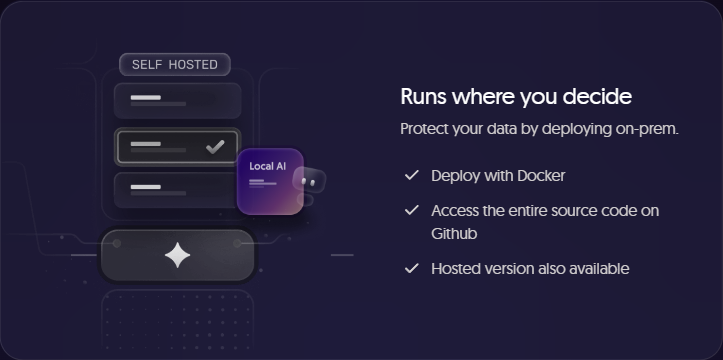
Data residency and vendor lock-in are recurring objections agencies hear from SaaS prospects, and n8n’s answer is baked into the product rather than tacked on as an enterprise afterthought. Because n8n is fair-code and source-available, you can self-host the entire platform, deploy it with Docker, or spin it up instantly with npx n8n for local testing, and keep client data inside your own infrastructure the whole time. The full source code is on GitHub, so nothing about how the platform behaves is opaque.
That matters in practice for two groups: agencies that handle sensitive client data (financial records, healthcare-adjacent information, anything with a compliance requirement attached) and SaaS companies that need automations running inside their own VPC rather than a third party’s cloud. n8n’s Business and Enterprise plans are built specifically around self-hosted deployments with SSO, SAML, LDAP, and audit logging, while the Starter and Pro plans run hosted by n8n for teams that just want to move fast without standing up their own infrastructure. Both options run the same underlying platform: you’re not choosing between a “real” version and a stripped-down cloud version.
n8n Pricing, Plan by Plan
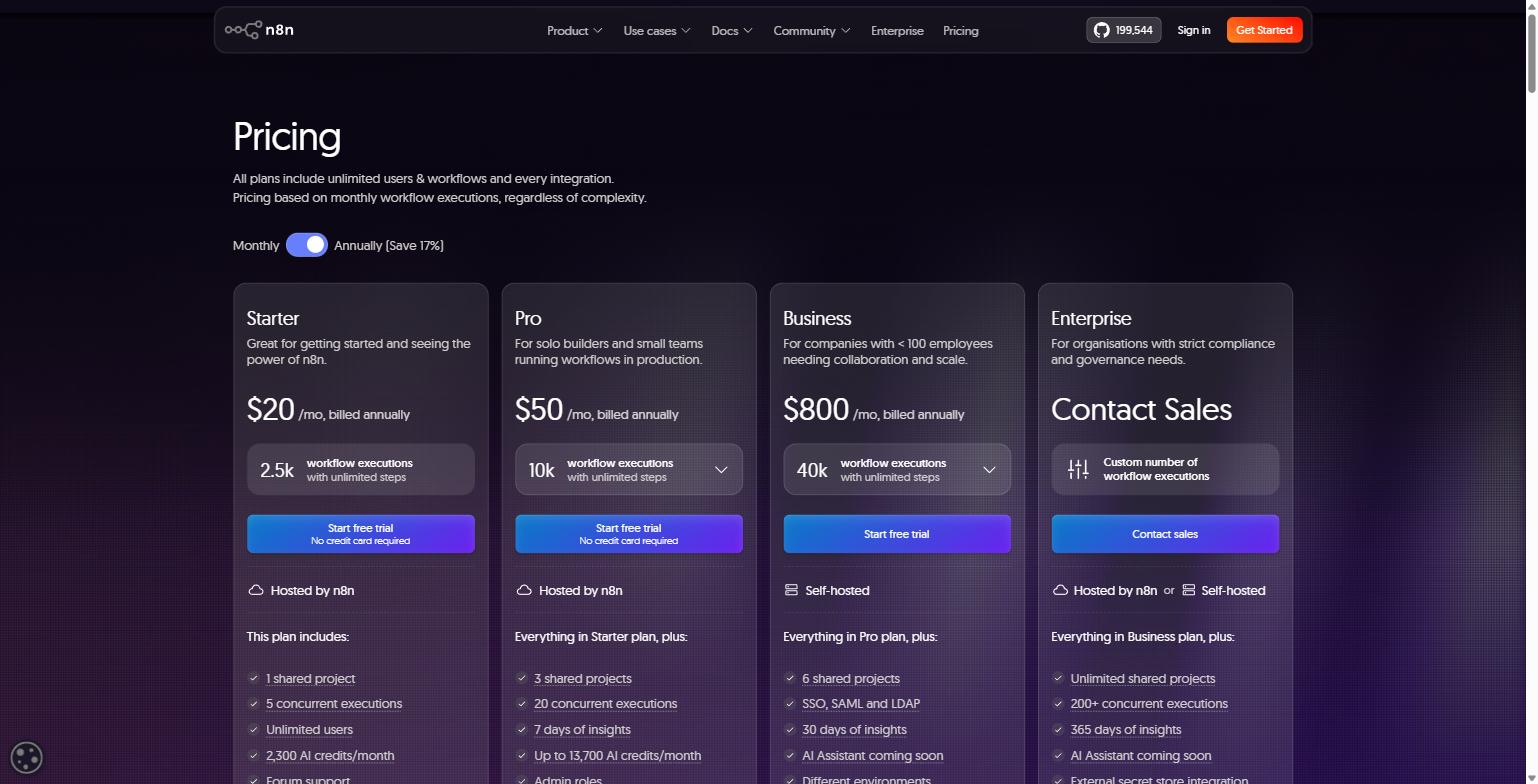
n8n’s pricing model is worth calling out because it’s structured differently than most of the category: every plan includes unlimited users and unlimited workflows, and you’re billed based on monthly workflow executions rather than per user or per individual step inside a workflow. That’s a meaningfully different economic model than tools that charge per active user or per “task”: a single n8n workflow with fifteen steps still counts as one execution.
Here’s what’s live on n8n.io/pricing as of this writing, shown at the annual billing rate (annual billing saves 17% versus monthly):
| Plan | Price | Executions/mo | Hosting | Notable Inclusions |
|---|---|---|---|---|
| Starter | $20/mo | 2,500 | Hosted by n8n | 1 shared project, 5 concurrent executions, 2,300 AI credits/mo, forum support |
| Pro | $50/mo | 10,000 | Hosted by n8n | 3 shared projects, 20 concurrent executions, up to 13,700 AI credits/mo, admin roles, workflow history |
| Business | $800/mo | 40,000 | Self-hosted | 6 shared projects, SSO/SAML/LDAP, 30 days of insights, Git-based version control |
| Enterprise | Contact Sales | Custom | Hosted or self-hosted | Unlimited shared projects, 200+ concurrent executions, dedicated support with SLA, invoice billing |
There’s also a free, self-hosted Community Edition available directly on GitHub for teams that want to run n8n with no subscription cost at all, and every paid plan starts with a 14-day free trial that doesn’t require a credit card. If you’re not sure how many executions your team will actually use, that free trial window is the honest way to find out before committing to a tier.
n8n vs. Zapier: An Honest Comparison
It’s worth being direct about where n8n is a better fit than Zapier, and where it isn’t, because the two tools are genuinely built for different users, not just different price points.
Zapier’s strength is speed for non-technical users: you can connect two apps with a simple trigger-and-action “Zap” in a few minutes, and its integration library is enormous. If your automation needs are genuinely simple (a new form submission adds a row to a spreadsheet, a new Stripe payment sends a Slack message), Zapier will get you there with less setup friction, and you won’t need anyone on the team who’s comfortable with a more technical tool.
n8n starts to win once your workflows get more complex than a single trigger-and-action pair: multi-branch conditional logic, loops, error-handling paths, custom code steps, or AI agents that need to reason across several tools before taking an action. Because pricing is based on executions rather than per-step “tasks,” a complex fifteen-step n8n workflow can be dramatically cheaper at scale than the equivalent built in a per-task billing model. The tradeoff is that n8n has a real learning curve: it’s built for technical marketers, ops people comfortable with logic, and developers, not for someone who has never looked at a flowchart. If your team doesn’t have anyone willing to learn node-based logic (even without writing code), the AI Workflow Builder narrows that gap, but it doesn’t eliminate it entirely.
Self-hosting is the other clear differentiator. Zapier is cloud-only. If data residency, compliance, or long-term cost at high volume matters to your business, n8n’s ability to run on your own infrastructure is not something Zapier offers at any price.
Who n8n Isn’t For
To be fair to readers evaluating this seriously: if your automation needs are genuinely one or two simple connections between two apps, and nobody on your team wants to spend even thirty minutes learning how nodes and data flow together, a simpler point-and-click tool may get you moving faster. n8n rewards a bit of upfront learning with far more flexibility down the line, but that upfront investment is real, and it’s worth being honest about before you commit a team to switching platforms.
Frequently Asked Questions
Do I need to know how to code to use n8n?
No. The visual canvas and pre-built nodes cover most common automations without any code. Code steps (JavaScript or Python) are available for advanced logic, but they’re optional additions to a workflow, not a requirement to get started.
What counts as a “workflow execution” for billing purposes?
One full run of a workflow from trigger to completion counts as a single execution, regardless of how many steps or nodes are inside it. That’s different from platforms that bill per individual step or “task”: a 20-step n8n workflow and a 2-step n8n workflow both count as one execution each time they run.
Can n8n connect to AI models other than OpenAI?
Yes. n8n’s AI Agent nodes support Anthropic, Google, OpenAI, and self-hosted or open-source models, and you can switch the underlying model without rebuilding the workflow around it. MCP support also lets n8n workflows act as tools that other AI platforms, including Claude, can call directly.
What’s the difference between the hosted and self-hosted versions?
Both run the same underlying n8n platform. The hosted (cloud) version is managed by n8n and is available on the Starter and Pro plans. Self-hosting (required on the Business plan and optional on Enterprise) means you deploy n8n on your own infrastructure via Docker, giving you full control over where your data lives. A free Community Edition is also available for self-hosting outside of a paid plan.
Getting Started
If your team is routing leads by hand, copy-pasting reporting data between platforms every Monday morning, or has an AI pilot project that never made it past a demo because nobody could explain how it actually worked, n8n is worth a serious look, particularly if your operation already leans technical enough to get real value out of the flexibility it offers over simpler tools. You can start a free n8n trial here and test it against your own workflows before committing to a plan.
If you’d rather have someone build the automation layer for you (lead routing, client reporting, onboarding sequences, or AI agents wired into your existing stack), that’s exactly the kind of work MV3 Marketing does for B2B SaaS and agency clients every week. Book a strategy call and we’ll map out what’s actually worth automating in your operation before you spend a single hour building it yourself.
Share this article

Ryan Brooks leads technical SEO at MV3 Marketing, specializing in schema architecture, entity graphs, crawlability, and the structural signals that determine whether AI answer engines cite a page.
Ready to audit your organic growth opportunity?
$2,500 flat. 5 business days. Six deliverables tied to pipeline , not rankings. No retainer required.
Get the Organic Growth Audit →