Emergent is an AI-powered development platform at app.emergent.sh that builds working websites, mobile apps, and internal tools from a plain-language conversation. You describe what you want, an AI agent designs it, writes the code, wires up the data layer, and deploys it, and you end up with an application you can actually host, modify, and hand off, not a chatbot or a prototype mockup. Emergent’s own site lists its audience as Enterprise, SMB Owners, IT Agencies, Product Managers, and Operations Teams, which lines up closely with two groups this blog talks to constantly: marketing and growth agencies that need to stand up a client landing page or internal reporting tool without pulling a developer off a real project, and B2B SaaS teams that want to prototype an ops tool, an admin dashboard, or a lightweight internal app in an afternoon instead of a sprint.
Disclosure: MV3 Marketing participates in affiliate and partner programs, including with Emergent. This article contains an affiliate link, and if you sign up through it, MV3 Marketing may earn a commission at no extra cost to you. Everything below reflects what we found directly on app.emergent.sh as of this writing, including the current published pricing.
That audience framing isn’t marketing gloss we’re adding on top, it’s how Emergent segments its own site. The main navigation on app.emergent.sh breaks “Solutions” into exactly five categories: Enterprise, SMB Owners, IT Agencies, Product Managers, and Operations Team. That’s a fairly unusual level of specificity for a builder tool, and it tells you who Emergent thinks its buyer actually is: not primarily hobbyists building a personal project, but people inside organizations who own a backlog of small-to-medium software requests and don’t have the engineering bandwidth to clear all of them the traditional way.
What Emergent actually is, and what it isn’t
It’s worth being precise about the category here, because “AI builds software from a chat window” now covers a few genuinely different products. Emergent is not a chatbot builder and it’s not a workflow-automation tool. Per its own FAQ: “Emergent is an AI-powered development platform that transforms your ideas into fully functional applications. Simply describe what you want to build in natural language, and our AI handles the coding, design, and deployment. No programming experience required.” The output is a real application, with real source code behind it, that gets deployed and hosted, not a canned response engine or a no-code drag-and-drop canvas dressed up with an AI label.
Emergent draws a specific line between itself and traditional no-code tools in its own FAQ as well: “Unlike traditional no-code tools that require learning drag-and-drop interfaces, Emergent works through natural conversation. Plus, we generate actual production-ready code that you own and can modify.” That second half matters more than it sounds. A lot of “AI website builder” tools hand you a black-box hosted page you can only ever edit through their own interface. Emergent’s answer to “what happens to the code Emergent creates” is direct: “You own all the code Emergent generates. We can integrate with GitHub for version control, and you’re free to download, modify, or host your applications anywhere you choose.” For an agency building something for a client, or a SaaS team building an internal tool that might eventually need a real engineer to extend it, that ownership and portability is the difference between a usable starting point and a dead end.
How the conversational build-and-deploy process works
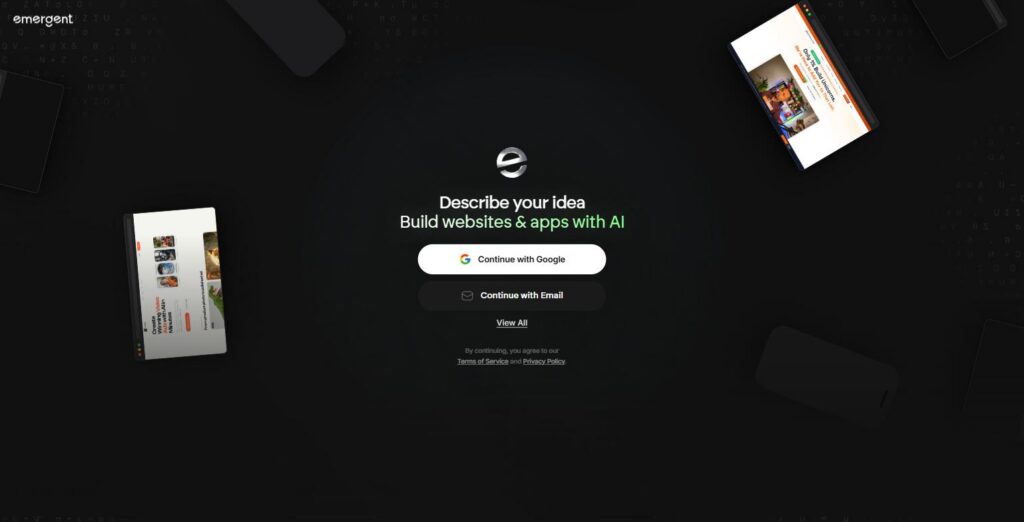
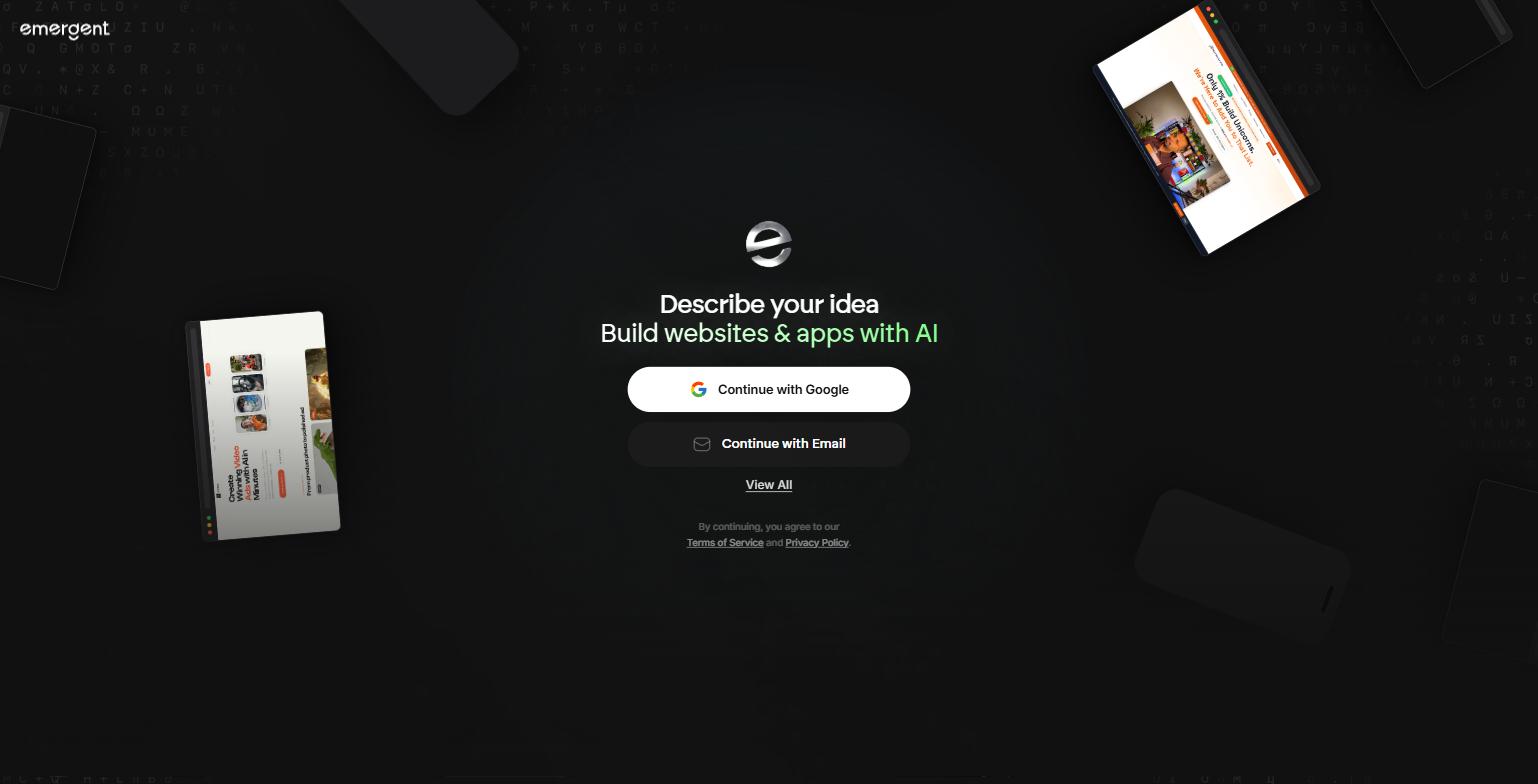
The entry point to Emergent is deliberately minimal. Land on app.emergent.sh and the entire first screen is a single prompt: “Describe your idea, Build websites & apps with AI,” with sign-in via Google or email underneath it. There’s no template gallery to click through first and no multi-step onboarding wizard, you start by describing the thing you want built, in your own words, the way you’d brief a developer over Slack.
From there, according to Emergent’s own product description, the platform “handles every aspect of software development so you can focus on what matters most, your vision,” across three build modes it lists explicitly on its site: building websites and mobile apps, building custom agents, and building integrations that connect to outside services. For most agency and SaaS use cases, the first mode is the relevant one, an AI agent that designs the interface, writes the application code, connects the data layer, and pushes it live, all inside the same conversation thread. Because the whole exchange is chat-based, iteration works the way editing a Google Doc with comments does: you describe what’s wrong or what you want changed next, and the agent revises the running application rather than making you dig through a settings panel to find the right toggle.
Two details from Emergent’s FAQ are worth calling out for anyone evaluating this against building something in-house. First, “Not at all! Emergent is designed for everyone, from complete beginners to experienced developers. You simply describe your vision, and we handle all the technical implementation,” which is Emergent’s own answer to whether coding experience is required. Second, what you can actually build is not narrowly scoped: Emergent lists “web applications, mobile apps, dashboards, e-commerce sites, portfolio websites, SaaS tools, internal business applications, and more,” and says it handles “simple landing pages to complex multi-user platforms.” That range is exactly the shape of the workload an agency or SaaS ops team tends to have, a client microsite here, an internal lead-routing dashboard there, a quick e-commerce landing test somewhere else, none of it big enough to justify a full engineering sprint, all of it too specific for a generic template.
Feature deep dive: building real websites and mobile apps
This is the core of Emergent’s pitch and the mode most relevant to agency and SaaS use cases. The screenshot below is a live example from Emergent’s own product page showing what actually comes out the other end of a build: a responsive desktop web app and its companion mobile app, both generated and deployed from the same underlying project, shown side by side as they’d render on a laptop and a phone.

Emergent’s own copy for this capability describes it as: “Transform your ideas into fully functional websites and mobile apps with instant deployment, seamless data connections, and powerful scalability.” The “instant deployment” and “seamless data connections” pieces are the parts that separate this from a static site generator, the app in the screenshot above isn’t a flat mockup, it’s a working product with navigation, search, and content pulled from an underlying data source, deployed to a live, shareable URL as part of the same conversation that built it. For an agency, that’s a client landing page or a campaign microsite that can go from brief to live link in the same working session instead of a multi-day dev handoff. For a SaaS team, it’s the same mechanic pointed at an internal tool, a lead-scoring dashboard, an onboarding tracker, a quick admin panel for a support team, without opening a ticket with engineering for something that isn’t customer-facing infrastructure.
Feature deep dive: integrations that connect to your existing stack
The second capability worth walking through in detail is Emergent’s integrations layer, because it’s what keeps a fast-built app from being an island. Emergent’s own description: “Build scalable integrations that connect services, automate tasks, and accelerate delivery.” The screenshot below, pulled directly from Emergent’s integrations panel, shows the specific named connectors available at the time of writing.
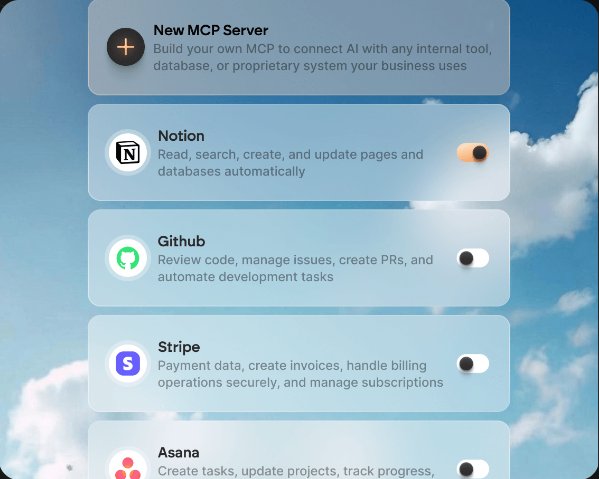
What’s shown live in that panel: a “New MCP Server” option described as letting you “build your own MCP to connect AI with any internal tool, database, or proprietary system your business uses,” plus pre-built connectors for Notion (“read, search, create, and update pages and databases automatically”), GitHub (“review code, manage issues, create PRs, and automate development tasks”), Stripe (“payment data, create invoices, handle billing operations securely, and manage subscriptions”), and Asana (“create tasks, update projects, track progress”). Google Sheets and Airtable are called out as included integrations on the Standard plan, and Stripe specifically is flagged as a premium integration unlocked at the Pro tier and above. For an agency building a client tool that needs to write leads into their existing Asana board, or a SaaS ops team that needs an internal app to read and write against Notion without a custom API integration project, this is the layer that turns a fast demo into something that fits into how the team already works, and the MCP server option means it isn’t limited to the handful of named logos in that panel.
Emergent pricing
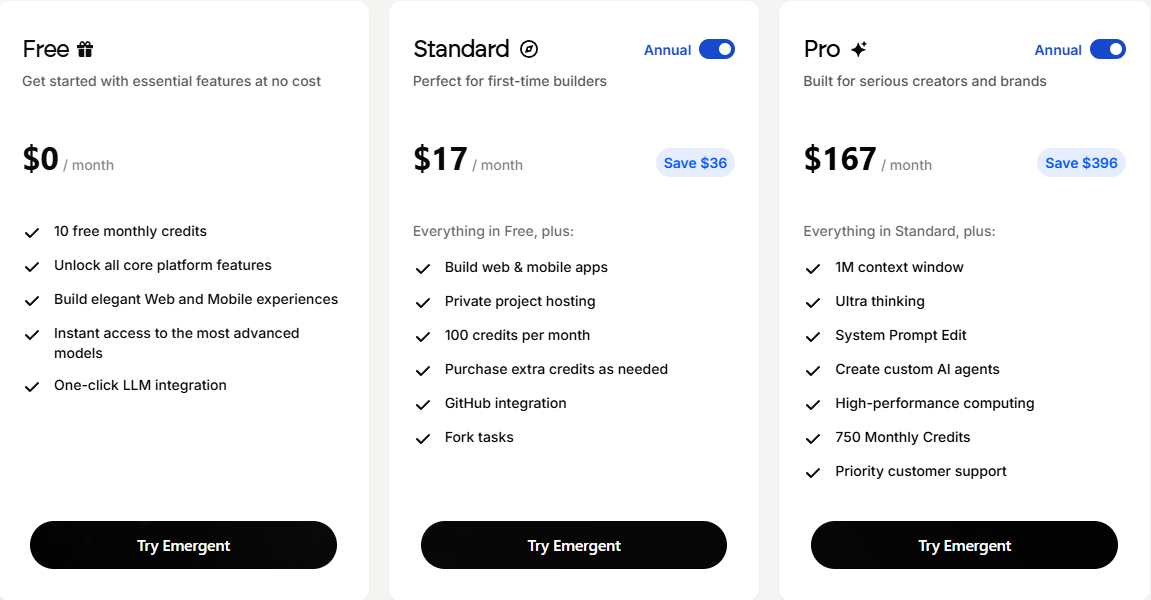
Emergent publishes its pricing directly on the platform rather than gating it behind a “book a demo” wall, and the tiers are structured around monthly build credits rather than seats. The table below reflects the individual-builder plans as shown live on app.emergent.sh; an Enterprise tier with custom pricing sits alongside these for teams that need it.
| Plan | Price | Monthly credits | What’s included |
|---|---|---|---|
| Free | $0/month | 10 | All core platform features, elegant web and mobile builds, instant access to the most advanced models, one-click LLM integration |
| Standard | $17/month billed annually ($204/yr, saves $36/yr vs. monthly billing) | 100 | Everything in Free, plus web & mobile app builds, private project hosting, purchasable extra credits, GitHub integration, task forking |
| Pro | $167/month billed annually ($2,004/yr, saves $396/yr vs. monthly billing) | 750 | Everything in Standard, plus 1M context window, “Ultra thinking,” system prompt editing, custom AI agent creation, high-performance computing, priority support |
| Enterprise | Custom, sales-assisted | Custom | A separate Enterprise tab on the pricing page, aimed at organization-level deployments beyond the individual plans |
The pricing page toggles between annual and monthly billing, and defaults to annual with the discount already applied, which is what the $17 and $167 figures above reflect. Emergent’s own FAQ summarizes the model this way: “We offer plans starting at $17/month for individual builders, $167/month for power users, and custom pricing for enterprise. Each plan includes monthly build credits. You can also purchase additional credits as needed.” Every plan, test, fix, and deploy inside a build consumes credits, so a team that expects to iterate heavily on a single project will burn through the Standard tier’s 100 monthly credits faster than a team doing one clean build and light maintenance, worth factoring in before picking a tier based on price alone.
Who Emergent isn’t for
Emergent is built for teams that want a working application, not for teams that need pixel-perfect control over a highly custom design system from day one. If your agency has an established design language with strict component libraries and a design team that expects Figma-to-code fidelity down to the pixel, a conversational build process will get you close fast but will likely need a design pass afterward, the same way any rapid-build tool would. It’s also not the right fit for applications with genuinely heavy compute, complex real-time infrastructure, or regulatory constraints that require a specific, audited architecture from the ground up, those still belong with a dedicated engineering team, and Emergent’s own code-ownership model (you can export and host anywhere) is actually a reasonable way to hand off from a fast prototype to that team when the project graduates past what a rapid build should carry.
It’s also worth being clear about what Emergent is not, since the “AI + business software” category is getting crowded and the labels get used loosely. Emergent is not primarily an AI-agent-building platform, the kind of tool built specifically for designing conversational AI agents, chatbots, or automated assistant workflows as the end product. Emergent does list “build custom agents” as one of its three build modes, so agent creation is technically on the platform, but its core product and its own homepage framing are about building and deploying real websites, mobile apps, and internal tools through conversation, with the resulting output being an application you host and own, not a conversational assistant you deploy into a chat channel. If what you actually need is a tool purpose-built around designing and training AI agents themselves, that’s a different category of product with a different design center, and worth evaluating on its own terms rather than assuming overlap just because both use natural-language prompts as the interface. To be clear, that’s not a knock on either category, an agent-building platform and an application-building platform like Emergent solve different problems and can reasonably sit side by side in the same team’s toolkit, one for building the conversational assistant, the other for building the actual website or internal tool that assistant might eventually plug into.
One more practical limit worth naming: Emergent’s free and lower tiers cap how much building you can do per month through the credit system, so it isn’t a substitute for a team that needs to ship continuous, heavy iteration on one large product all month long without watching a credit meter. That’s a solvable problem, extra credits can be purchased, and the Pro tier’s 750 monthly credits go further, but it’s a real constraint to plan around rather than something to discover mid-project.
FAQ
What can I actually build with Emergent?
Per Emergent’s own FAQ: “Build web applications, mobile apps, dashboards, e-commerce sites, portfolio websites, SaaS tools, internal business applications, and more. From simple landing pages to complex multi-user platforms, Emergent handles projects of any scale.” In practice, for the agency and SaaS audience this blog covers, that means client landing pages and microsites on the simpler end, and internal ops dashboards, lead-tracking tools, or lightweight SaaS prototypes on the more complex end.
Do I need to know how to code to use Emergent?
No. Emergent’s FAQ states directly: “Not at all! Emergent is designed for everyone, from complete beginners to experienced developers. You simply describe your vision, and we handle all the technical implementation.” Experienced developers can still go deeper, the Pro tier includes system prompt editing and a 1M context window for more technical control, but it isn’t a requirement to get a working build.
Who owns the code, and can I move it off Emergent later?
Yes, and this is stated plainly in Emergent’s own FAQ: “You own all the code Emergent generates. We can integrate with GitHub for version control, and you’re free to download, modify, or host your applications anywhere you choose.” That matters for anyone worried about vendor lock-in on a client deliverable, the build isn’t trapped inside Emergent’s hosting.
How is Emergent different from a traditional no-code website builder?
Per Emergent’s FAQ: “Unlike traditional no-code tools that require learning drag-and-drop interfaces, Emergent works through natural conversation. Plus, we generate actual production-ready code that you own and can modify.” The interaction model is chat-based rather than a visual canvas, and the output is exportable code rather than a page that only exists inside a proprietary builder.
The bottom line
Emergent’s real strength for a B2B SaaS company or a growth agency is speed on the specific class of project that’s too small to justify a sprint and too specific for a generic template: a client microsite, an internal dashboard, a quick prototype to validate an idea before committing engineering time to it. The conversational build process, the code ownership, the named integrations into tools like Notion, GitHub, Stripe, and Asana, and the transparently published, credit-based pricing are all real and verifiable on Emergent’s own site as of this writing, not just marketing language. It won’t replace a dedicated engineering team on a complex, high-stakes build, and it isn’t the right tool if what you’re actually after is a platform for designing AI agents rather than shipping an application, but for the fast, in-between projects that pile up on every agency’s and every SaaS ops team’s backlog, it’s a legitimate way to close the gap between “someone should really build this” and a live, working link.
If you’re trying to figure out where a tool like Emergent fits into your team’s broader stack, alongside your CRM, your existing dev workflow, or your client delivery process, book a strategy call with MV3 Marketing and we’ll help you map it out.
Ready to try building your first project from a description instead of a spec doc? Start building with Emergent and see what a conversational build produces for your own use case.
Share this article

Ryan Brooks leads technical SEO at MV3 Marketing, specializing in schema architecture, entity graphs, crawlability, and the structural signals that determine whether AI answer engines cite a page.
Ready to audit your organic growth opportunity?
$2,500 flat. 5 business days. Six deliverables tied to pipeline , not rankings. No retainer required.
Get the Organic Growth Audit →